I have a music library in Plex with around 30k tracks. All has been working fine for years, but yesterday a playlist usually containing 4 hours of music was only showing a handful of tracks and 30 mins of duration. When I look at my list of artists there are now 9. This is the same on every player (Android phone, desktop, plexamp etc). My library still lists all the folders, but it’s as through nothing is matched any more.
When I look at the agents in the settings for the server, I just see personal media and local media assets, no plex music agent.
The Plex Music agent selection is now made in the individual Library settings, rather than the global Agents settings page, so not seeing it in the Agents page is normal:
As for why things have disappeared from playlists, my best guess is that, at some point, Plex probably was unable to find those tracks, and thought they had been removed from the library. There are a couple ways this could happen, depending on your system:
If you’ve ever done the Plex Dance - When you remove tracks from the library, they are also removed from any playlist or collection they may have been part of. When you restored the files to the library, they are not re-added to the playlist (unless it’s a smart playlist).
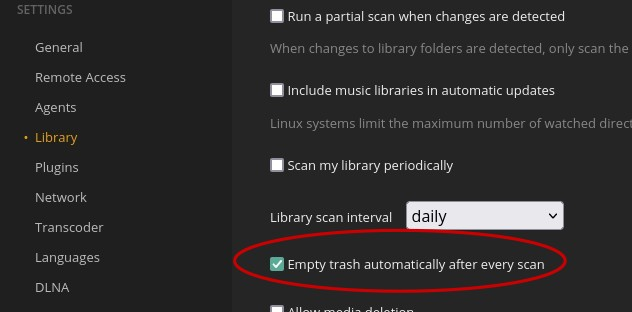
If your media is stored on an external drive - If Plex’s periodic automatic refreshes occur when the external is disconnected or inactive, Plex will assume, again, that the files have been removed, and will delete them from the Library and all playlists. In this case, you can prevent the issue by disabling this setting:
Thanks for the prompt response! Yes it’s on an external drive that sleeps and is supposed to wake with the computer. It’s been that way for a year now, so perhaps I’ve been dodging this bullet for a while now! I’ve unticked the empty trash option. Will that cause me issues going forwards - i.e. at some point in the future will I need to manually empty trash or something?
Not that I’m aware of. You can always empty trash (just make sure the external drive is active when you do), but I don’t think having “old” trash is known to cause many issues.