Server Version#: 1.19.3.2764
Player Version#: 4.30.2
I have a boxed set of various artists. Three of the 4 CDs were recognized as such, but #3 ends up being tagged as not part of the set. The tags showing Disc 1 of 4, 2 of 4, 3 of 4 and 4 of 4 are all there, but the Album name recorded for #3 is different. I tried correcting this, but the name is locked and I don’t know how to unlock it. Simply clicking on the lock icon does not make any difference. As I am very new to this, I am certain that I am simply missing a step.
Any help is appreciated.
The lock on any metadata field should not prevent you from manually changing the value. It is only supposed to prevent your manual edits from being overwritten with metadata retrieved from online sources during refresh operations. For reference, the field is ‘locked’ when the lock icon is orange - but again, you can still change the value manually, regardless of the lock status.
If the Album title is different for one item in a box set, that’s enough to cause what you are seeing. As for the Disc numbers, make sure you’re putting the disc number in the Disc tag, and the track number in the Track tag. Don’t do “1 of 10” in the track tag. I know the ID3 specification allows for it, but it causes problems.
Also, the Album Artist tag should be identical in each track. For a various artist album, make it “Various Artists.”
Wow, thank you for the very quick response.
I’m afraid I am still missing something, though. Thank you for explaining how the lock works. That makes sense. However, in this case, I can type in any change I want, but it does not take whether the lock symbol is orange (highlighted) or not.
All of the album names in the boxed set were uploaded to the Plex server with the same format, as well as the individual tracks, as you can see here:
Discs 1, 2, and 4 all show up under the boxed set. Disc 3 shows up as a separate album. When I check on the tags for individual tracks, I see things like this for those done correctly:
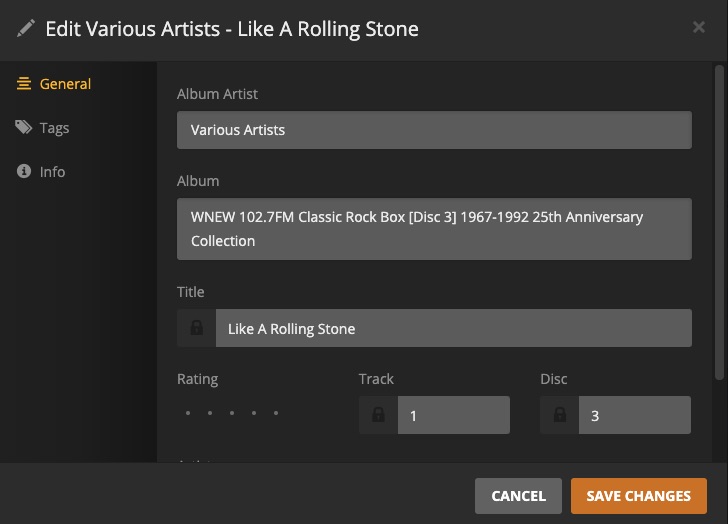
For anything on the second disc, the track is listed as Disc 2. For any on the fourth disc, it is listed with Disc 4. Now here is the odd part, to me, at least. For anything on that 3rd Disc, they will look like the following, with the Disc number correctly listed as well. But the name, as of the Album, as you can see here is different.
I’ve tried changing the Album name to these tracks and that is where I find a problem. That was why I thought it was locked. No matter what I enter in the field, even after selecting “Save Changes,” nothing actually changes.
Any ideas?
Dave Moore
If Plex isn’t accepting edits, there’s something going on, whether it’s a bug or something is blocking the function. This problem doesn’t occur on my system (also a linux box), so I don’t know. Maybe one of the Ninja’s will chime in.
Are you editing tags solely in Plex, or are you using something like Puddletag or EasyTag? You should know that tags you edit in Plex are not written to the embedded tags in the media files - they are only stored in Plex’s database.
I would seriously consider making your files/folders look like this:
Why Plex is separating disc 3 and not the others, I don’t know, but that’s just the kind of unpredictable results that are commonly seen if Plex can’t decipher the file/folder structure.
If you want to join disks of an album that got separated, you need to make the album name the same in all the disks (remove the disc # from the album title).
WNEW 102.7FM Classic Rock Box 1967-1992 25th Anniversary
You cannot have both separate disc names in the album title, and a single combined album.
also, in general, you should not have the disc # in the middle of the title
not WNEW 102.7FM Classic Rock Box [Disc 2] 1967-1992 25th Anniversary
instead WNEW 102.7FM Classic Rock Box 1967-1992 25th Anniversary [disc 2]
or if you want to subtitle your albums
The Collection (disc 1: Toto)
Thank you very much. I will alter the folders accordingly and look into Puddletag and EasyTag as I would guess that they would give me much more control over how I can order my collections.
Your advice is appreciated,
Dave
Didn’t help, but something else is apparent here. I am seeing some strange file transfer issues that may have nothing to do with Plex. Until I can figure that out, I don’t think I will should be looking at troubleshooting Plex. Thank you for the advice, though.