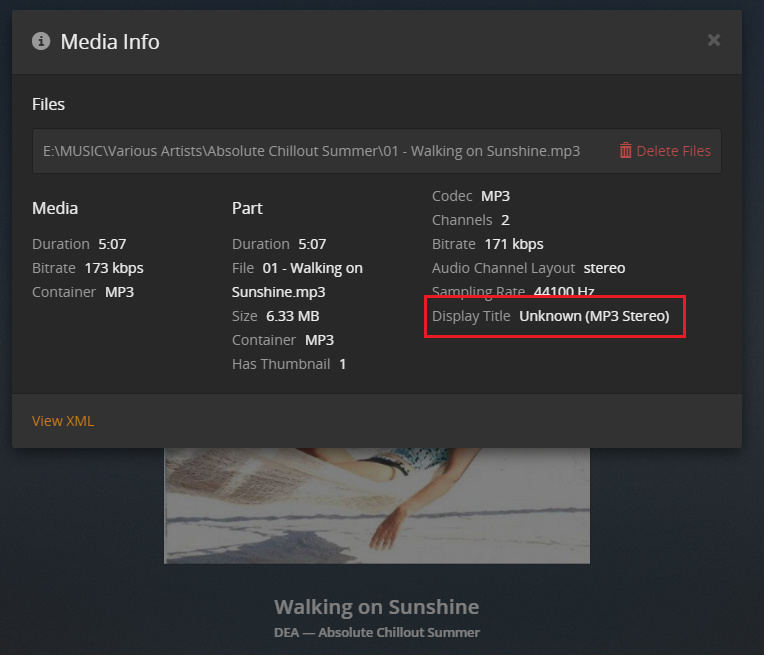
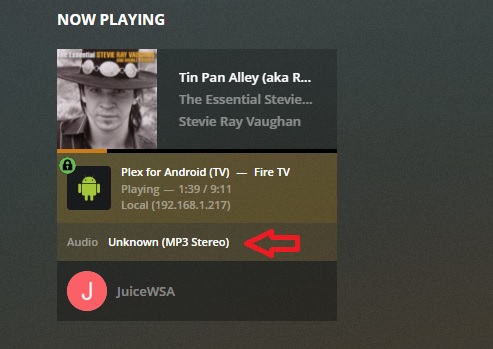
Any ideas where it is pulling the DISPLAY TITLE from? I have an extensive library of music - and all have been processed with MP3TAG to make sure they are as complete as possible.
Complete name : E:\MUSIC\Various Artists\Absolute Chillout Summer\01 - Walking on Sunshine.mp3 Format : MPEG Audio File size : 6.33 MiB Duration : 5 min 7 s Overall bit rate mode : Variable Overall bit rate : 171 kb/s Album : Absolute Chillout Summer Album/Performer : Various Artists Album/Performer/Sort : Various Artists Part/Position : 1 Part/Total : 1 Track name : Walking on Sunshine Track name/Position : 1 Compilation : Yes Performer : DEA Performer/Sorted by : DEA Publisher : EVA Records Genre : Easy Listening Original/Released date : 2007 Recorded date : 2007-06-13 Writing library : LAME3.97 Cover : Yes Cover type : Cover (front) Cover MIME : image/jpeg Media Type : CD SCRIPT : Latn originalyear : 2007 MusicBrainz Album Type : album/compilation MusicBrainz Album Artist Id : 89ad4ac3-39f7-470e-963a-56509c546377 MusicBrainz Artist Id : bf5fd1b3-aa24-4d1b-b8f4-6e2bcb778620 BARCODE : 094639369126 CATALOGNUMBER : EVACD 5107 Artists : DEA MusicBrainz Release Track Id : 2773bee0-2666-35d7-9f0d-ff9977e6f65c MusicBrainz Release Group Id : 5e7c90d5-2a4a-355f-aa79-9be7937b6375 MusicBrainz Album Id : 9b7b5612-5659-4fee-8f12-30cf18d871fb MusicBrainz Album Status : official MusicBrainz Album Release Country : SE
Audio
Format : MPEG Audio Format version : Version 1 Format profile : Layer 3 Format settings : Joint stereo Duration : 5 min 7 s Bit rate mode : Variable Bit rate : 171 kb/s Minimum bit rate : 32.0 kb/s Channel(s) : 2 channels Sampling rate : 44.1 kHz Frame rate : 38.281 FPS (1152 SPF) Compression mode : Lossy Replay gain : -8.1 dB Replay gain peak : -1.000000 Stream size : 6.28 MiB (99%) Writing library : LAME3.97 Encoding settings : -m j -V 2 -q 3 -lowpass 18.6 --vbr-new -b 32
The “Display Title” is currently composed of the “language” tag on the stream and its codec.
Since a language tag on pure audio files is pretty much unknown, it will always display ‘Unknown’ for your music.
This “display title” is mainly intended for audio streams inside of video files, where it is good practice to tag the language of the stream.
You cannot tag the language in many audio file containers. And even if you could, it is questionable if Plex will bother to read it, since it is mainly useless with music.
When what might be 85% of your life is over and you’ve not been able ‘get used to’ some things within Plex - join the club.
The correct response from Plex would be to simply not look at MUSIC files so it can’t show ‘Unknown’, but apparently that news will NEVER reach those who could fix it.
USERS are the ONLY group that seem to care about this - and Plex clearly does not care about this.
Bingo - another user with the correct response.
(there’s ‘more than’ a million of us - and ALL of us know how to correct ‘the problem’ - Will Plex ever get it? Stay Tuned)
Plex has drilled into us the virtue of setting language tags (some of us didn’t need drilling on the matter as ‘Unknown’ 'causes violent allergic reactions) - and now Plex is displaying ‘Unknown’ in a place we can’t fix - and the ‘Solution’ is to ‘not worry about it’?
Horse Nuggets to that, I say.
Fresh, Steaming Horse Nuggets.
“Men? We have 1.4 million howitzer rounds to lob into enemy territory today.”
“25% of them have ‘Defective’ written on the blowey-uppy-end and will in fact, blowey-uppy in the breech wiping out the entire crew.”
“The brass wants half the crew to stand over there, while this half gets blowey-uppied.”
“Don’t look at that writing - it doesn’t concern you and will be harder to fix than finding your replacements.”