I see it was reported a long time ago, but unfortunately it’s happening to me too. It’s very frustrating that sometimes the songs stops right after the very first one. It happens to me when I am on my way to work, Plex is set to Offline mode so it can’t be a buffering issue.
I am using latest version (7.23.0.13123 on Android) and my Plex server version: 1.18.1.1973
Android version: 8.1.0, LineageOS 15.1-20190226
If you need logs or more details, please let me know, I would love to get this problem resolved.
Having the same problem with music and audio books. Randomly stops, I touch the power button and it’ll start up again. Sometimes if I let it sit for a few seconds or a few minutes, it’ll resume on its own.
I to have issues of playback stopping. After you resume playing a song where it left off after a phone call the music will stop as soon as the screen goes black and when you wake the phone up the music will start to play again. The only way to fix it is close the plex app and restart it. This is on a Samsung galaxy S8.
Im also having this issue. The music stops randomly and never plays again, only if I change the current music. It happens on the android app. I`m using a galaxy note 8 and a plex server running on a NAS (western digital my cloud).
Happened to me too while listening to music in offline mode two days ago. I was listening to an album and playback stopped after the 4th track. I had to hit PREV then NEXT to make the next song starts. It did that for the remaining 4-5 tracks of the album.
Happening to me on my Pixel 3a, with Bluetooth headphones.
If I start playing a playlist, or use library radio, it can play some songs without problem, but at some point it will fail to start the next song. If I unlock my phone and open the app, it shows the pause button, but playback is stuck. It starts playing again if I hit next.
Phone: Note 9. Android Pie. App is not ‘optimized’ for battery life (having it optimized for battery life creates a separate issue of stuttering while the screen is locked.)
Typical usage: playing in the background while driving and Waze is in the foreground. Phone is not locked and screen is on. My phone is playing through my car’s stereo via bluetooth.
I start playing a synced shuffled playlist of music. About 90%+ of the time the progress bar does not track along with the song or resets once the song is finished but stays visually on the same song even if it is audibly playing the next song in the playlist. Usually 1-3 songs will play before audible playback will cease. When I navigate back to the app, I visually see the original song of the playlist at 00:00 progress and not progressing further. The app does not respond to any commands at this stage–i.e. play/pause/nextSong/PrevSong. I need to press the “X” in the upper right to kill the playback instance and the start the playlist again.
As you can imagine, when driving, I don’t want to have to continually interact with the app to restart the playback instance in this manner.
Just wanted to add my logs. Seems to me that this is a bug with the connection service or something like that. Reading the logs I have found several connection failures. This was while I was walking in a stable 4g area with other apps having no trouble at all connecting to the internet.
It may be a problem with my router, or with the main plex server punchthrough, or even with my mobile device.
A shared user of my library has always had this issue, on an HTC U Ultra running Android 8. I originally thought it might have something to do with battery optimization put in place by HTC as I had never experienced the issue myself. It seemed to happen during any music playback, whether streaming directly on WiFi or using offline files.
I’ve now started to experience this issue as well on a Pixel 2 XL running Android 10. I was playing music in offline mode, while connected to a mobile network (with an unreliable signal, not sure if this is relevant)
Quite disappointed to see this issue is so longstanding, and doesn’t fill me with hope that it will ever actually get fixed. Especially considering most users have paid a premium for the Plex.
I have the issue, playing a playlist with a browser (Chromiun / Linux), it stops after each song qnd I have to press play for the next song.
Using the iOS-App for playing a playlist - everything works fine… .
My solution - try an other browser i.e. Opera - the songlist is playing song after song.
It is the browser - not the plexserver.
Same issues here with 2 different Samsung S8 + model phones. Music randomly stops, cleared app cache, uninstalled and reinstalled app. Same problem. Synced and non-synced songs exhibit the same issue. Looking for alternatives for Music now…glad I never bought a Plex pass!!
Just created a thread a couple days ago with this being one of the issues I highlighted that I ran into. Wow… the fact that this dates back to 2016 and it still hasn’t been fixed (the basic functionality of playing back songs), is truly scary.
Literally the only reason I pay for this Plex subscription is for the ability to sync music to my phone. But when Plex on Android stops playing music every now and then (and since this has been an unresolved issue for almost 4 years) I’ll rather just uninstall plex and use the default music player. At least it plays music, unlike your app.
Yeah, I’ve been getting the same issue, music just stops after a few songs or right in the middle of a track. Sometimes it won’t even play a track and I have to quit the app and try again. It never lets me continue a track if I stopped in the morning and go to pick it up later in the day. It’s really annoying and feels like it’s gotten worse. I always keep everything up to date as well, so it’s not like I’m running an older version.
A few months back I paid the lifetime membership fee and I’m a bit annoyed. As a whole Plex works great on my computer and server, but the mobile app is really lacking. I’m considering alternatives on the mobile side of things, but it will be a shame as I love the way everything is synced up. Can we fix these bugs/issues and make it more like the Spotify app? I understand Spotify is a bigger company and has more money, but these issues are basic requirements that really need to be sorted.
This has affected me for about a year now too, but strangely only with Firefox. Tested on Windows, Linux, FreeBSD hosts. It’s all the same. Have to use a chromium derivative to use Plex when listening to music. Kinda sad to see this is almost a 4 years old bug now. Maybe I have to stop using Plex
I went months without experiencing any of these issues, then suddenly in the last month or so I have had intermittent issues plaguing me. The Android app keeps stopping in the middle of a song and I have to click the back button and next track button to continue my playlist. Also, when I open the app the artwork isn’t loading, and sometimes it still displays the previous track artwork/artist/track title rather than the one it is currently playing and I have to click the next track for it to ‘catch up’. Not sure why this started happening. My only thoughts are that my music library has grown and there is a lot of folders now. That’s just a guess. It is certainly frustrating. I will play music, jump in the shower, and it will stop playing and it drives me nuts!
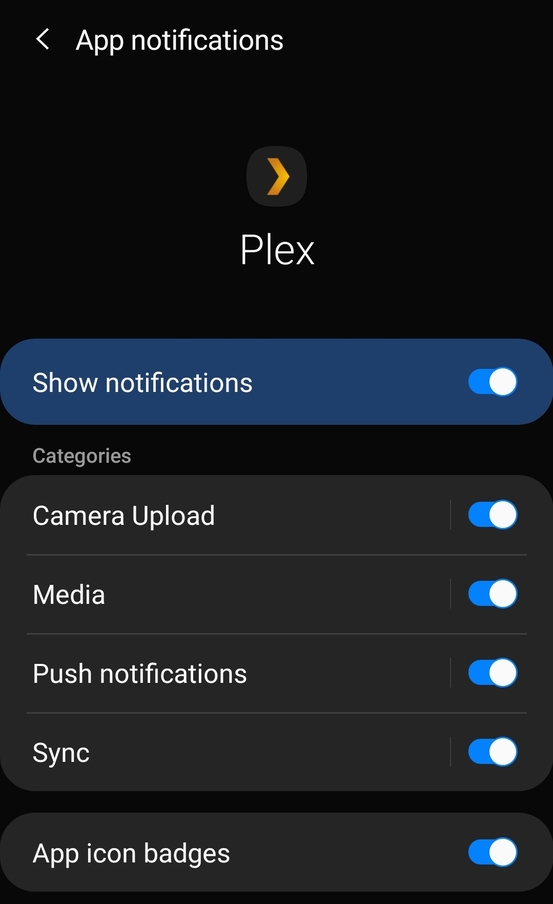
I spent some time last night going through all of the settings on my Samsung Galaxy S10+ for both Android app settings, Always On Display, and for Plex settings on my phone and seem to have resolved all of the issues I was encountering with songs pausing, and having to unlock my phone and use the next track button to continue my playlists/albums. I don’t know if this will work for you, but I have been listening to music with headphones on for a few hours while working from home and haven’t had one issue. Here are some screen shots of my settings: