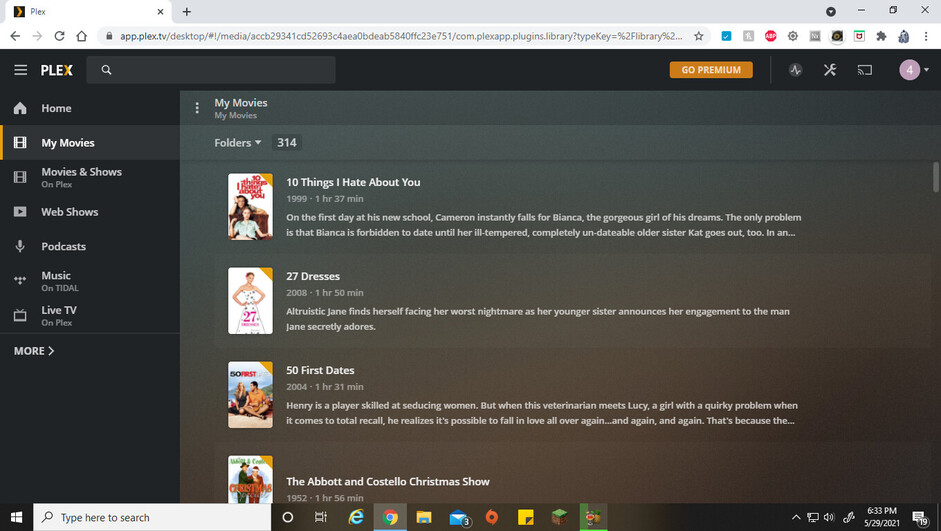
I have several TV series as well as movies burned to my hard drive in separate folders in the “My Movies” library. When viewing “all - movies - by title”, I can choose the viewing layout (grid, detail or table), but if I look “all - folders” they show in detail view and the contents of each folder is also in detail view with no option to go back to grid. This is only on my PC, when watching from my Roku, they display in grid.
since may 27th, 2021 server update I have the same problem. I have my movies sorted in 10 main alphabetical folders (A-C, D-F, G-I, etc) along with others named after the movie which I haven’t finished subtitling or any other modification needed, and an specific one with music videos, which obviously aren’t inside its own folder. Also have and another single drive that holds hundreds of movies. I had them displayed in grid view, which got a big folder icon for the folders, and then the picture in grid view for all the movies inside the big movies drive that were listed without folder. That way, I could double click a grid icon folder, see the content still in grid view, and there was also the option to switch between display options. Suddenly, with this “update”, Plex removed the suboption “by folder”, (All/Movie/by Folder). Now it is (All/Movie-Folder/–)If Movie is selected, I get the option to change between grid, detail or list views, but if I change to Folder view, it automatically locks to detail view, with no option to change view. This restriction stays if I go into a folder, so all the movies inside every folder are listed in detail view and there is no way to change to list or grid view, being the latter the one I prefer as default. Also, if Movie option is selected in the second submenu, in the third submenu for organizing the movies, the option “by folder” was removed. So now my movies are all scrambled with the music video files, totally unorganized. can’t believe someone deleted a sorting option that totally mess the media organization. I hope someone reads this or detects that error and fix it/reverse it; I’m pretty sure I’m not the only one affected or disgusted about this inconvenience. And I refuse to believe this was premeditated to force people into using the collections feature, which I don’t find really functional or practical in any way (I just dismantle every collection Plex creates automatically like Star Wars, Halloween, James Bond collections, because it messes up with my alphabetical folder organization. Even though I Do have James Bond movies in a separate folder, the collection feature does not order it by year, but alphabetically, so I eliminate that collection too) They should verify the changes any of their employees make before sending updates that crashes all the media organization, which is mainly the ulterior reason to use Plex. I’m really upset with this changes!
Not a real solution, but I rearranged my folders where 1 only has movies, the other only has series shows. Now I don’t have to use the “folder” option. I just have to set up all of my “collection” files. When setting up the tv shows folder, label them “show name” S# E# and it will do the backgrounds for you. It works and looks much better.