Only a few days ago I had the folder option that organized the movies list by folder names with the movie file inside the folder. Now it’s gone… How do I get it back? All of my movies are just listed out of whack when I have training videos I watch that are all over the place now.
I am preparing the bug report for Engineering.
Can you replicate/demonstrate, provide a screenshot, and include the PMS version as well as the Web info?
I need this to complete the submission
In this post: https://forums.plex.tv/discussion/296909/where-have-all-the-folders-gone#latest there is the server and web versions for both my Shield and a computer I have set up to verify the “bug.”
As I remember when I clicked on the library name at the upper left of the screen it allow access to the folder view.
I have tested in four different browsers.
When you hover above that “name” the mouse pointer just shows a vertical line kind of like it is in an editor and when I click on it nothing happens. This is true on both my Shield and my text computer.
The computer is running Windows 10 Pro.
This is my attempt at a screen shot. I almost never use that function so I hope it works:
You will note that the “Movies” at the top left does not have any drop down menu like it did before.
@“justin.l.white28.mil@mail.mil”
Is this what you’re referring to being missing?
If so, I cannot replicate.
What version of PMS are you using, on what host/host type and which browser please?
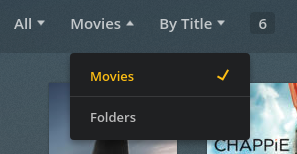
Yes, that is exactly what is missing. I have tested on Chorme, FireFox (The latest), Vivaldi, Opera and (yuck) Edge.
Are you running the same level of web and server? Web Version 3.29.4 Server Version 1.9.5.4339 for my Shield and:
Server Version 1.9.7.4460. Web Version 1.9.7.4460 for the computer I am testing on.
There is no folder drop down on either.
One more thing to add to this thread:
I have found that if I access the servers via http://app.plex.tv I have the problem but if I access the same server from the same the same computer using the direct address: http://192.168.x.xxx:32400 etc then I have the folder drop down available.
Actually, at this point, I am just going to contact the family I was helping and inform them what I have found and then they will have a folder view to use to get their system set up.
It may not be working totally correctly but it is working and that is quite good enough for now.
