Same problem here, after the Monterey Update I’m unable to access the Plex Server (hosted on a Synology NAS). Android Access works just fine!
So… what exactly isn’t working for you and how is that related to this thread?

I have the exact same issue. @BigWheel can you help me out?
Let’s start over…
- on what host/platform are you running your PMS?
- what version of PMS do you have installed on that machine?
- what issue do you have with it?
- [Edit]: which exact client app (and version) are you using to access your server
There’s way too many different factors when it comes to issues, therefore it’s better to have that as a separate thread instead of stating “I have the same issue” in different other threads. No offense.
Thanks tom80h!
- Hosting on a Synology NAS (DSM 6.2.4-25556 Update 2)
- Latest PMS release: 1.24.5.5173
- I’m able to reach the Plex server via App (Android, LG TV) but not via web browser (Chrome, Firefox, Safari), macOS (12 Monterey) and win10 tested.
Nov 07, 2021 18:18:59.848 [0x7f6e788d3b38] ERROR - [MediaProviderManager] Error issuing curl_easy_perform(handle): 6
Nov 07, 2021 18:18:59.848 [0x7f6e788d3b38] WARN - [MediaProviderManager] HTTP error requesting GET https://plex.tv/media/providers?X-Plex-Token=xxxxxxxxxxxxxxxxxxxx (6, Couldn't resolve host name) (Could not resolve host: plex.tv)
Nov 07, 2021 18:18:59.848 [0x7f6e796e2b38] ERROR - Error issuing curl_easy_perform(handle): 6
Nov 07, 2021 18:18:59.848 [0x7f6e796e2b38] WARN - HTTP error requesting GET https://plex.tv/api/v2/server/users?auth_token=xxxxxxxxxxxxxxxxxxxx (6, Couldn't resolve host name) (Could not resolve host: plex.tv)
Nov 07, 2021 18:18:59.848 [0x7f6e788d3b38] ERROR - [MediaProviderManager] Error parsing content.
Nov 07, 2021 18:18:59.848 [0x7f6e788d3b38] ERROR - [MediaProviderManager] Error parsing XML: Error parsing file.
Nov 07, 2021 18:19:04.854 [0x7f6e796e2b38] ERROR - Error issuing curl_easy_perform(handle): 6
Nov 07, 2021 18:19:04.854 [0x7f6e796e2b38] WARN - HTTP error requesting GET https://plex.tv/api/v2/server/users/subscriptions?auth_token=xxxxxxxxxxxxxxxxxxxx (6, Couldn't resolve host name) (Could not resolve host: plex.tv)
Thanks in advance!
You you get different results using https://app.plex.tv/desktop or http://[Syno-IP address]:32400/web ?
The error in your logs implies the PMS on your Synology cannot find the IP address(es) of Plex’ backend (e.g. to verify your Plex Pass status, update metadata…). This usually implies there’s an issue with the DNS server used by the host or your router. Can you change that to a common/trusted one like one of Google’s or CloudFlare’s DNS?
I get the same results using https://app.plex.tv/desktop and http://[Syno-IP address]:32400/web
Cannot believe that the DNS Server is the problem. Everything else just works fine.
Gave it a try anyways via Google DNS, didn’t help.
Nov 07, 2021 20:48:00.843 [0x7f6e796e2b38] ERROR - Error issuing curl_easy_perform(handle): 6
Nov 07, 2021 20:48:00.843 [0x7f6e785b3b38] ERROR - [MediaProviderManager] Error issuing curl_easy_perform(handle): 6
Nov 07, 2021 20:48:00.843 [0x7f6e796e2b38] WARN - HTTP error requesting GET https://plex.tv/api/v2/server/users?auth_token=xxxxxxxxxxxxxxxxxxxx (6, Couldn't resolve host name) (Could not resolve host: plex.tv)
Nov 07, 2021 20:48:00.843 [0x7f6e785b3b38] WARN - [MediaProviderManager] HTTP error requesting GET https://plex.tv/media/providers?X-Plex-Token=xxxxxxxxxxxxxxxxxxxx (6, Couldn't resolve host name) (Could not resolve host: plex.tv)
Nov 07, 2021 20:48:00.844 [0x7f6e785b3b38] ERROR - [MediaProviderManager] Error parsing content.
Nov 07, 2021 20:48:00.844 [0x7f6e785b3b38] ERROR - [MediaProviderManager] Error parsing XML: Error parsing file.
Nov 07, 2021 20:48:05.850 [0x7f6e796e2b38] ERROR - Error issuing curl_easy_perform(handle): 6
Nov 07, 2021 20:48:05.850 [0x7f6e796e2b38] WARN - HTTP error requesting GET https://plex.tv/api/v2/server/users/subscriptions?auth_token=xxxxxxxxxxxxxxxxxxxx (6, Couldn't resolve host name) (Could not resolve host: plex.tv)
Has your router configured a different DNS server?

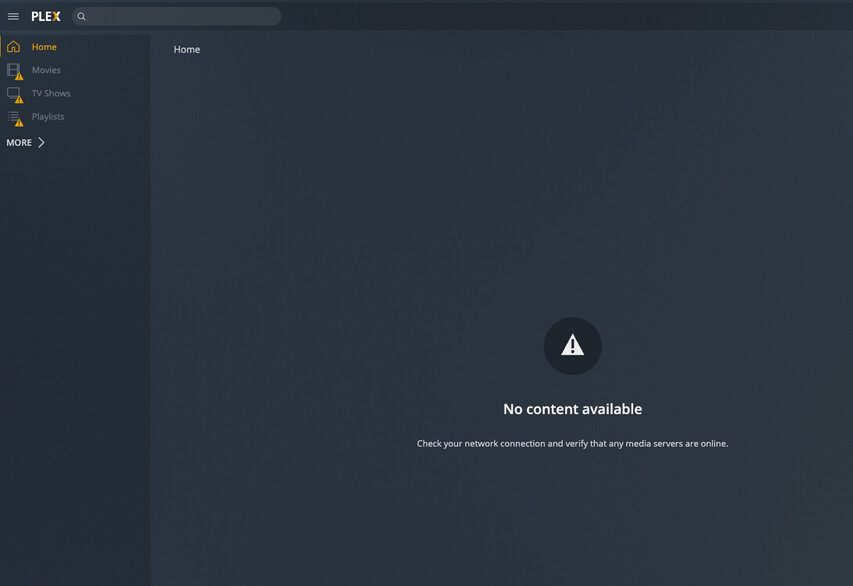
Tried Cloudflare and Google DNS settings on the router, the problem persists.
