I know Mythbusters is a complex subject since they released them one way, and then renumbered the episodes when they were released on DVD, so what my sagetv listed them when they were recorded had to be changed when I removed the commercials and saved them for use on Plex.
The problem is, despite the fact that I got the episode numbers from theTVDB, plex now names them for the wrong episode. For example, my file MythBusters-S03E06-IsYawningContagious-33133009-0.mp4 but Plex lists it as Mythbusters S2.E6 - Son of a Gun.
What’s the easiest way to get this straight? I’m happy to renumber them if I know with confidence the source that plex is pulling from, but if I can get plex to use theTVDB info, that’d be even better…
Plex is using TheTVDB as its default metadata source for tv shows.
So make sure that your episode numbers do follow what is used on there.
Since you are using mp4 files, there might be incorrect metadata embedded in your files.
Do this to prevent them to be used:
Go to
Settings - Server - Agents - Shows - TheTVDB
In there, grab the line ‘Local Media Assets’ with your mouse and drag it downwards, so it ends up being at the bottom of the stack of active agents.
Repeat the same under
Settings - Server - Agents - Shows - TheMovieDatabase
Settings - Server - Agents - Movies - Plex Movie
Settings - Server - Agents - Movies - TheMovieDatabase
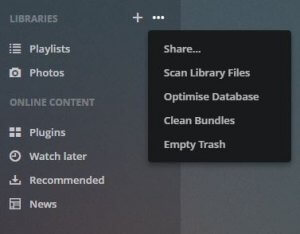
Afterwards perform the Plex Dance with all files of this show.
Yea, I clicked on that and it jhsut explains what it is and when it runs, not any way to trigger it manually. I ended up just changing the run time to the top of the next hour and waited before re-adding the files.
Subsequently, all episodes now show up as “Episode1” “Episode2” etc… Even tried ‘Refresh Metadata’.
Thanks for your patience and help.
I had followed that and just found;
"Clean Bundles
Poster images and other metadata for items in your library are kept in “bundle” packages. When you remove items from your library, these bundles aren’t immediately removed. Removing these old bundles can reduce the size of your install.
This action is performed on the currently selected server only. By default, your server will automatically clean up old bundles once a week as part of Scheduled Tasks."
But I don’t see anything that said how to make it run other than on the schedule.
As I noted, at 10:45 I told it to run at 11:00 and re added the files shortly after, so I expect it did what it was supposed too, but now it just lists the episodes as ‘episode 1’ ‘episode 2’ etc.
Can’t imagine how I missed that! I’ll run through the whole process again just to be safe and let you know if they come back with the episode names this time.
Some time ago, TVDB changed Mythbusters to be yearly seasons. There isn’t a Season 1/ Season 2 anymore. Now it’s Season 2014, Season 2015. It ticked a lot of people off.
Your files are probably named right in the sense of Season 1/Mythbusters S01E01 etc…but that’s not what TVDB will return. You’ll need to rename the seasons to years. Unfortunately, some of the episodes also jumped between seasons with this change (an old season crossed years).
Filebot thought - you could run your existing S03E01-named files through a bulk renamer first to trim off the current wrong episode numbers. Then run it through Filebot with just the titles and it’ll match properly with just title against TVDB to rename the season episodes.