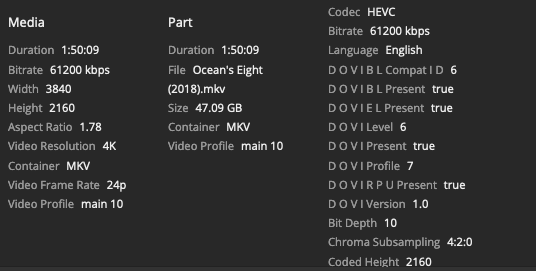
Perhaps this has been addressed already on this forums, but when will native Plex App on Roku support Dolby Vision and Dolby Atmos?
It is no absolutely no reason for Plex employees to respond with an explanation on the limitations of Roku.
Roku has apps with Disney Plus, Paramount Plus, Amazon Prime Video, and Netflix which support Dolby Vision. Netflix offers Dolby Vision and Dolby Atmos.
The Plex Roku app will only support Dolby Vision and Dolby Atmos on videos is when it is encoded in .mp4. Perhaps, this is how Dolby Vision and Dolby Atmos is supported on other apps; specificially the mp4 codec is recognized and not MKV. I could be wrong.
On the NVIDIA Shield Pro, both .mp4 and .mkv Dolby Vision and Dolby Atmos rips are supported on the Plex app and play just fine.
Can someone explain why Dolby Vision & Dolby Atmos MKV playback is not possible on the Plex app on Roku OS?
There are two versions of Atmos for home theaters:
“Streaming Atmos” or “Lossy Atmos” is the type used by Netflix and other streaming services. It is Dolby Digital Plus + Atmos (EAC3 + Atmos).
“Blu-ray Atmos” or “Lossless Atmos” is the type found on Blu-ray discs. It is TrueHD 7.1 + Atmos.
Roku devices support passthrough for Dolby Digital Plus + Atmos. That is why you see Atmos indicated on your audio gear when streaming the appropriate titles from online services.
Roku devices do not support passthrough for TrueHD + Atmos audio. Therefore, you will not see Atmos indicated on your audio gear when streaming such titles via Plex.
You can use tools such as MediaInfo to identify the audio formats in your media. Plex client apps show the audio codec, Dolby Digital Plus (EAC3) or TrueHD, but do not show if Atmos information is present.
If you have media with “Streaming Atmos” audio tracks, they should play in Plex and provide Atmos audio. Some movie trailers and demo files are available at thedigitaltheater.com. Try the “Nature’s Fury (Dolby Digital Plus ATMOS)” video. There are many other such sites. Google “Dolby Atmos demo” or similar.
With respect, this is categorically false. Roku devices support passthrough for Dolby Digital Plus and Atmos, but not on Plex, why is this with this platform? Disney Plus, Prime Video, and Neflix on Roku devices support the passthrough.
I am fully aware of the two types of Atmos, it is just weird for Plex to be this behind in getting Plex on Roku up-to-date.
Do you have a sample of a file you could provide us with?
Passthrough of Dolby Atmos (DD+ Atmos) is dependent on the Roku model itself, and Dolby Vision has to be profile dvav.09 for AVC content, or dvhe.05 for HEVC content. As long as they’re in either an mp4 or mkv container, it should work, dependent on the Roku model. Can you let us know the exact Roku model you’re using?
Yes, a sample video would be much appreciated. I’m not familiar with the exact specs of that TV, and what profiles and containers it supports, as that’s a little different than the standard Roku models
Unfortunately, I’d need details on the actual containers and profiles it supports. Just because Netflix or Disney+ work doesn’t mean that it will necessarily support the container, profile, or codec that you have