The updated app is absolutely awful. It’s much harder to navigate and there is functionality missing. The app randomly will jump to the next episode in the middle of playback. And navigating shows is horrendous. Terrible experience.
As if the app logs the user out when you switch apps briefly (Android).
And I still don’t understand the justification for removing music libraries from plex.
I don’t want multiple apps to play my content, that’s one of the reasons that I and many others signed up for plex in the first place.
Plexamp has annoyed me since an update messed up the sorting of albums. I want it sorting by artists and album name, not artist and year. It screws up the various artists order by sub sorting by year. Yet in plex it sorts just fine.
In the history of apps, this is the first time where features have been removed with no immediate benefit.
The old app worked just fine so why fix what wasn’t broken?
I have a Plex Pass and nothing works right in the new app. Cannot Chromecast and cannot AirPlay. Works flawlessly in older app version. So no, the Plex Pass is not the issue.
Went back to previous version of app with APK from above. I will likely never update again. I highly doubt the massive issues with the app will be fixed in the near future, since im sure the Engineers are overworked and have so much on their plate. So, I dont blame them at all. Plus, the previous version of the app is so great, that im happy with it in every way. Having used the new app for a week or more now, the old app is SO MUCH FASTER and less buggy in every way. I got sick of the force closes, the error messages, leaving the app and it stopping playback…its so nice to be back to “real plex”.
I cannot believe after the multiple feedback threads pointing out all the UX issues and lag that pretty much none of it has been addressed.
Everything is slower, clunkier, and takes many more taps than before to accomplish. And features that many users don’t use at all are forced into prime UI positions instead of a user shortcut. Promoting services and content that perhaps we don’t want promoted to our elderly parents or children.
Plex’s message could not be more clear: its not your media experience, its theirs. Be grateful, plebeian.
I’m infuriated and insulted. Uninstalled for now while I decide if I migrate my family off this before it’s too late.
Adding to the comment in the hope someone at Plex actually reads/acknowledges. have not read the previous 868 replies as yet, but a skim of the top relies pretty well answers it.
New app at first use is a massive step backwards.
First impression - where’s the ability to re-arrange the home screen or library order?
What happened to being able to trigger library actions? No option to trigger a scan, or empty trash on a library via app anymore?
Serious performance issues (as seems to be a theme from feedback)
Major ui changes aren’t always a deal breaker, but most commonly a company would retain the core functionality with the option to switch to a ‘classic’ interface. Especially if the new interface is missing functions. Also users are creatures of habit, if you’re drawing a line in the sand on the old and new versions - release the new version as it’s own app and slowly depreciate the old one as required. It lets users trial the new app, and gives a progression path without alienating your user base with breaking changes and feature loss.
I’m similarly uninstalling the new app and installing the old one with updates turned off.
Aside from issues many others have pointed out, on my iPad the app freezes when I go onto the Libraries tab and I have to force quit the app to get back into it. It’s also really frustrating that I can’t airplay from within the app anymore, that seems like a weird thing to remove. I didn’t get the update until the day after I bought the lifetime pass, which is just my luck! Hoping this all gets resolved soon.
Just got the new app on my iPad as well.
I already had it on my iPhone, but it didn’t bother me much since I mainly use the tablet.
But this UI is terrible.
Why did you move the 30-second forward and 10-second back buttons outside — where the previous and next video buttons used to be? That’s a major logic issue.
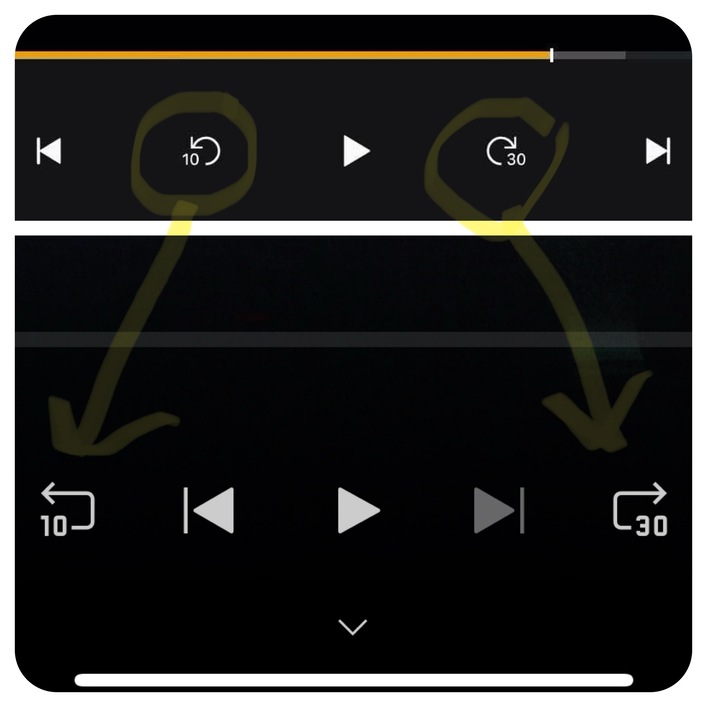
Why change something that’s been working for years?

And starting a movie or series now takes so much longer. It used to be: tap play, and the content started. Now I have to wait? In 2025?
Come on… please fix this.
And the worst part: video playback isn’t even smooth — it stutters.
Bro, on an iPad Pro?!
I had to switch to Infuse just to watch the movie — this is unacceptable.
I gotta say, the new client fails at the only thing I git a ■■■■ about. It doesn’t find my library that was working in the old client, and it doesn’t give me the ability to see why it fails at all. Just a bunch of useless settings and a bricked app that I’d kind of like a refund for if you can’t resolve the issue.
In 2025.14.0 on Android 15, the “Lock to Landscape” option seems to only support left edge down landscape. The fix is to disable the option and turn on Auto-rotate, which is a regression from the previous version (that is prior to the new experience) which supported landscape viewing with either edge down without requiring Auto-rotate to be enabled.
so many bugs in the new version, nearly unusable for live TV
PIP bugs,
I have just found a network issue , when moving from 5G to WIFi stream drops out and have to quit the app to reconnect,
also an audio issue, when bluetooth speaker or headphones or air pods turned off or removed, audio doesnt emit from phone speaker,
there seems to be nowhere to raise these issues, not does anyone from plex chime in to answer
The inability to zoom in and have content take up the entire screen on my iphone is super frustrating.
During playback just hit the three dots icon, go to Playback Options and Display Mode.
Regarding the bottom bar. I’m sure some exec or designer at plex thought it would be a great idea to have live tv, discover etc… front and centre on the bottom bar, promoting what they see as the future of plex.
However, what is happening in reality is folks are now going in and disabling these features via their account just so they can get rid of these unwanted buttons.
In the previous app these were somewhat hidden behind the hamburger menu but putting them in front of everyone without the ability to customise it was a major misstep. Just look at the forums threads and reddit you will see sways of folks now disabling features just so they can remove these buttons.
Thanks! Unfortunately this is way more steps than simply double tapping the screen.
Another frustrated customer here. Bought plex pass in 2013, everything great up until now, sure there were teething problems occasionally and not everything was perfect but the direction of travel was good. This release is an abomination, as far as I can tell, the primary purpose was to rewrite this so they have a single code base to maintain, that’s fine, once that code is worthy of release and this is far from that.
I’m not happy with multiple apps for different content types, none of this serves the customers at all and can only be viewed through the lens of Plex needing to reduce costs or increase income, there’s a way to do that without alienating your entire customer base. Just wish Jellyfin was a bit better.
We need watchtogether back!
On this note, the aspect ratio is screwed up on the new client, old (see: working) one you double tap the screen and it fills the screen, the new client requires you to dog down into a menu to change aspect ratio and by default it letter boxes content. When you stretch content so it actually fills the screen in landscape, and unlock rotation it keeps the stretch in portrait, real disaster for watching content.
This is a major regression.
Serious battery drain on all versions of the new experience Battery drain and heat - iOS - #26 by scottrus
