2025.17 testflight says unable to queue item for download
Hi,
I apologize if this has been answered, I just can’t find the answer if it has been. 20k+ replies on the topic sure is a lot!
That said, has anyone seen a roadmap regarding when downloading series by season/unwatched status will be restored? Its quite tedious to go in and download every single file, then delete them one by one by one after the fact. Its also quite cluttered in the downloads section of the app, making it difficult to select the specific episode I am looking for, if they are all in just one big directory.
Thanks!
its planned but no eta
I’ve not seen any commitment to add back in “Download the next x unwatched shows” Just entire Seasons and Series
a dev has said its planned, cant remember which thread they said it in though
Still no updates on this still occurring issue.
Could you share the name of this app please
Infuse is one option (but IOS/Apple TV only).
Thanks, but I’m android
KODI is another option, but it takes more setup work.
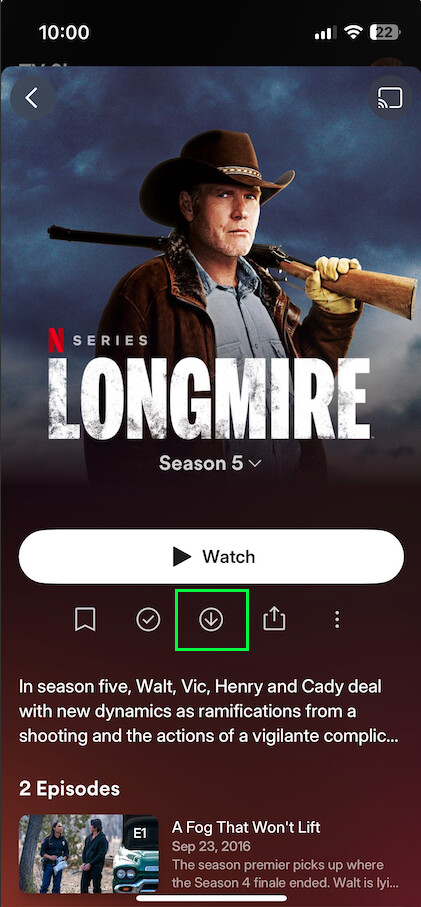
On iOS and Android mobile you can download by season in the current releases/betas. Navigate to a series and then long-press on a season. From the menu which appears select “Download,”
Or, you can navigate into a season and then click the down-arrow icon (the one with the circle around it).
Either option will download the entire season. But no, there is currently no way to download by watch status
Noticed as i was comparing Android to Roku… that the new UI does not flip horizontal… which i suppose is all fine and good for a normal phone, but i have a Zfold which has all the screen space in the world. It felt awkward having to physically rotate the phone depending on navigation and playback. That should just work.
Appologies if i missed a prior post about it. Im not doomscrolling 1200 posts looking to see if someone already brought it up.
I don’t know if this is what you are referring to, but I was confused on how to set the screen orientation myself.
There is nothing in the Settings for this.
I found it or works similar to the Windows App. You need to start playing a video, go to Playback Options and make the changes. These changes appear to change the settings for all future videos being played.
These are my settings

That’s not available on IOS/ipadOS in the Current Release.
Yes, it is. I just tested it. Version 2025.16.0, iOS 18.4.1, iPhone 13 mini. Not sure why you’re not seeing it…

Guess I found a bug in 2025.17  it’s not consistently available for me (but is sometimes).
Why do you use tvheadend and xteve when tvheadend has a built in hdhomerun server?
Extremely dissapointed in the new app and overall tempo of fixing the issues. Removing features was never a good thing. New UI results in a poor user experience with lacking options (that were removed). With the uptick in price, this really leave a bad taste and gives a vibe that they just don’t care. New mobile app is now out for a while and it’s in terrible shape. Network errors, not being able to play episodes one after the other without throwing errors.
Really, really extremely dissapointed in devs. 
