The new app is completely useless for me.
I don’t want to go into any details reagarding the UI/UX - that’s completely objective and somehow I like the new design.
But it doesn’t play any of my HDR files (spinning forever within my local network) and all other videos are choppy.
Trying to play anything on LiveTV (using TVheadend with xTeVe) just fails with “A server with the specified hostname could not be found”. I even went the extra mile and completely set up my Tvheadend+xTeVe from scratch but without any luck.
All of this is working completely fine in the web interface or the old app.
So, the whole app has no value for me anymore, as it doesn’t even do what should be its main goal: Playing my media.
I’ve now set up Jellyfin and everything is working flawless.
Thank you Plex team for destroying the usually very good experience with your new “experience”. You’ve lost another Plex Pass customer.
I’m experiencing a bug with Live TV/DVR that I haven’t seen mentioned before. I’m on Android app version 16.
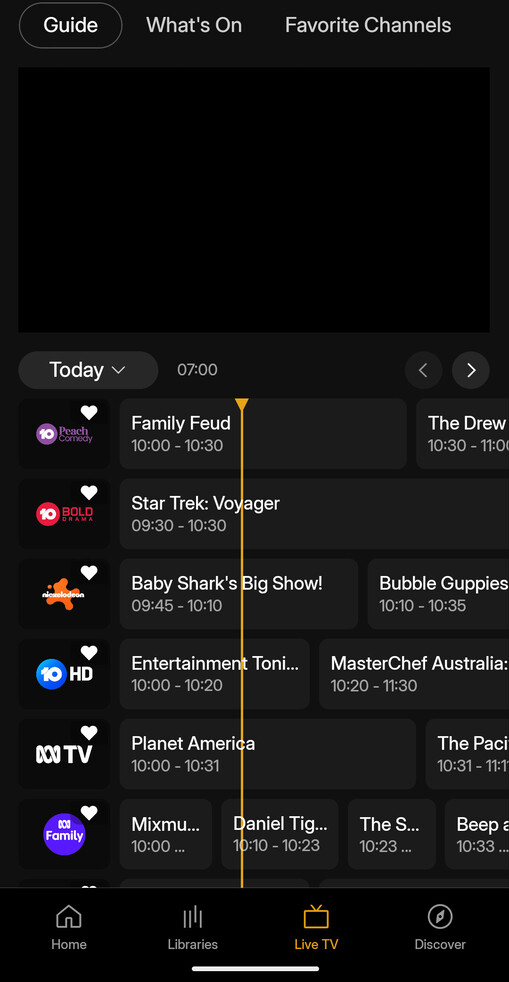
If I try to watch live tv early in the morning, I can’t because the guide is wrong. The programs listed as ‘now’ are actually the ones broadcast at 10AM.
After 10AM, programs are listed correctly for the rest of the day.
The live tv function is still VERY slow when it does work, and frequently has issues (black screen in the preview, or won’t load in the preview until going full screen first). Honestly I’d prefer to be able to switch the preview off, just have the guide and make my selection.
Also, why can’t we change channels from within the player any more?
Browsing Movies library and Live TV does not work and I still get those uh oh errors. I can only watch movies if do a direct search or filter movies with some category. I tried to install 16-version from scratch and after sign in I received the first error. I had to kill the application several times before I got into the user selection view.
Browsing some client logs there and can see these:
2025/05/16 21:08:06.501 (1683307) (private) | The file “user_info_cache.json” couldn’t be opened because there is no such file.
2025/05/16 21:08:06.502 (1683307) (private) | The file “network_service_preferences.json” couldn’t be opened because there is no such file.
2025/05/16 21:08:07.353 (1683337) (private) | File does not exist at path: /var/mobile/Containers/Data/Application//Library/Application Support/downloads
2025/05/16 21:10:38.050 (1684986) (private) | The file “background_tasks.json” couldn’t be opened because there is no such file.
Not sure if these have anything to do with the issues but those caught my attension. Is there some new video file codec limitations with new iOS Client? I have 0 issues with the movie library or Live TV with the old client version which I continuously downgrade after testing.
@elan
Plex has been one of the greatest platforms for media management with great apps on every platform and device. Over the last 15+ years, I’ve helped no fewer than 500 people implement it, nearly half of which are now PlexPass subscribers. Now I feel like a MASSIVE FOOL.
WHAT IS THIS?
The new experience is absolutely terrible. The old experience was clear, refined, and reliable.
This new one is broken, frustrating, limited, and arrogant. Who in their right mind thought this was a good idea? Why don’t you actually ask the people who purchased the Plex Pass and have made your company possible what they value? You are now completely blind to it.
BRING BACK THE OLD INTERFACE. Just revert. Don’t try to salvage this. Look up “sunk cost fallacy”. Don’t fall into that trap with the new development you have done. Just bring back what worked and what we loved to use. Stop thinking you know better (you obviously don’t). Exercise a bit of humility and be willing to listen and learn. Apologize sincerely for this massive mistake that is obvious to everyone besides the decision-makers at Plex, apparently.
Why wasn’t it released yet? Oh right because it’s still pre-alpha, just like all the rest of the trash experience apps. So why did y’all release that hot garbage then?
@elan@McWankeMany of us sincerely hope you’re reading all of these sentiments and genuinely reconsidering the position of the new experience. Splitting up the apps has begun to feel like they are passion projects made solely for the developers at the expense of the users.
Please, we are literally begging you, put the old app back up. Continue development of the new experience but allow all of us to have our flows and preferences back before just pulling the rug out from under your paying customers.
Based on comments and suggestions from others about switching to alternatives, here’s a chat thread with research from ChatGPT comparing and contrasting Emby, Jellyfin, and Plex in case anyone’s interested:
Honestly, I think some parts of the assessment are more generous to Plex than it deserves at the moment considering everything that’s been going on, but it’s still a useful read to understand how they stack up. I suggest starting from the top.
Which version are you using that actually works? I start the subtitles and it plays 2 of them and then stops.
I can’t believe they haven’t fixed this yet. So much for accessibility.
In Software companies that aren’t startups, it’s rarely the Dev’s who make decisions around design or product direction. They certainly don’t decide when to release the product.
Plex are lucky that they have so many people who care about the product (some people from Plex may not feel like this at the moment) especially with how bad this version has been. When your users don’t feed back, it means you’ve lost them and there’s only one way from there…
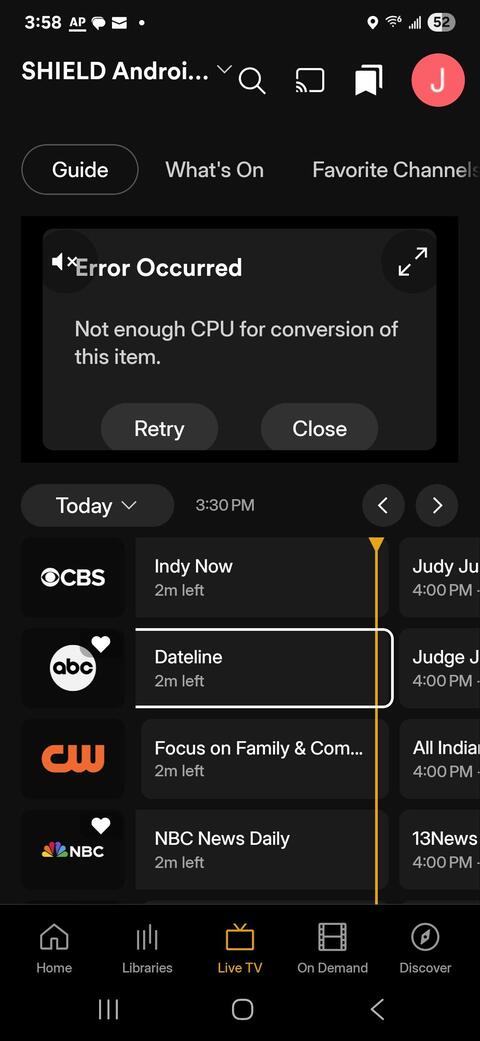
I’m getting the same error if I tap on any show appearing on the list. No amount of retrying accomplishes anything. Also I cannot see any shows if I scroll past 8:00PM (it is now 4:00PM) – all channels are blank. Future days are all blank. This has been happening for days.
Note that the guide on the Windows app on my laptop seems to work fine.
Please advise if there is a solution to this.
Nvidia Shield Pro 2019 | HDHR Flex 4K | Galaxy S24 Ultra | Plex Android 2025.16.0 | Platform ver 15 | Lifetime Plex Pass | Plex Windows 1.109.0.329 (laptop) | Plex Server Shield Android TV 1.41.6.9685
 (private) | The file “user_info_cache.json” couldn’t be opened because there is no such file.