Server Version#: 4.145.1
Player Version#: Don’t know, but it is the new interface
OK, so two things:
Why? The old interface was straightforward and worked just fine. I see no real improvements. Seems like things were changed just for the sake of change. If changes are made that do not improve the software, your resources are wasted. From a cash flow model, it is a complete waste of funding. But that is not my problem.
The new interface does not access my servers remotely. The old interface did! I have not changed anything on my server or phone. An upgrade SHOULD NOT break old functionality! This remote access problem is a problem with the app since it used to work with the old app. If you cannot fix this, please allow us to download the old version as an option. Again, it worked just fine before!
Originally when I brought it up this morning, it just said that “No libraries found” and “Looks like you don’t have access to any servers…”. When I got back home I fired it up and it showed all the libraries (but I was on the same network). Now when I take it back off line, I am back to the “No libraries found” and “Looks like you don’t have access to any servers…” again. Thing is that I have made no changes to the server, network, or the Plex server software.
I have spent some time this morning getting things working with the defaults I had before while I was on the network. This is great software. I just need it to work remotely.
I can’t get to ANY of my Plex servers now with this new IOS app. It keeps saying that all my servers are outdated. I checked in General and they say they are up to date. I want to go back to the version of the app that was working just fine.
Does the Plex product team see these messages? Or are we just spitting into the wind?
This remote access seems to be a high issue in the Plex community! In the software development world, this would be considered an “A-Level” ticket. Meaning that this issue is severely impacting the customer base. And that as many internal resources as necessary would be assigned to it. In the software world, this would have to be resolved in a couple of days, tops.
I would like to extend what I have tried to say what is wrong this new approach to the apps on IOS. The previous versions had some issues, but at least I could get to my movies, music, photos and personal videos all on the one app.
You have NOT fixed anything. You now require that we use three apps on IOS, one for movies, one for music and one for photos. But, here is what is wrong.
It appears that you have not provided us with the options to display icons of folders, but have restricted us to lists. If I am wrong about this, please explain how we can this done.
The new apps do not allow us to reorder or to pin or not pin folders.
And now, I have to maintain three apps.
On the Plex Photo, I have 100’s of thousand personal photos organized into year/month/day sub-folders. With the old app, we could visualize/scan photos based on selected posters that would allow us faster access since we would NOT have to read every General title to decide which to by-pass and which ones to select. Confucius says ‘A Picture is worth a thousand words’. Give us this back.
Another (AND THIS IS MAJOR) problem is that for personal photos, I have over the years shot and design thousands of videos that mixed in with any particular subject folder. So far, I have NOT been able to view ANY of my videos on the IOS apps. All I get is a black screen with a little line that circles depending on the WiFi or Phone signal and/or size of the video. And a lot of my videos are a mix of photos/videos/music/verbal.
There also seems to be some issues even with the selection of folders. (example: Let’s say I have a first level folder containing photos/videos of an individual. The sub-folders below would be first arranged by year. When the app starts up, I may or may not remember where you stopped last time, so you might be at the oldest year (1970) and I want to view this year (2025). I scroll down to 2025 listing and touch it and instead to going to 2025, it starts to display 1971. I scroll down again and touch 2025 and 1972 displays. It appears that it will continue to do this until I reach 2025 or by some fate of chance, touching 2025 will work and I have no idea how my touch was different.
There are probably more things that will show up if I continue to use these apps, but for now
What do I wish? I would love to just have the ability to get back the old app. I also think that you should give the option to upgrade or not.
I agree 1,000%. I would pay the new $325 lifetime pass fee just to restore the old app with the promise not to go on this destructive product rampage in the future.
I have come back from an over the weekend visit with friends, where we share an exciting weekend of preparing, watching and enjoying the Kentucky Derby, we choose our winners but we don’t bet. These just for play. I picked the winner.
But, I came home in utter embarrassment. I share phones and videos with them and for the first time, I could not view any of the photos as the app continually blanked out. I would select a year/month & day, even though I could only guess that it was correct as I could not see any poster. As I have numerous days that have multiple events, selecting one and trying to back out because it would not display would only leave me exiting Plex Photos and trying all over again.
NOT ONCE WAS I ABLE TO SHOW THEM ANY IMAGES USING YOU TERRIBLE APP.
I have several Plex Media Servers all of which reside on sufficient drives (two Synology NAS drives and one Mac Studio). Drives on the Mac average 2500-2700 read/write access numbers. I have 1GB into the house and direct connections from router to a FAST switch handling all three of these devices to easy access.
Though your original Plex Player app that including movies, music, photos & small videos has had some issues when trying to play anything. I could with patience access them. Your THREE NEW apps are NOT working. There is hardly anyway that I can configure anything that would remotely resemble the older app
I don’t know how Android users feel about these apps, but I know a lot of us on IOS BEG you to put it back to the way it was. At least we could enjoy our photos and videos with much greater success.
I am going to add another short coming on this new rolled out app. PlexPhoto.
When I can finally get a string of photos at home here that appear to all me to see them, as I flip through them, they are out of focus for a moment. The images it there but out of focus. This does not last long and then I clears up.
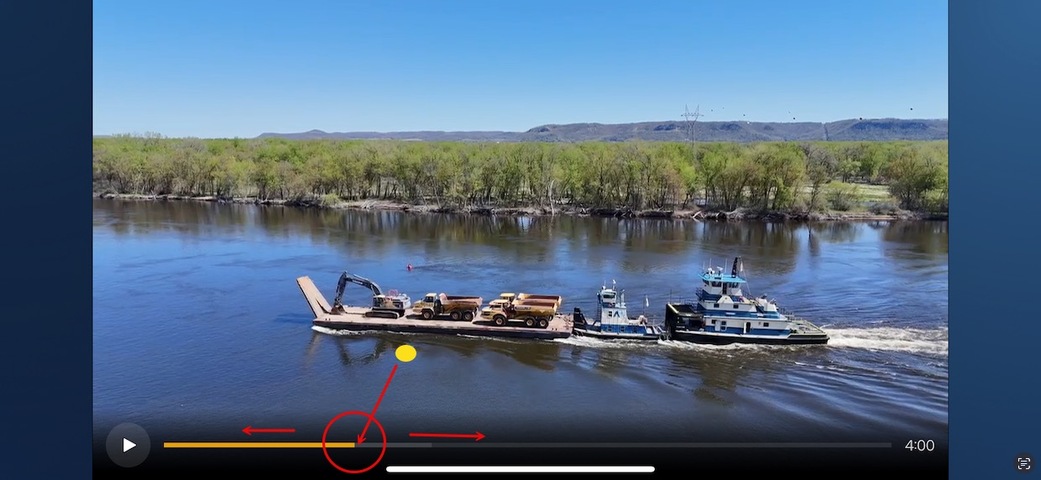
Okay, Another day and another disappointment. I love taking photographs and many times, will record a short video that I can shares with friends. But, your new PlexPhoto app is having another issue.
Yesterday, I took numerous images of some river traffic. I also filmed some of the movement into a video. When I went to look at these videos on my iPhone or iPad, I noticed that while I can stop the video at any point, there does NOT appear to be any method to move the video back or forward manually.
In your older Plex app, one could hold on the line at the bottom and manually move the video back and forth.
It would be nice if the Plex folks would at least respond by saying that they know of this issue. Oh, and maybe a date when it will be fixed. Or even, we do not know what is wrong yet. But no response is like giving everyone the middle finger! That we are not even important enough to respond!
The new app just plain sucks and is BUGGY like hell. It doesn’t play Live streams at all anymore, playing things out of a Playlist in “Shuffle” mode just plays the first video on a loop. Its interface is confusing. I’m seriously thinking of going back to Emby or trying Jellyfin because just forcing users into a Beta that has this many bugs is a BAD BAD BAD practice and will alienate your user base. I know I feel alienated, I’ve opened 3 tickets with bugs and heard zero response.
OK, I solved this remote library issue (at least on my phone). What developers of the Plex app did was to blow away all of our custom settings and overwrite them with the Plex app’s default settings. This is a VERY poor development practice. I have been going through all my settings to get everything back to what they were.
So, if your phone is like mine, then to resolve this library attachment problem…
Bring up the Plex mobile app
Select the “Home” icon at the bottom left of the screen
Select the icon in the upper right corner (on mine, it is a red circle with the first letter of my username).
Select settings
Select Downloads
Turn off “Wi-Fi only”
From there, I had to give it a minute to attach, then it found my libraries. This obviously is not to say that everything is fixed. I have found several errors in the playback functionality from the downloads area. So, all I have to say is, come on Plex, get your house in order! Adopt the concept of Quality Control and Quality Assurance!