Does your Subtitle work? i cant select Subtitle
Could you enable logging in the app to a server, reproduce the issue, and then grab and send me the server logs? If the issue is consistent with certain files then you could also send me a sample file that reproduces the issue.
(File removed)
Guys, what are you doing with the subtitles?
Now you have made it so that when subs are included in the .mkv-file they look extremely bold, jagged and have either black or grey background. Looks awful. (VOBSUB, pic#1)
When there are separate subtitles tracks they look like they have always, in high-res and with thin black borders. (.srt, pic#2)
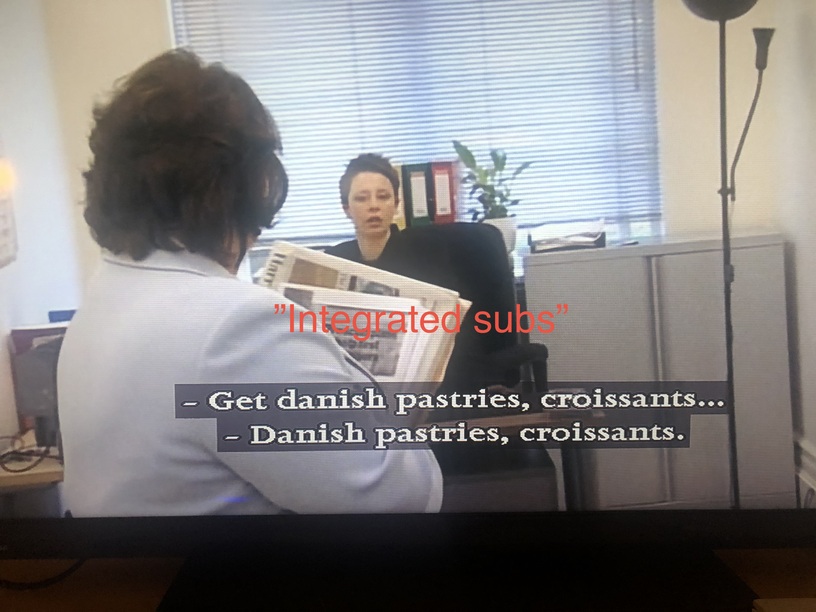
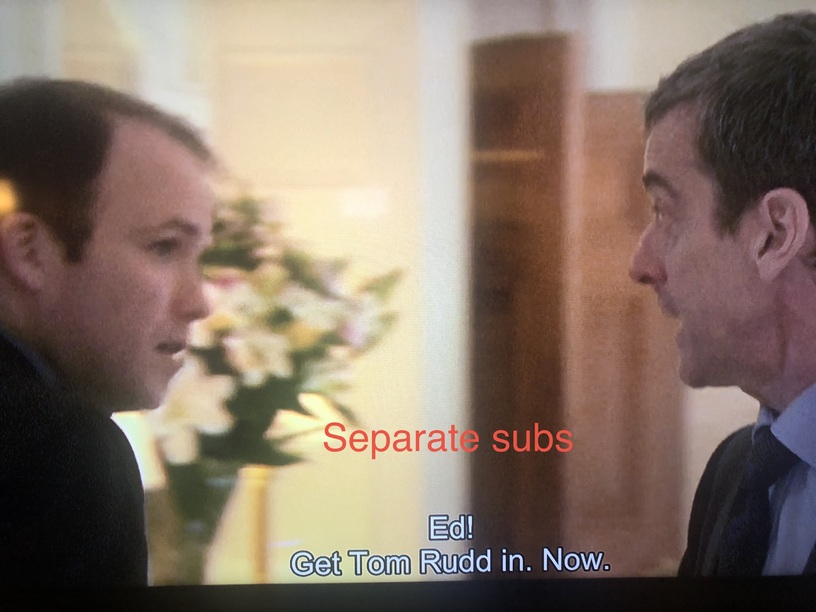
Was that the correct files I’ve send you? . . The issue is still there after last night’s update.
@Pigge Vobsubs are image-based subs. We (the client) don’t have control over how they look, they’re burned into the video stream by the transcoder. SRT subtitles are text-based, and we have total control over how they’re rendered.
@eric_molin85 Thanks for the logs. I do see some interesting behaviour, but I’d need a sample file to reproduce as there’s not enough information to see the cause. Are you able to send over a sample file that reproduces the issue?
“Vobsub are image-based subs. We (the client) don’t have control over how they look, they’re burned into the video stream by the transcoder. SRT subtitles are text-based, and we have total control over how they’re rendered.”
@Moussa Now that was a very good answer and I realise now that I was my fault lashing out when suggesting/accusing you of fiddling with these specific subs. I am sorry for this.
You are doing an amazing job with the app for PS4/PS4 Pro and I see improvements every week since my PS4 is my only media player. And I am sure that you are working with all subtitles issues and that it will be great in the end!
Just tell me how to send you a sample file and I’ll figure it out.

In the last few weeks, my Plex app updated on PS4. Plex runs horribly now. After I choose my login profile, it hangs with the new looking loading circle for 1 min+. I’ve used PS4 + Plex for years and I’m used to like 2-3 second loading times after choosing my profile. When I navigate through my media, it’s also very sluggish. It takes way more time than usual to load thumbnails for media… but once I’m watching something it seems to be ok.
Please fix the sluggishness… embarrassed to turn something on with friends now because its so slow. I can open Netflix or Amazon Prime and everything is instantaneous and snappy… just Plex is slow.
put it on Google Drive or something then either provide a link in a reply in this topic or click his username and choose message.
There you go. Its from the remote server i use
Thanks for the sample, but sadly I’m unable to reproduce the issue you’re describing. There’s only one internal subtitle file, and I can select it with no issue. Can you confirm you can reproduce with this particular sample file, and what steps are you using?
This is a video of me using my Playstation 4 app and the exact “error” that occurs. https://www.dropbox.com/s/uwl2m1genpxpuo8/Plex%20Subtitle%20error.MOV?dl=0
@eric_molin85 Thanks for the video, it’s helpful. Just not sure why I can’t reproduce. Could you perhaps share the item with me on Plex? Doesn’t have to be the whole library, just the single item. My Plex username is Moussa.
My remote library has sent you an invite to the episode in the video.
Most of the problems with subtitles seem to have been solved which is great!
However I do experience that when scrubbing back in a video with the left arrow key on the DualShock or scrub with the left joystick, this messes up the video completely in this latest release.
The scrubbing issue is gone and I am not experiencing any more issues with subs like before.
@Moussa What an amazing job you are doing! Thx really.
A new issue have occurred and it is that cropping have appeared in the vertical space on movies. So if there are burned in subs the bottom line disappears.
Well of course it is also an issue that parts of the movie is cropped on top and bottom.
Note: This is NOT an issue on the iOS- or the MacOS-version of the player when playing the very same film/TV-show.
One issue that have to do with “cropping” of subs is that forced subs (ASS) in mkv files are located too low making the bottom part of the subs being “below” the TV-screen.
This is not an issue on the iOS-version when watching the very same film.
@Moussa, please let me know If you want a screenshot of how I mean.
Otherwise, I see no more problems with the preview, all the scrubbing issues seem to have been solved as well.
Oh, when pressing the PS-button while watching a movie it takes a loooooong time for the app to respond.
