Switched to the new plex experience and the scan library functionality is missing. Is this going to be apart of the new interface but in a different location? Does the new interface rely heavily on the “scan library automatically functionality”?
Not missing, just moved. Go into Settings, scroll to the ‘Manage’ section of the sidebar, click on Libraries. There’s a ‘Scan Library Files’ button at the top right of the page.
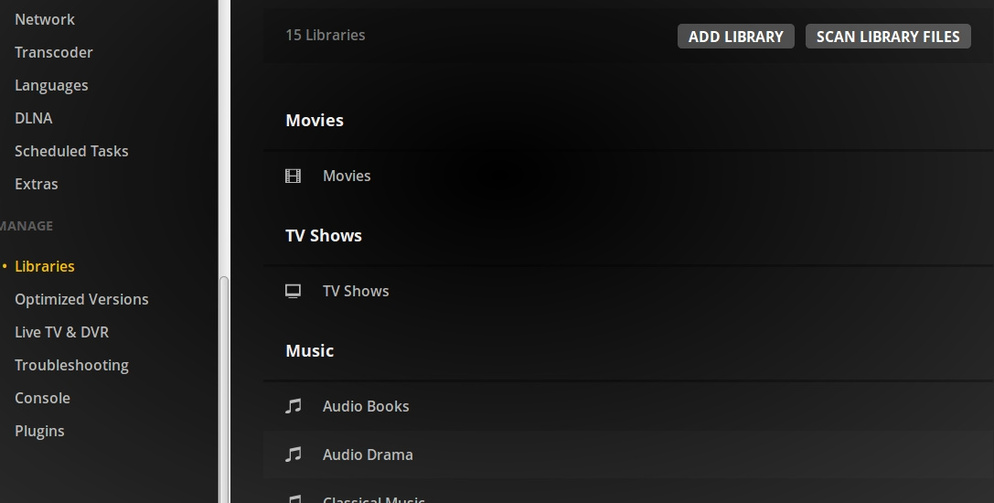
You should not have to go into settings. Click on More on home screen to see all servers/libraries. Hover on server name and to the right of it click on the three dots to open the menu and Scan Library files should be there.

2 Likes
Ah! Learned something new, @bigwheel. Thanks.
So you can’t scan all libraries at once? You have to do each one by itself individually? How is this an improvement? Where are the Clean Bundles and Optimize Database options?
Yes, you can scan all libraries at once. Both my and BigWheel’s responses show you how. There are two ways to do it.
Clean Bundles and Optimize Database are in the Troubleshooting area.
1 Like
they absolutely need to be back on the main page same as the non-uno interface.
3 Likes
Hopefully the fact that they’re burying them means that the problems that make them frequently necessary (‘Plex Dance’ issues) will soon be fixed.
I think we have all been here long enough not to pin any ‘hopes’ on anything plex ‘might’ do.
Plex dance issues are irrelevant.
Trying to make plex web more pretty is fine, making admin chores more difficult is NOT fine.
And yes, hiding previously front page functions behind ‘more’ or settings is more difficult.
understand this, not everyone can or wants to use automatic scans.
making it more difficult to rescan all libraries, is not acceptable.
4 Likes
It’s okay to bury useful functions in the hope they will fix Plex Dance issues…that doesn’t make it acceptable. Ridiculous mindset.
1 Like
Ah ha! Thanks for this thread… I’ve been looking all over for “Optimize Database” and “Clean Bundles”… I’ve got a fairly large, ever-changing library, so I find I end up having to manually run those options every few weeks, they always do the trick when things are getting wonky… Then they just vanished. I’d never even noticed the “Troubleshooting” section before, but now that @beckfield has pointed it out I see that’s exactly what I need.
Please bring back the “Scan all libraries” shortcut to the home page, with the same ease of access as before.
1 Like
Why is there no “Scan All Libraries” option on the homepage anymore? Why do you have to “Empty Trash” individually for each library now instead of all at once? Why do you have to bury the “Clean Bundles” and “Optimize Database” functions in the troubleshooting section of the settings? ALL OF THIS used to be easily accessible on the home page and now it is more difficult to do these things.
Suddenly today my homepage switched to this terrible new design without my permission! How do I revert back to the homepage looking the way it used to? Not this crap UNO version! This is absolutely terrible.
Also I created new libraries before the homepage changed, after the switch to UNO homepage they were not even displaying by default! I had to pin them and then put them in the right order. Never had this problem before with libraries being hidden!
You designers at Plex are really great at taking useful functionality and making it worse and more difficult, great job!
I want it back to the way it used to be! I DID NOT ask for the homepage to change to the new design, it sucks!
1 Like
Troubleshooting tools should not be front and center, because troubleshooting should not be a common task. With recent changes that are reducing the need for these procedures, there are fewer times when you need to use them.
You never had the ability to pin and re-order your libraries before UNO. This is the result of some very popular feature requests.
Plex has certainly made some serious mistakes in the past (like the UI that UNO replaced), but UNO isn’t one of them. The new layout may take some time to get used to, but as far as I’m concerned, it is far more intuitive and useful than its predecessors.
1 Like
no it is no longer on the default home page, but…
- click MORE
- click three dots menu

I’m not certain of this, but I don’t think the “Empty Trash” command is library-specific, even though it is accessible on the individual library menus. If there’s any doubt, follow TeknoJunky’s illustration.
the individual library context menu > empty trash are definitely library specific (only affect that one library).
it is easily confirmed with by having trash in 2 different libraries, and emptying trash using one of the library specific menus.
the server level > empty trash, also definitely empties all trash (although sometimes it seems to get broken until restart).
I don’t even know where to look to see if there’s trash. 
if you see a trashcan over a media item (like it was deleted or not accessible by plex).
a common example may be when you upgrade a video from a lower quality to higher quality, or whatever. IE add new version, remove old version, plex keeps old version until trash is emptied.
Thank you TeknoJunky that is exactly what I was looking for. You are a big help pointing that out, thanks for the screenshot illustrating everything. Problem solved!
1 Like
