That was fixed in the second test release.
Hi, the french titles detected are wrong for some movies, for example “Bad Boys for life” and “Wild Wild West”. It seems to be the french canadian titles and not the French titles. The movie’s description are in english, however my language library is in french.
The french movie “Le meilleur reste à venir” has his name in english instead of his french original name
Have a nice day.
Interesting, I just installed this test release 4 days ago…
I use Plex with my laptop as the server. I’d like to try the new scanner but here’s my setup with questions:
- 32TB total storage
- Pure BluRay rips (across 4 drives)
- Pure 4K rips (on one drive)
- CONVERTED BluRay/4K/Extras (on one drive)
Is there a way to scan the above folders differently from one another? Like this:
Pure BluRay & 4K rips - scanned by Plex/Movie Database for Movie Info
Converted BluRay/4K/Extras - I want these files to display the metadata that I’ve custom-inserted via MKVToolNix, with all my capitalization retained. (For example, what SHOULD appear as:
Contact BLU - 5GB 2passMED(NT)–DD (1)
is re-lettered by Plex as
Contact Blu 5gb 2passmed Nt Dd 1;
This is especially necessary for Disc Extras that should not be matched to the movie itself. Also, I want the CONVERTED versions of the Movie Files dealt with the same way, as I need the Metadata Title, NOT the Database Title.)
My question boils down to, does one’s entire library have to be scanned together in total, using one type of scan, or can you scan different Plex Movie Folders differently from one another, to achieve what I’ve asked above? WITH my capitalization/spacing/etc retained?
EDIT: Ironically, this message board even changed my Profile Name.
What should be:
G:L:E:N:N
was renamed
G_L_E_N_N
got a movie that did not get matched up correctly; it is “The Guardians (2017)”.
Ran into trouble picking the correct match with Fix Match because there are many movies with almost the correct name and similar release year.
Found the correct one after several Fix Match attempts, BUT the year listed in Fix Match seems wrong. Fix Match showed it as a 2018 release. TMDB displays it as a 2017 release:
The Guardians (2017)
With so many listed choices in Fix Match, might it be a good idea to also show movie length too (to help a user to try and pick the correct one) or even better show a thumbnail of the movie poster? this issue (of lots of similar names and nearly same release year) does not happen often, just a pain in the butt when it does.
There are other mismatches but this is the first one i am reporting on.
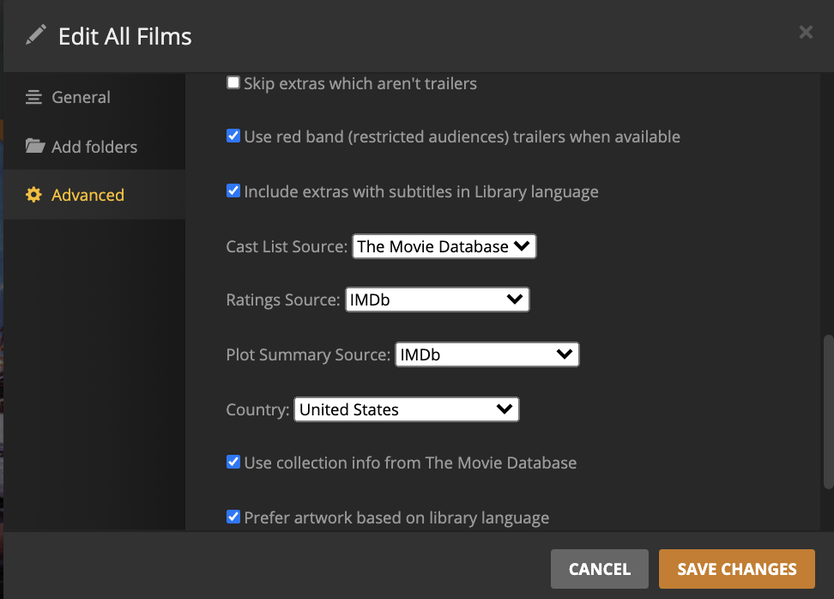
Interesting result but a quick check at IMDb it was found the Original movie Title was “Les gardiennes” US release date 4th May 2018. Some other countries 2017. So depending on which Country you have set in Library advanced settings, may influence a result.
I have found with hard to match Titles using the IMDb reference : tt6213362 should have resolved your Match. ( Found in Web page address)
Then apparently you didnt get what i was saying. I was asking them to group it together to the same genres, just said FOR MY SAKE, english was fine as a start. But remember that i do have localization for a reason 
@drzoidberg33
Was wondering when I was testing and looking at the speed that this new scanner and agent was achieving is great, but that was with no users. using 80%+ of the CPUs makes this process much faster and better but does it throttle itself back when CPU is need for other processes like a user transcoding a movie?
Since this is a test system and I wouldn’t want to mess with one of my regular user systems, I can’t test that out myself.
1 Like
Issue fixed for Parasite (2019). Able to find and download metadata
1 Like
Here’s the result of my tests:
I usually have subtitles in English and Portuguese. The new scanner wasn’t able to recognize the languages:

In most cases, even though I have only two subtitle files, the new scanner exhibits random Unknown subtitles.

Although my library was set up for Portuguese metadata, only the Covers were being set to Portuguese, all the other data were being set to English. This test was made with American, Russian, Chinese and Estonian movies, and english was the default language (not a problem at all)

Other than that, I’m shocked with the speed of this new scanner. I don’t know if that’s because there are few people using it, but this thing is flying.
Thank you very much for adding the thumbnail in the Fix Match window.
3 posts were split to a new topic: Some issues with Plex after new install
got a funny one a mainstream movie. i have it named
“The Hunt for Red October (1990) - UHD.x265.10bit.SDR.TrueHD.5.1 - 76.mkv”
if it sits in a general dir with other movies, it gets matched up with DuckTales the Movie: Treasure of the Lost Lamp 1990. And my attempts to fix the match don’t seem to work.
but if i put the same file within a folder named
The Hunt for Red October (1990)
it matches up fine.
looking again at Fix Match, I have not idea how it comes up with this initial Title to search on.
BTW, i have been comparing against the current matching and the new code is doing a lot better on many fronts.
What is the full path that this file is located in? If I manually test that filename it matches correctly to
[{"parsedTitle":"The Hunt for Red October","parsedYear":1990}]
The Hunt for Red October 1990 (imdb://tt0099810)
these are on a synology NAS that i have mapped to Z drive.
And this is windows
Z:\movie hdr\The Hunt for Red October (1990) - UHD.x265.10bit.SDR.TrueHD.5.1 - 76 - Copy.mkv
this is the one that maps to that ducktales movie; the “- Copy” at the end was just my creating a copy to play with.
and the one that correctly maps
Z:\movie hdr\The Hunt for Red October (1990)\The Hunt for Red October (1990) - UHD.x265.10bit.SDR.TrueHD.5.1 - 76.mkv
Could you tell me what the full path and filename is for these subtitles? A bonus would be if you could run a “Refresh Metadata” on only those items in your screenshots and then send me your log files (Settings → Troubleshooting → Download Logs). Thanks!
These forum preview builds are meant for testing purposes only so I don’t hold it against anyway who doesn’t want to install them. It shouldn’t be much longer until this is available in beta and public builds though - as long as testing here goes well 
Thank you @bob_braveheart I can reproduce the issue (for me it matches to “A Movie (1958)”) and have passed it on to our matcher team.
If you are using the bundled Web App the fix match UI now shows preview posters for other matches. This feature should eventually make it into hosted web app as well.
Remember that this is scanning in an entire movie library from scratch - when that process is complete adding a few new items at a time will hardly be noticeable.
What kind of hardware are you using?
Missed this question. This has two part:
- Have you enabled localized titles in the library’s advanced options:

- We don’t yet have localized summaries, these will always be in English at the moment but will be addressed before we launch this in an official release.
Always check the original post to make sure you have the latest version before reporting new issues - I update these builds sometimes daily when reported issues are resolved.
