I saw the announcement when I opened up the Plex web app today. But where is this setting? How do I control what my shared users see? It would be great if that were possible so I don’t have to schedule video calls with all my novice end users. 
- Go to
Settings>[Server Name]>Manage>Libraries - Hover over the library name(s)
- Click
Manage Recommendations - Here you can configure which hubs from your libraries will show up on shared user’s home screen (if they have pinned that particular library).
Edit:
Here’s an example…
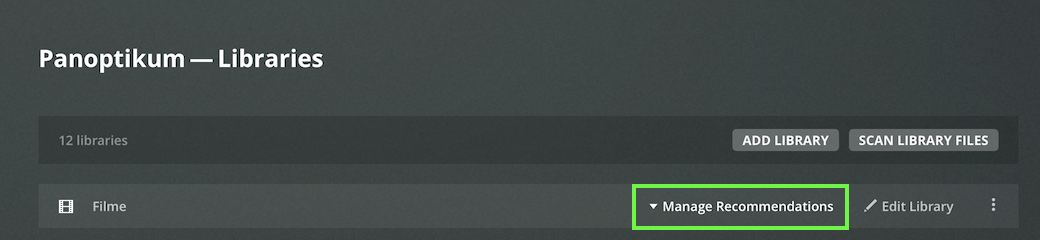

Hmmm, that’s cool, but I don’t get that view. No options when I hover, and the settings only show this. I’m on version 1.22.1.4228.
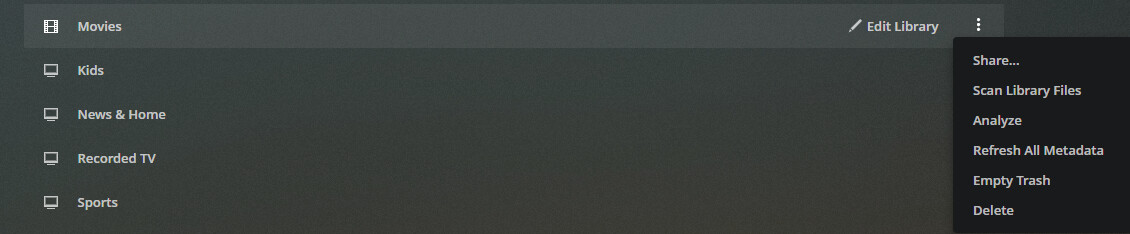
Make sure to use the hosted version of Plex Web (http://app.plex.tv/desktop). This feature requires Plex Web 4.54 or newer. The bundled version (http://[PMS IP address]:32400/web is only on 4.53!
1 Like
Never mind, a stop and restart of the server did the trick.
Btw, is there any way to configure the Pins for the end user? That’s a headache too that would be great to control for them.
No, there’s no option to manage which libraries are being pinned for end users. That’s 100% in their hands
- When you go into one of your libraries from the menu, you have the recommended tab (first tab top). This will influence what appears there and what order.
- When you click on the home menu, what appears there. This will influence what appears there and what order
- If you have shared users, when they click on their home menu, this will influence what appears there and what order
1 Like
-
Library Recommended= theRecommendedtab of your library -
Home= the overall home page of your client(s) -
Shared Users Home= the overall home page of the clients of users with whom you’re sharing that library
You can remove them by unpinning Live TV/DVR, but you then lose it from the main menu.
Any way to keep the pin live tv / dvr but remove those two sections from the home? Or plans to add this later?
1 Like
Agreed. Seems odd that Live TV/DVR is the only “library” that doesn’t have any options to enable/disable hubs. We just got granular control for all the others, why not live TV/DVR too?
Well no control for web shows, podcasts, news either.
This topic was automatically closed 90 days after the last reply. New replies are no longer allowed.
