Server Version#:
Player Version#:
Hi,
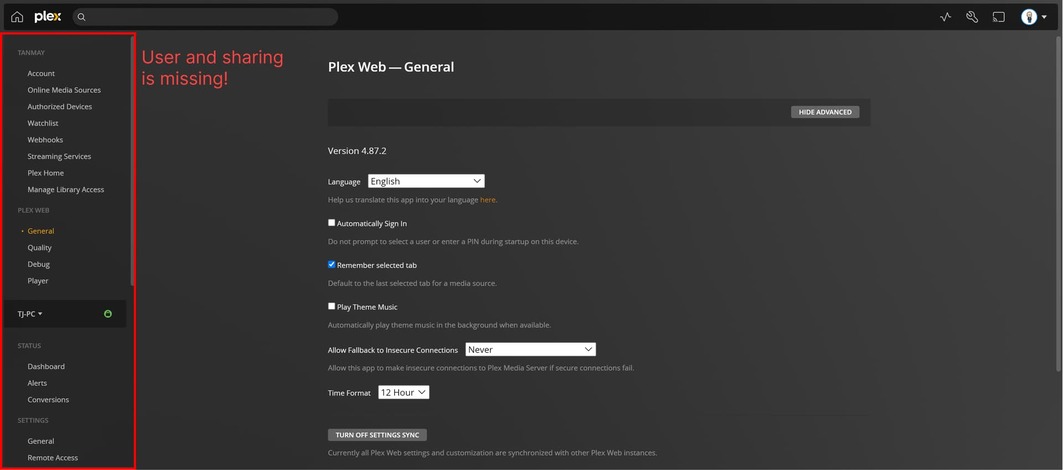
New here and my first post. I am a plex pass user. I am not seeing the User and Sharing tab on the side page in the settings menu in my Plex server. It has the latest version as on 2nd Jan 2023. I am running it on windows 11.
Screenshot attached.
Use the hosted web app.
Take also a look under your user avatar (in the top right corner).
I checked under the user avatar. Its not there either. Why would my server have different option list. That is off, its coming off from Plex directly.
Are you actually using the hosted web app?
What kind of web browser are you using?
Use a standard browser like Chrome or Firefox.
Disable browser add-ins.
Try the “incognito”/“privacy” mode of the browser.
Thank you OttoKerner for helping.
Yes I am using hosted web app.
I am using latest version of Chrome browser.
I tried using incognito with no add ins.
Still i cannot see User and sharing. I think they have updated the layout and now Plex calls it “Manage Library Access” and have dropped User and Sharing from the menu.
All you need can be found under “Plex Home” and “Manage Access”. These two have replaced “Users and Sharing”.
If you need an additional view of all your friends (instead of all users who already have access), click on your user avatar in the top right corner, then again on “Show Profile”.
The list of friends is at the bottom of that page.