Really enjoying the new player. The one issue I have is with collections however. The older collections had background art. This new layout has no background art and just a grey background which feels very bland when I’ve gone to the effort of assigning my collections their own custom background art. Could this layout be looked at again? Or just have the background art added?? Thanks for your efforts guys 
The general playback issues need to be addressed urgently if you ask me, thing is that playing files and fast forwarding and rewinding are the basics of a media player, if you can’t pause, resume and skip (back or forward) then it’s a really bad media player as it lacks even the most basic of functionality. I bring this up because in the current series I’m watching I missed an important bit of text so I tried to rewind…it froze up (maybe this is a latency issue related to the app being run remotely? I do live in Africa after all)…I tried a couple of times to resume play and that worked but I still needed to go back but couldn’t. So I left early access to watch rewind a bit in the current release version player and that worked fine.
Also regarding current release channel version and subtitles: IF you’re playing something and you skip or pause or do whatever to bring up the timeline then it doesn’t cover the subtitles, the show will play on and still put the subtitles on screen above the timeline/playback functions. Would be nice if this can be kept in mind for the new version too.
Hello, everyone.
My model of TV is UN50NU7090.
Today I tried for the first time the new Preview of the new App of Plex (5.0.11), and I saw a big bug.
When I navigate in the app, I noticed like pixels everywhere (similar when a Nintendo game fail).
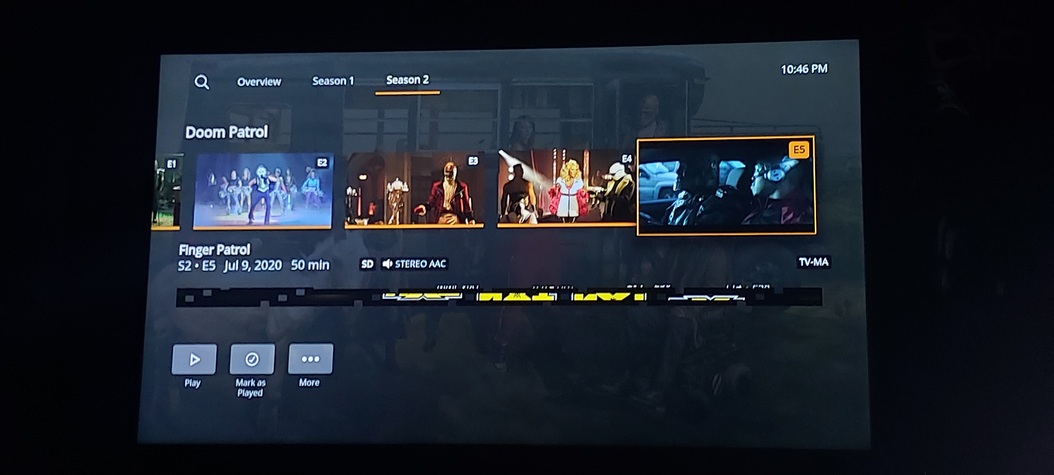
This pixels also appear in the subtitles all the time, so I can’t play with subtitles with the new version.

My native language isn’t English (is Spanish) so I always watch with subtitles, because my english is not very well.
Other thing, I can’t switch the Audio/Subtitles Language outside of the video, either the version of the Movie (if I have 2 version, for example, Theatrical And Extended), about that, I have a suggestion: if you can put a name of the version in the interfase wil be great.
For the rest, it’s great, the Skip Intro, The new view of Collections, excellent, only if you can return the wallpaper behind the Collections will be cool.
If you can put a button for queued, please, I need it, 
Thanks for everything.
On the newest version and using a Samsung un50nu6900. I have the same pixelization on subtitles and in the live TV guide as the above poster. Seems to be anywhere words are present.
Oh, I forget something more: The Collection poster in “Other Videos” section is Horizontal, not Vertical.
OK here in Other Videos, is complicated. Normally, the random videos haven’t posters, so, for me, I think that in this section, Horizontal thumbnails is better than Vertical (in all views: Library, Recommended and Collection). But, other persons maybe think different and say that Vertical is better. So, I think that you can put a option that you can choice the direction of thumbnails (horizontal or vertical).
Other thing, the “Remember Last User” option, not working.
Thanks again.
Please where I can set default language for subtitles search? It’s still searching English only. I can’t switch it at all. And please can you add button to go directly to subtitles as it was in current public version? To go to settings, Streams, subtitles, … is too long way to go … uncomfortable at all 
It’s perfectly possible this is an issue my end, but on my 55mu7000, where it normally would indicate HDR under picture mode, it never has on any version of the Plex app. So I figured I’d test it by selecting an HDR movie that is on Plex as well as Netflix. I chose 6 Underground.
The difference is stark. On Netflix, my TV registers HDR and the colors are vibrant. On the Plex version, it’s sharp, but by comparison, the colors are washed out.
On the laptop, even in the Plex browser, the description mentions HVEC Main 10 HDR in the exact same place the app describes the content as UHD 4K.
So is this not playing in HDR on the Samsung App?
5.0.12 Released
NEW:
- Added subtitle offset editing for external text subtitles.
- Use subtitle text outline instead of shadow for better readability.
- Show remaining time instead of duration in player.
- Update subtitle font for better readability.
- Added user profile creation and editing.
- Added subtitle and audio selection to more menu.
- Increased sidebar item height and made minor color changes.
FIXED:
-
Fixed an issue where the buffering indicator sometimes won’t show when seeking.
-
Fix Live TV not tuning movie channels.
-
Force transcode for Live TV playback.
-
Fixed cut off timed lyrics button.
-
Fixed seeking if PMS prunes live TV capture buffer.
-
Fixed an error that can occur when the live tv grid is loaded.
-
Fixed busy spinner position on sidebar items.
-
Fixed stuttering playing high bitrate content, this is done by preferring insecure connections
- By default insecure connections are preferred for connections to local servers, secure connections will be used if the server requires secure connections or the Prefer Insecure Connections setting is changed to Never.
- You can set the app to prefer insecure connections for all connections if you’re experiencing stuttering from remote servers.
- You can verify the connection type in Media Server Status available in the user menu.
1 Like
I’ve just updated to 5.0.12, and it looks like “Disable Early Access” has disappeared from the user menu (if I remember rightly it used to be next to “Media Server Status”). Is there a way to get it back?
1 Like
This looks a lot better/tidier in my opinion than 5.0.11 did. However:
- I detest the new plex logo at the top - as it truncates my username and seems to serve no functional purpose
- I did like the scroll effect of the menu items in current release (4.x) version
- I still don’t see the point of two menu items for settings, one through my user and the second direct - I would prefer one or the other, or at least allow the user to remove one
- I absolutely hate seeing my server name in the highlighted menu items - I personally would like to see this removed when only menu items from one system are present.
As such I would rather have the full Plex logo at the top, and the “Settings” option at the bottom take me to the user page. Like with the server name, I don’t need to know my user name 
The playback of live channels certainly seems more reliable now…
Some channels that weren’t playing previous when selected (Paramount, Sony Movie Channel), are now working for me, and TBN UK is now at the correct aspect ratio.
However, certain channels are still not playing when selected - ITV +1 (Freeview Channel 033) and Five +1 (Channel 044) for example. As with previous releases selecting the channel/programme does nothing, no error or visual no feedback, just s click sound and then nothing.
I also managed to get the Playback error whilst tuning to another channel whilst one was already buffering - sorry I’m being a typical software engineer and breaking things!
I turned the TV off but that didn’t help and now it seems the server is in a bit of a pickle, as can be seen from the following Plex for Windows snippet:

I will try and get log files over
To follow up my earlier post, I tested another movie that should definitely be HDR as it comes up as such on the phone app PLEX search filter: Early Man.
As an animated film, it seemed perfect as a tester. The Blu-Ray displays vibrant color. On Plex, despite stating HEVC MAIN 10 HDR in the settings of this latest preview version of the app, there’s no way this is HDR. The colors are muted to the point of washed out.
So, whilst it’s great that this post exists to fix issues, the HDR issue has been raised several times above and yet, there still seems to be a problem.
Now it’s entirely possible these Plex HDR are just highly compressed or low res, but the Plex version of Early Man is SO washed out, it’s borderline monochrome compared to Blu-Ray HDR.
So, again I ask, is Samsung Tizen App displaying HDR content?
Updated to 5.0.12
Same pixels problem, everywhere, so I can’t use new version. Please, fix that problem for my TV model (UN50NU7090).
As a Samsung 65KS9500 owner, thank you for these series of updates. So far so good; I only wish for a quick fix for the option to be able to manually search subtitles other than English; local language is a must for my wife in my case I just don’t want to find and upload Turkish subtitles for each movie I add to my library; too much time and effort. Thx.
I encountered the same exact problem with the subtitle language selection: I cannot change the search language from English to any other language when searching for online subs.
Model: UN58NU7100
Firmware: T-KTM2LAKUC-1292.1
1 Like
Thank you! Live TV is working for me now.
Yup! Fixed live tv for me too. Thanks.
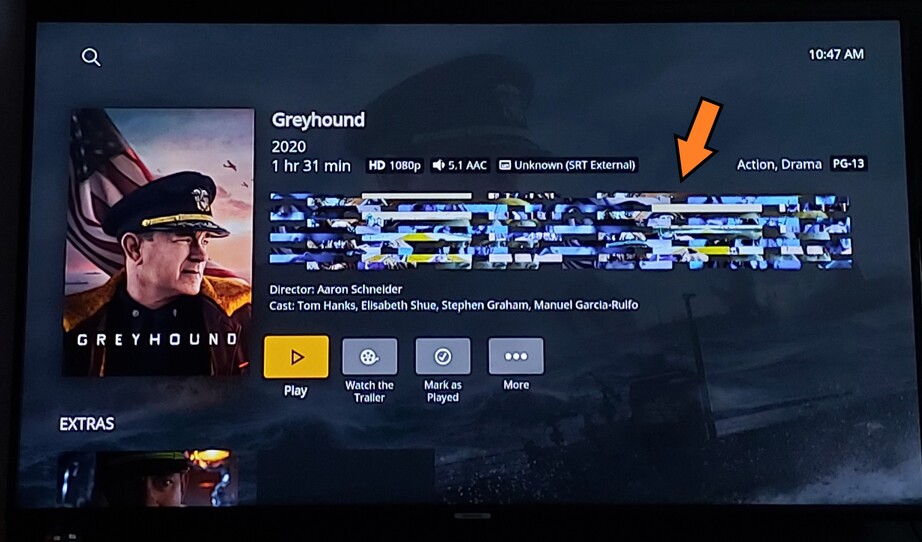
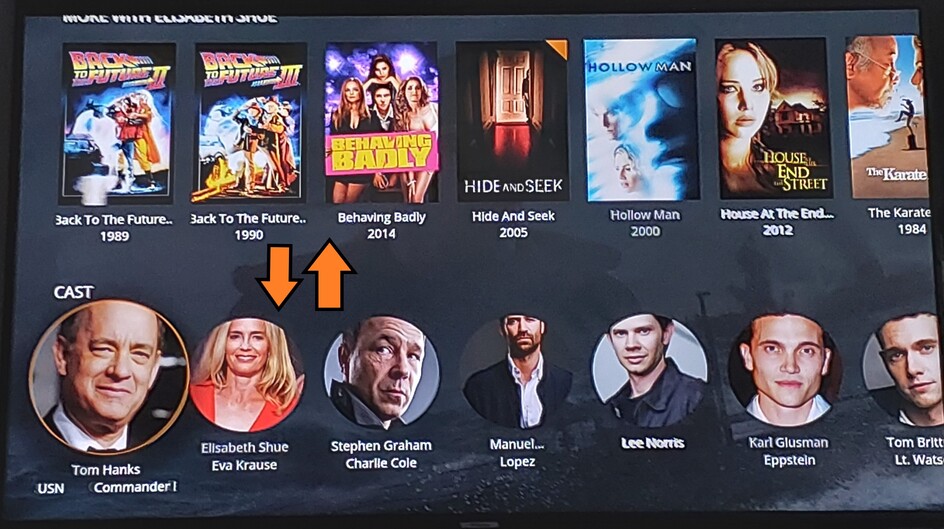
Pixels Everywhere, and yes, I reinstalled Plex many times, restart the TV, check the resolution, and nothing, the pixels are there.


1 Like
What was the main reason for forcing a transcode on Live TV? The first few releases of the Preview before the issue of channels not starting, were Direct Playing Live TV fine.
Unwatched TV Shows filter is dodgy. The preview app shows 32 shows and standard app shows 5 which is correct. Movies unwatched filter is working fine.
