New Samsung Tizen App Preview

Subtitles need an option for more substantial shadows; it can be difficult to make out the words against certain backgrounds.
Subtitles also seem to have issues displaying text with overlapping timestamps; instead of displaying different lines of text to their designated positions, it only displays a single line, in the spot chosen in Plex settings. Setting “Burn subtitles” to “always” can alleviate this, but is not optimal.

The screensaver function needs more options; using generated thumbnails from videos in an “Other Videos” library really ruins the effect.

1 Like

Yup this is why I’ve tried changing the colour and size but alas this doesn’t work either, it’s why I switched back to the old release version but ok I switched back to early access because I figure if there’s ever a time to give your input and get things fixed then it’s easier and best to do it now before it becomes a bug in the release version and will take more time to fix.

Here’s a bug I was able to reproduce a few times…selected S01E37 from my dock but as you can see it says E37 yet it’s actually gone to E1 for some reason. I went out and in a few times and even closed and restarted the app but it kept doing the same thing. I played it coz I was curious to see what would happen and it played E01, go figure.

Sidenote: I love the new sidebar, smaller text looks neater somehow, I’m all about effeciency and I love the work the devs have put into it so far, looking great. I still think that the dock shouldn’t just show the ‘unplayed’ tick…I mean it’s in your dock so obviously it’s unplayed, I’d prefer it shows the number of unplayed episodes for that show…and also in playback the current release version shows end time and how much play time is left for what you’re watching, this new version doesn’t do that.

v5.0.11
With the previous version, when getting to episode credit, I could hit RETURN on my Samsung remote, and auto-play would then show the next episode queued up and counting down to play. I could hit ENTER or PLAY to start it.

With the new version, I cannot figure out how to get auto-play to work except by letting the entire episode play out or annoyingly by fast-forwarding to the end of the episode.

I prefer the previous behavior for autoplay of TV Shows.

Hi Plex team

tizen-preview

Model: QN75Q80RAFXZA

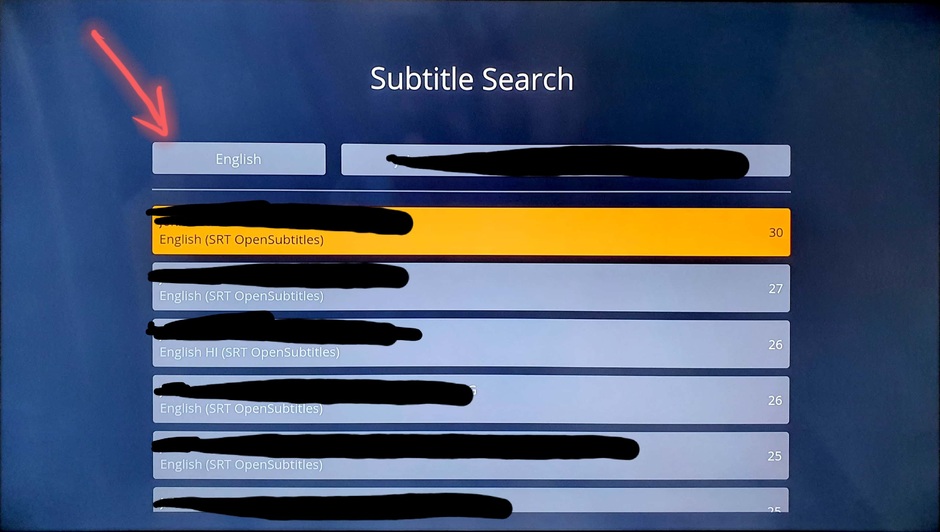
In new version under Subtitles Search option it doesn’t allow you to change language. Please check attached image.

Hi, I have been trying the App Preview with a UE43TU8505.

All the SRT subtitles have problems for me (in direct play and direct stream). Every other subtitle does not appear or shows up and disappears immediately. I’m on verstion 5.0.11 and when reverting to the old app everything works as it should

2 Likes

Yeah subtitles need some work…as does general playback. If you just play then it’s fine but if you stop and restart it has issues or I’ve seen issues with skip functionality too.

The other problem I mentioned is still happening whereby I select the next episode in the dock but it goes to S01E01, is there something you’d like me to try to troubleshoot? Curiously enough it seems to be only doing this with that one show because I tested with 2 others and the dock selection works fine.

v5.0.11
If you auto-play into a next season, it’s jarring that when you press RETURN on the remote, you’re back in the previous season.

Maybe after an update the player still crashing and start to lagging on a QE55Q60R with a 4K content direct play.
In the previous versions it was fine. Now it is totally unplayable.

First my preface: I have really slow internet, which is why I use plex on my home network.

I can’t barely get the app past the PLEX loading screen. Is it trying to hit the servers and waiting on responses? It shows me a Plex is taking a long time to start screen. If I ignore that for like 5 minutes, it eventually shows me offline and starts loading, but goes to Something went wrong error loading home screen and gives me a Currently Unavailable if I try to connect to my server. If I start up my phone tether it will load much faster and gets to the home screen, but I obviously can’t see my server from there (different network). Went in and set Manual Servers, doesn’t seem to do anything. Just my normal server is visible and I still can’t connect (Currently Unavailable).

Tried to toggle Allow Insecure Connections as well, just in case… no change, still can’t find server.

If I load with my phone, then switch internet to my local network, it can’t find the server (Currently Unavailable). Everything works fine with the non preview app and works fine on all other devices.

Was really looking forward to tv guide, it’s the last thing holding me up from disconnecting all my TV cables from our TV’s.

Version: 5.0.11
Tizen 3.0
Internet = satellite crap, very long pings (sometimes in the 5 second range) with bandwidth that barely competes with dial up.

Sounds like you have a DNS rebinding issue so that local devices are having trouble seeing each other.

Is the behavior different with the old app?

The old app works without issue. I can launch and find my server no problems. Just the preview app isn’t working.

Edit: Also, to reiterate, it’s working on all my other devices right now, while not working on the Samsung TV so I find it pretty unlikely to be a LAN issue. For sanity check, I just pinged my TV without issue. I clicked reset settings when it came to it load slow. Now it comes up with Visit https://plex.tv/link etc, but has no code on the TV. If I leave it up for a few, it comes with An unknonwn error has occurred. Please try again. (this is due to my crap internet, I connected to my phone and it gives me the code).

Edit: Last update. Just reverted back to non preview, start right up with everything working.

Using Samsung Q90R. Client 5.0. Application runs smooth and everything works well, my only feedback is the subtitles are now forced and converted to one format. They’re also forced to be oriented in one direction, meaning films with songs that may have a translation attached to it will overwrite the dialogue sound track. This wasn’t an issue with the old app, where the subtitle file was not edited in any way.

Here is a link to my example of an anime with a song, with the song subtitles translation on the top left, but the dialogue translation on the bottom. This is in fine in the old version of Plex for Tizen and this is how it appears in Plex for Desktop. In the early access, the top left subtitles for the song are forced to the bottom and overwrite the dialogue subtitles.

All else is good. Feel free to reach out to me for more feedback or screenshots if something is unclear!

@chewmull

Selecting Unplayed still gives you everything including Played…

I’ve filed an issue for this. Someone or myself will take a look as soon as we get a chance. Might’ve missed something in the last fix we made.

@jwaltrip4

What happens is it plays pre-roll and starts from beginnig. Was issue in .10… still an issue

We’ll take a look again. I think we fixed this for trailers and missed custom prerolls.

@montypython @captain_caveman2k @Micha_Bessems @redairforce We’re investigating the live tv playback issues.

@emb531

Is there any way to reorder the home screen items?

Not at this time.

@3pwood Were you able to change size and color for tx3g subs in the older version? As far as I’m aware, only size is taken into consideration for burned-in and image subs.

@elasticmaster We have an internal issue filed to track the collection issues you’ve mentioned.

@Micha_Bessems We’ve confirmed an issue in the delete functionality across all our platforms. Should have a fix soon.

@TrevWill Have you tried adjusting your Insecure Connection settings? It might be affecting playback. The default setting on the current app and the preview don’t match (we’ll have a fix for that soon) but try adjusting that to see if it helps.

@fede777 @bunksteak We have some subtitle changes that will address legibility and overlapping timestamps.

@3pwood

selected S01E37 from my dock but as you can see it says E37 yet it’s actually gone to E1 for some reason.

Confirmed, we have an issue tracking this.

@natkin

If you auto-play into a next season, it’s jarring that when you press RETURN on the remote, you’re back in the previous season.

Thanks, filed an internal issue for this.

@daevyd44

Maybe after an update the player still crashing and start to lagging on a QE55Q60R with a 4K content direct play.

Can I get some logs? I haven’t changed anything with the profile since 5.0.10 so it shouldn’t have affected playback, unless you mean the 4.x versions when you said “previous versions”?

@ready4droid_gmail.com We currently load the app remotely for the early access preview, because that allows us to deploy fixes quickly without going through the whole Samsung release process (which is incredibly backed up right now). Unfortunately, the app will take some time to load if you’re on a slow connection. We have some plans to address this in the future but for now, you might need to stick with the non-preview version unfortunately.

Cool - sorry I’ve not had chance to give you log files yet, work is kind of busy (50 hours last week, and 31 so far this week!). Do you still need these?

No wonder I don’t have time for other things like curl !!

Logs would be great. Just make sure Log to Server is enabled in your settings

v5.0.11
Near the end of an episode, strangely if you hit fast forward, you actually rewind a bit.

You sir would be incorrect. lol, check out this video New Plex, made it just for you. You’ll see old compared to new and you’ll even observe a playback problem when trying to resume, as mentioned before I’ve had issues using skip functionality too, sometimes just hangs, one time got something like ‘unexpected playback error’ or something to that effect. Note that my server sits less than 2m away from my TV/player so this is all local network. Also note the options differences between old and new version regarding colour options available.

This brings up a nagging question that has been on my mind though: why is this version being built completely from the ground up? I’ve been a Plex user since around 2013 or so so don’t get me wrong, I love development of software as the new server and player packages are way better from what we had back then so the work you guys do is amazing and that is what drove me to become a Plex Pass member in the first place…but while there have been loads of improvements over the year other times I look at changes and roll my eyes because it feels like the devs are just changing things for the sake of changing things so I don’t feel that it enhances my experience in any way. (just my opinion and how I feel maybe?)

For me here are the reasons to change things:

  • feature improvements/enhancements
  • performance improvements
  • bug fixes
  • security fixes

So the new beta version feels more responsive yes…but is it maybe because of missing features and bugs? I don’t know. I noticed more issues with music playback, 1 is that I can’t find where/how to get the lyrics on screen and 2nd more important problem is that I can’t find a simple way to skip tracks…used to be that I press the ffw/rewind buttons on my remote to move from track to track but now it just skips within the current audio track being played.

Anyway let me know if there’s anything else you want or need? If you like my video let me know, if you have any criticisms or advice on how to make it more helpful to you let me know, the version in the link is compressed, original clocks in at just under 600MB but I still have it if you need it for whatever reason. Like I eluded to before I’m committed to trying to get these annoying bugs ironed out before it gets released as I’d imagine development might slow down once the team has moved onto something else.

About the subtitles, I noticed 4 things.

The Yellow ones at least looks a bit bland, like they are lighter.
There’s shadow, but not outline which makes them harder to read, specially against light scenes.
Even in the same size, Normal, the new ones look bigger
It’s not the same font

If you can fix that and the Playback UI which is just too big and missing a lot of functionality I’ll be happy

Well who the hell fast forwards at the end of episodes to test this anyway! Lol
