I upgraded the Synology NAS device today to Version 7.01 and I can’t install Plex and can’t find any package to try it.
HELP!!!
I upgraded the Synology NAS device today to Version 7.01 and I can’t install Plex and can’t find any package to try it.
HELP!!!
Control Panel - Info Center
– Will tell you which CPU is used
You will find it’s a
– Synology DS1618+ x64 (Atom C3538) 2.1 GHz
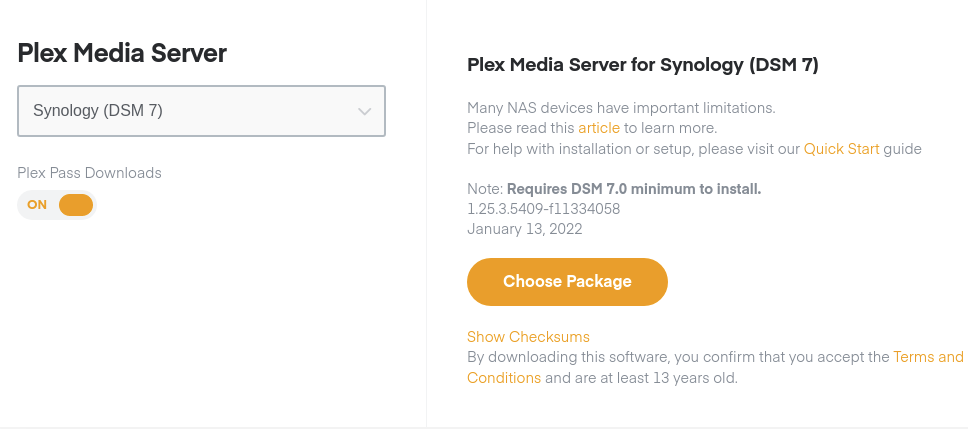
Media Server Downloads | Plex Media Server for Windows, Mac, Linux, FreeBSD and More will present you available platforms.
– Choose `Synology (DSM 7)
Next click “Choose Package”
– You want the Intel 64 bit package
That is the one I downloaded and this is what downloaded…


It says DSM6 and as I said I just upgrade the OS to 7.01-42218
However, I was able to find the DSM7 intel Plex update and applied it, but before it would allow me to use it, it said that my NAS needed to do a data scrub, so that is what it is doing right now. BUT it is going to take a LONG time.
When it is done, I will try the install again.
Did you power off the NAS instead of doing a shutdown?
You can still install and do everything on a Synology while it’s doing a volume scrub. Scrub is a background task. File system repair should have been done before it allowed you to sign in.
I haven’t done a shutdown manually, but during the install of the NEW DSM7 on the Synology, it did a reboot.
after that, I just found the Plex update app and tried to install it, and that is when it stopped and said that it have to do a data scrub, so started that up.
now while it is running the system is really slow and it seems that I can’t do anything else.
Ah, I see my mistake on the download. I grabbed the first Synology not the Synology (DSM 7). I will get the most current now.
Installing DSM 7 will make the Syno reboot; that’s part of the upgrade process for the OS. It installs DSM 7 then restarts so it can use it.
If you’re finding the NAS slow, that’s not right but might be because of something else. It will recover on its own.
Do you have a Plex shared folder with Library/Application Support/Plex Media Server ?
Yes I do. That folder is there. That brings up another question. When I ran the update on Plex, it first off asked to a shared folder with the example /volmue1/MyShare. Do I take it that I would change that to where the Plex is installed? When I place my mouse over that folder it gives me this…
Plex @volume2, Available: 5.17 TB, Total: 7.68TB
But there is no “MyShare” folder there.
It sounds like you initially got the app from Package Center? (version 1.21.0.3744 BETA)
Sound about right?
If that’s true, I can give you the instructions to upgrade your DSM 6-based installation to DSM 7 .
We need to do the upgrade because DSM 7 changed everything about how apps work.
When the upgrade is complete, you’ll only see a few minor differences in how you administer the permissions.
I am going to wait until the data scrub is done and proceed with the Plex update. It is taking a long time. IT is only 18.26% done that started at 9:21 Central time this morning.
That’s moving along at a pretty good pace. When I do a data scrub, it takes 2 days 
Yeah, I kind a figured that anyway, so a weekend is a good time to do it.
Can’t I ask you just a non-related question?
Do you think that at some point Plex might add the ability to zoom in an image? I am building images from photographs, negatives, slides, movies of my family and my wife’s family and so far have accumulated about ¼ million or more. Some times, my family that I have allowed to few them has asked me about that since we all are getting older and zooming in on an image helps them (and me).
Without the pandemic these past few years, I would have never gotten this going or at least not this far.
I thought that I had it installed, but it is not allowing me to view ANY of my images or watch ANY movie
What the heck has happened? HELP!!!
Every single folder I go into and click to watch the images pop up this message “Unable to load photo”
This just happened after I updated the Synology NAS devices DSM OS and had to install an upgraded PLEX App onto the Drive.
This topic was automatically closed 90 days after the last reply. New replies are no longer allowed.