I have seen some discussions on the web but wasnt able to answer my question.
All my video files are typically 1080p or 720p. All my friends that share them are watching them in transcoded sd(h264). I have tried changing my settings and going in on their remotes and changing theirs to no avail. I am hoping someone can help me so that they can get the proper quality or explain why i cannot.
First off my system is Intel Core i7-4770 cpu @ 3.40ghz, 3401 Mhz, 4 cores. 32 GB Physical memory. My download / upload speed (incl with my VPN) is 59.61 / 80.52 My videos are stored on two external hard drives attached to my pc.
I do not have the automatically adjust quality (beta) selected. My video quality is Maximum (i used to have it lower), i have play smaller videos at original quality selected.
My friends are on new hi def Roku tvs. I stream and watch fine at home no problem for myself.
Can someone help pls?
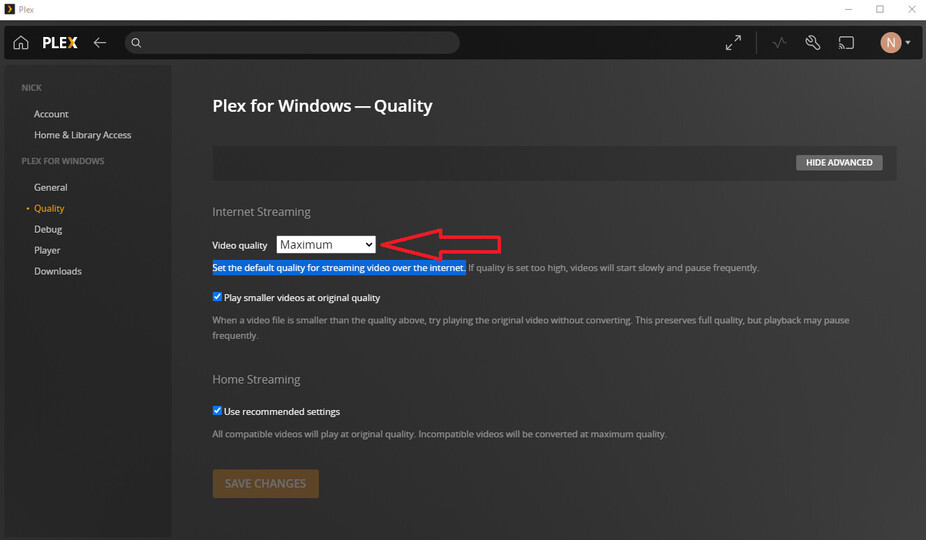
Most client apps SELF RESTRICT the remote (connecting from outside the house) bitrate to 2 Mbps. It is a client setting that your friends are going to have to change on their end in order to choose higher bitrates.
Set the following (as I did) to Maximum:
Once they do this, their player ought to attempt to get the video at original quality.
But what your showing is how it appears on a pc correct? They are watching on TVs, what they see is the following (this is from my tv):
How do they fix it from their tv remote?
I myself already have it at maximum.
original=maximum
they would need to set it on their TV’s
during playback on their TV open of the playback info from the on screen controller and it should say why it is transcoding.
The VPN is on my PC and is running (because i am typically downloading, while people share my files via plex). My media is on external hard drives.
I have had a problem with the remote access in the past, no one could access my server. My nephew went into my system and manually set it up and it has since worked and i can share albeit at sd H264.
This is how it is listed (see pic)
I appreciate the help, im trying to get this figured out.
As a test, drop the VPN. Disable remote access. Re-enable remote access.
The default settings for VPNs will not work with Plex remote access. The VPN tunnel interferes with port forwarding.
Your friends are most likely connecting via Plex Relay (aforementioned indirect connection), which is limited to 1 Mbps - i.e. 480p/SD.
I got my brother to sign on, first thing i did was make sure through his remote his video and remote were on “original”.
He started watching something. I disconnected my vpn. Disabled and re-enabled my remote access. It did nothing to change the quality of what he was watching. Also after he was off a short while later my remote went red on its own and i had to re-enable it again. The Pic shows what it came up while he was watching…
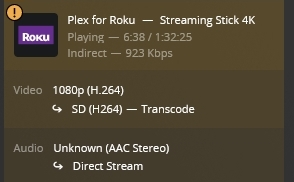
Ah, the friend is connected using the relay. Note the use of the word “Indirect” up there, plus the (!) mark on the player. This means that the normal method for connecting a server and a remote client (such as your friend) failed, so Plex fell back to relaying remote traffic through their own services. This is a last resort option for connecting the two locations. Since the traffic goes through their own servers (securely, no need to worry about them snooping on your video), they need to throttle the traffic to prevent overloading of their network connection. Basic users are restricted to 1 Mbps, and Plex Pass users get 2 Mbps.
Plex article on Relay.
I see you manually specified port 32400. This is the default port, and unless you plan to change the port to something else you should uncheck that option. Adding a VPN to the mix is going to cause all kinds of potential issues. Maybe check out the Troubleshooting Remote Access article for ways to get remote access working.
Perhaps download using something like delugevpn which runs in a Docker container and contains its own VPN configuration/tunnel. So that the download client is protected by the VPN but the PMS is free to serve others unencumbered.
Yeah but even when i dont run the VPN the result is the same. I dont think the VPN is the issue. The remote access doesnt stay on it goes red after awhile. I dont understand what to do…
Check the port forwarding statement in your Internet router. It should point to the IP address of your Plex server.