Server Version#: 4.62.1
Player Version#:
Tuner Make/Model:
Guide/Lineup name:
Using XMLTV?:
Channel number/Name: Multiple channels
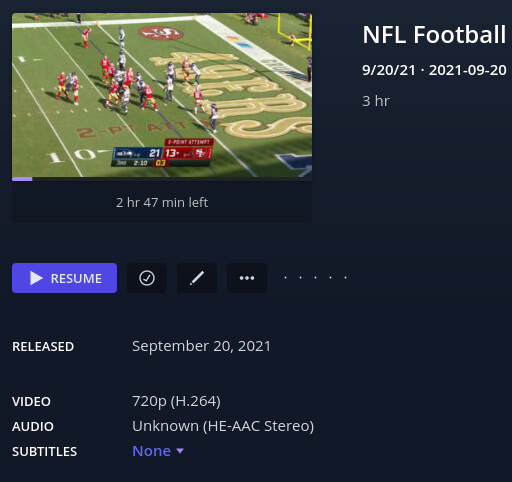
It recorded four game and clicking any of them takes you to the first recorded game even though all the file data is correct for each entry.
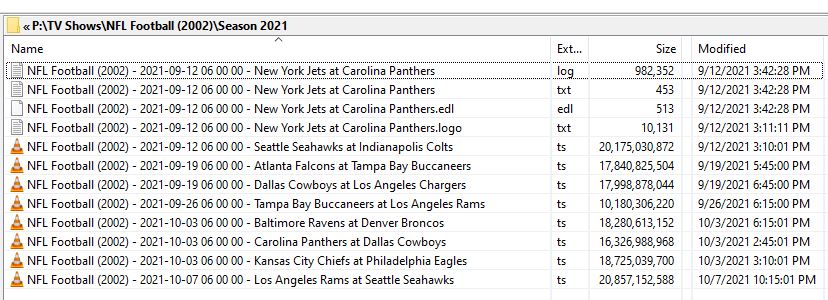
I’ve got three separate games that all go to “LA Rams vs Colts” even though I’ve checked the files and they are correct and the actual recordings were made. It’s just when I click the link it goes to a different file.
Here’s an example of the filenames it’s assigning.
NFL Football (2002) - 2021-09-19 07 00 00 - Kansas City Chiefs at Baltimore Ravens.mkv
Change the last part to whoever the game is between.
I thought this didn’t happen last weekend but looked closer and it did. So it’s two weeks in a row it’s done this. Had it happen during the olympics too but thought it was just related to that broadcast. Seems to be related to multiple broadcasts of the same series at the same time on the same day. Everything get’s recorded correctly and entered into the database, it just constantly plays the wrong one.
Yeah it’s not seeing the full filenames. I did an analyze and here’s how it lists the files in the alert (had to update this. I grabbed the wrong log entries first time):
8:11AM Finished processing NFL Football 2021-09-12
8:11AM Finished processing NFL Football 2021-09-12
8:11AM Finished processing NFL Football 2021-09-12
8:11AM Finished processing NFL Football 2021-09-12
8:11AM Finished processing NFL Football 2021-09-12
8:11AM Finished processing NFL Football 2021-09-12
And the link to the “NFL Football 2021-09-12” file always goes here
http://[IP_ADDRESS]/web/index.html#!/server/9428b367125bfba299eb19ffa2c1fac2ebd81fe9/details?key=%2Flibrary%2Fmetadata%2F32866
Wanted to clarify that the database is recording the filename correctly. When you do a “Get Info” on an entry it shows the full correct filename at the top. It’s only when it does anything with the file it’s apparently not seeing anything past the date.
More research. This is only happening through my web browser (Firefox). That’s why I never noticed it with sports games. Usually I’m watching them on my NVidia shield downstairs. It sees all these files correctly.