One other thought. Take the Plex client out of the equation.
Enable the DLNA server in Plex Media Server.
Use VLC on the Shield to play the video.
My receiver shows Atmos when playing the Chameleon video using VLC.
Note 1: Check the audio passthrough setting in VLC. If disabled, it will send PCM to the receiver, which will display Multi-Ch In. The setting can be changed in VLC settings or during playback.
Note 2: If you’ve an LG TV, do not leave the DLNA server enabled in PMS. There’s a longstanding, weird memory leak bug. If DLNA is enabled and an LG TV is on the network, the PMS process slowly consumes memory. This happens with PMS on Linux & Linux based boxes such as Synology, QNAP, etc. Not sure about Windows.
Tired VLC as suggested and ensured audio passthrough was selected. Same results, it won’t say Atmos at all.
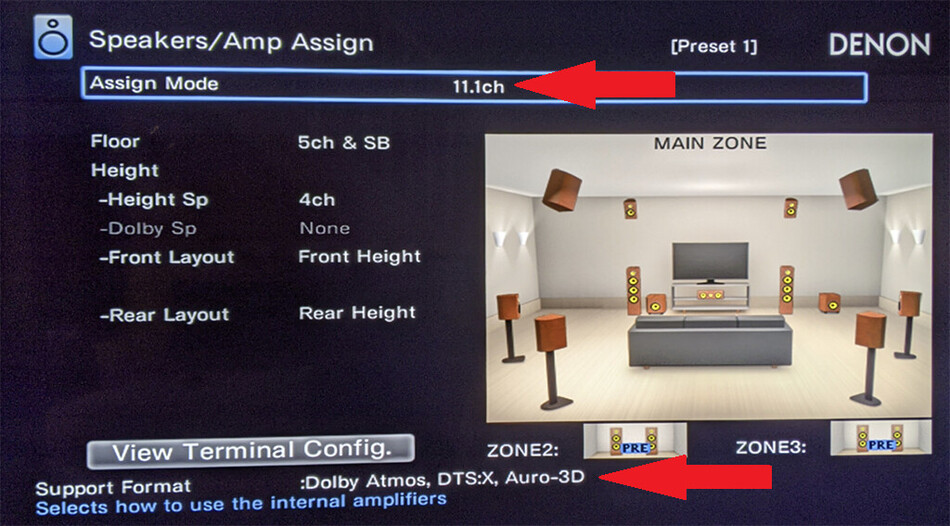
I have my speakers setup to 7.1(bi-amped) and the set it to Dolby Front speakers. it says it supports Atmos in that configuration.
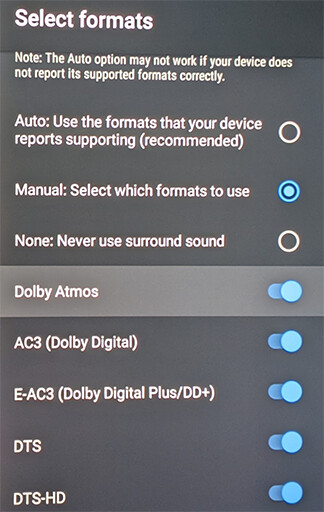
I went into Shield settings and set to manual, ensured atmos was on then changed back to auto. Rebooted just to be sure, still same results. I just can’t get Atmos to work with my Shield.
No LG TV in the house, only a Samsung and TLC Roku tv.
I also tried to switch the in put to what the Xbox uses and still getting the same results.
Only thing I can think of is the Denon speaker assignments.
You might need a pair of speakers assigned as ceiling, Dolby enabled, etc. before Denon will try to decode Atmos info.
Maybe re-assign two of your speakers as height / ceiling speakers and see if that changes things. You may not need to re-wire things, just change the assignments in the Denon. You can leave the volume at zero if needed to avoid sending the wrong audio to the wrong speaker (i.e. don’t send bass to a tweeter). You just need to see Atmos on the receiver display (or on-screen display on TV) to show the receiver is picking up the Atmos info.
And these are the Audio settings I use on the Shield…
I have never tried setting the Audio formats to Auto, because in my mind, I want to ensure that I am forcing the device to use the formats that I know the AVR supports.
I am running 7.1 Bi-amp which shows atmos is a format that is available.
I did figure it out. In the audyssey settings it listed the front height speakers but I noticed when I hit info that it was still showing 5.1 as active speakers, not 7.1. So I went into manual settings and they were not enable there as well. Turned them on, and good to go on manual.
When I used the audyssey setup where it tests for each speaker using the mic for some reason the first time I did it didn’t enable them, though audio was coming out of them during movies it just didn’t list them in the setup. I was looking at some old pictures and notices it said 5.1 for active speakers still.
So I factory reset the Denon, went through everything again, Atmos is working with my front height speakers.
Thanks for the help everyone! Happy to see Atmos working on the Nvidia now.
Good to hear you got Atmos working. I bought my X6700H in December, and it took well over a month of constant tweaking to actually get it right, but once it’s there, DAMN does it sound good !!
Coming from Onkyo amps, I LOVE the Denon. My Onkyo was buggy as ■■■■ but did get very loud but always seemed very flat. The Denon gets as loud, if not louder, and has so much more depth to it. I’ll never go back to Onkyo again.
Again, thanks for the help. I’ve been banging my head on a wall with that one for months.