Server Version#: 1.18.5.2309-f5213a238-armv7hf_neon.
Player Version#: 1.6.2.994-e05b79d6
I´m running der Server on a Synology Diskstation and the player on Windows 10.
My AV-Receiver is an Denon AVRX7200W with Dolby Atmos.
If I play a Movie with Atmos Sound with VLC the AC-Receiver shows “Atmos” and the sound is perfect.
If I play the same Movie with the Plex Windows Player it shows Dolby 7.1 but no Atmos.
If I play an Atmos Demo file with plex there is no sound from the ceiling-speakers.
I bought and activated Dolby Atmos for Headphones.
I don´t see any Sound-Settings an the Windows Plex Player.
There are none. Plex for Windows does not support audio passthrough.
Use Plex Media Player, PMP, instead. It is targeted towards home theater users. Download from the announcement thread.
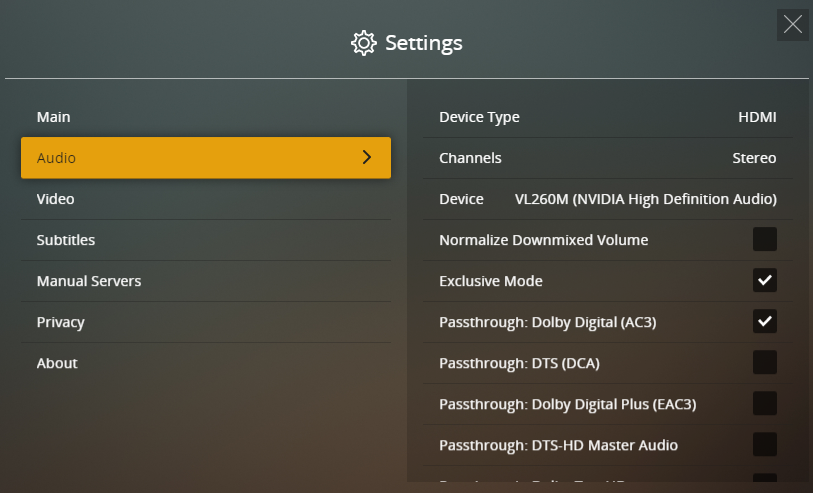
To configure audio passthrough, you’ll need to put PMP into “TV Mode.”
Click on the TV icon in the upper right.
Then click on your username and choose Settings → Audio
Set device type, number of channels, passthrough, etc according to your setup.
Links to additional documentation below.
Prior to 15 August 2019, PMP was the Windows/Mac client. Plex for Windows & Plex for Mac did not exist.
On 15 Aug, Plex announced PMP was EOL and being replaced by Plex for Win/Mac. HTPC users should migrate to streaming devices such as Roku, Shield, etc.
Much wailing & gnashing of teeth ensued.
Plex backed off. Said that like Gloria Gaynor, PMP will survive. However, it was never put back on the home page.
Net result is PMP lives on, receiving regular updates. Subscribe to the announcement thread to be notified of new releases. Scroll to the bottom of the thread and change “Normal” to “Watching.”
It should have also been put back on the home page. Even if Plex wants to push the new player (with more bugs and fewer features) there’s no reason it can’t put both there under clients in the drop down.