This is the config i need? or im wrong? Pls be patient 
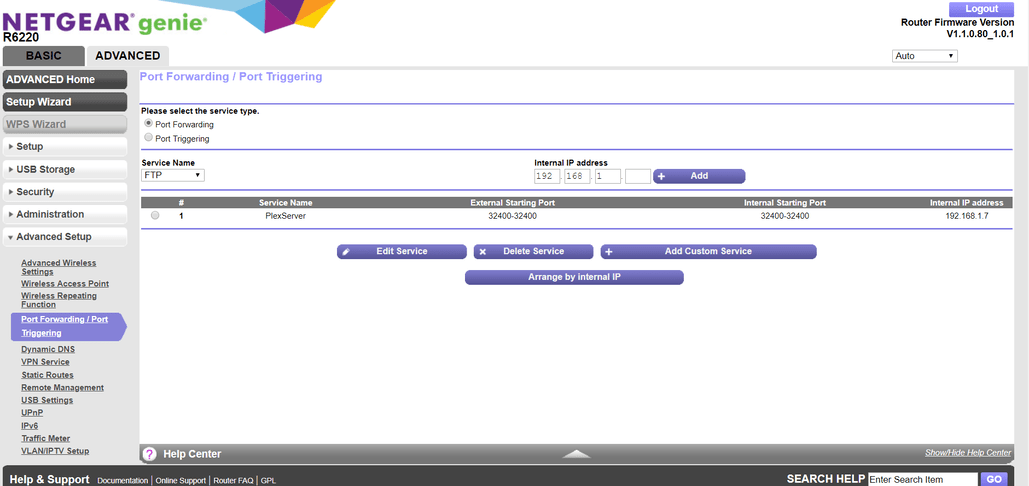
This is all on your end. plex.tv is handing out reserved address space instead of our ip addresses. port forwarding is working and as far as plex media server is concerned it’s working fine. If you connect directly to external-ip:port everything works, but you guys are telling plex clients to connect to the reserved network docker uses. See PMS is running and says remote access is running but i cannot connect to it
Someone should really update status.
So im not doing anything wrong? I also see this public IP change from time to time when I restart my Server trying to get it to work 
Any manual config I can do to fix it?
I don’t know if it’ll work, but if you have your port mapped you could try using that custom url option. I have mine set to publish my dynamic dns.
I also upgraded and it’s been a mess ever since, and I cannot find any older versions of deb. I made a mistake and thought it was my OS, boy was I wrong. “God Speed” to all!
not sure if every user is affected but here is a another big thread too:
I my opinion it doesnt seems to have to do with versions or platforms. All versions and platforms seems to be affected, pretty sure its because of plex’ servers.
I hope this is not the result of an attempt to hack plex. Maybe its a man-in-the-middle attack.
Additionally i dont get notifications about updating to 1.13.8 anymore. Seems strange somehow.
its working again. They fixed an issue on their side.
The problem where Plex media server reports a public IP address of 172.17.0.1 on the remote access server setting page has now been fixed in a change to plex.tv back end systems which has been deployed
You will need to disable / re-enable remote access or restart the server.
You may also need to kill mobile Plex apps and re-launch them to pick the correct route to the server
Thanks for reporting the problem
After a few tries I got it to work for a moment, but now I can’t even connect to the server. It just says “Connecting Server”
My logs: Plex Media Server Logs_2018-09-28_21-14-31.zip (2.7 MB)

A second issue on plex.tv has now been fixed and it also related to the public IP detected for the server. This issue led to symptoms of enabling remote access getting stuck or the public IP shows as unknown on the setting page
works for almost a second now 
EDIT: Now it’s just like before the update, no remote access
I guess I spoke too soon, my daughter told me the access is intermittent, I had time to try it tonight and can’t access my server from inside or outside our network.
I also can’t add new shows, it clocks then doesn’t find anything in the search.
I don’t know for sure but the problem seems to have something to to with ipv6, I turn that off and it seems to work although it works very slow…
This is frustrating so I hope it get’s resolved soon…
If you have used the setting for selecting a specific network interface, there would be problems if ipv6 is enabled
Other than that, would need logs when the issue arises and if the server is on a desktop, to try http://127.0.0.1:32400/web
1 Like
Please get logs zip and upload when the issue arises - making sure you have debug logging enabled
That might be it, I never noticed the setting before but it was set to the ip4 address. I changed it to “all” so let’s see what happens.
I really hope someone can help me out.
I am running 1.13.8.5395 anf have uninstalled, reinstalled, updated without any luck.
I tried to remove my router, and even installed the server on an rasperry but still unable to connect.
Sometimes my server starts green but immediately switches to red. Sometimes it says all good (green) but I am still unable to connect.
Hey sorry I’m just getting back to you I just went through a Liver transplant this past week and just got home and of course I was never able to watch Plex while in the hospital because remote access was down. I have checked the Windows logs as you requested but I don’t see any logs for those dates.
I have the same exact problem. I disable and enable. It is green and then switches to red immediately. Not port forwarding because I never had to for YEARS! I’ve never had problems since starting in 2016 =(
Not really helpful, but I’ve been having the exact same issue.
It goes green for a second, then flicks to red.
Haven’t had remote access since the 1.13.3.5223 update, though it may be unrelated to specific PMS version.
