Server Version#: 1.22.3.4523
Player Version#: Tizen 5.15.1
Hi.
After updating Plex Media Server to the last version ( 1.22.3.4523), the “Currently Watching” in the automatic “Home”, only showed a few of the items that it used to show (The oldest ones, to be precise). I’ve marked those items as watched in hope that the disappeared items would be back, but after that, the “Continue watching” bar disappeared totally and I haven’t found a way to bring it back.
If I manually admin the “Home” screen, “On Deck” appears without a problem, but only on the server. In the Samsung TV I use, it only appears the automatic “Home”
Could anybody help me, please?
It sounds to me like you have an older version of the app on your tv
You should not see “ON DECK” at all with the current set up
On Deck has been combined in a new row called Continue watching that shows all of those items in the same row now
The row won’t show up at all on your TV unless the app is set to automatically manage your home screen
They have done away with the manually managed home screen for all client players
The controls for your TV and other players is now controlled from the server side under
Settings->Manage->Libraries
Hover your mouse over the library and select Manage Recommendations
Try finding an update for the app on your TV
It’s the latest version as shown here: Plex for Samsung (2016+ 4K/UHD televisions) - #48 by sLumpy
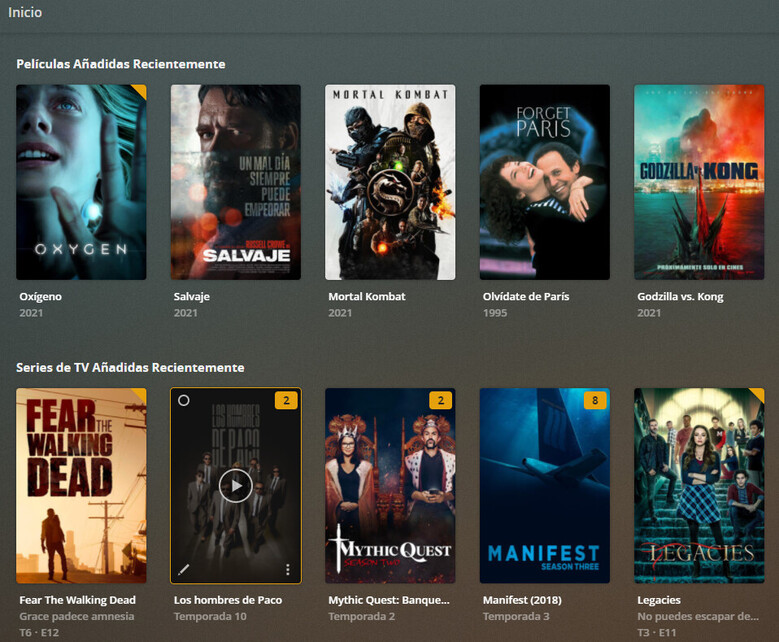
The “Home” that is shown in the TV, it’s the automatic “Home” that only has “Recently added movies” and “Recently added episodes”. No “Currently Watching”, “On Deck” or anything else.
The only place I could see what is “On Deck”, it’s in the server or if I choose the server in “MORE” on the TV
An incomplete continue watching was supposed to be fixed in the version before that (5.14.1)
It looks like 5.15.1 limits your CW/OD items again
If it worked okay in 5.14.1 but stopped with this update then you need to roll it back to the earlier version and hope someone from Plex sees this so they can fix it AGAIN in the next version
The items in your continue watching should now respect the value that you set for number of shows and weeks to show on the server
But on the TV you’re never going to get OD/CW to show if you try and manually manage the home screen
That is no longer possible
You have to set the TV to automatically managed or do without the OD/CW
In your first post you referred to the CW/OD only showing on the TV in the automatically managed home screen
Not sure if i’m misunderstanding you but I think you’re saying the OD/CW doesn’t show on the TV in the automatically managed home screen either?
If you’re not seeing the CW/OD in either manually or automatically managed for the TV then yeah you have a bug
I saw other posters asking if they could remove the OD/CW from the home screen and that’s not even an option
Either way, you need an employee because your OD/CW items are limited and shouldn’t be
I’ll try to find a way to roll it back and try, but as the TV updates the app silently and without user intervention, I’m not very positive that it can be done.
Exactly. But it also doesn’t show on the server if the home screen is automatically managed. Right now, i’ve got it manually managed and shows items that were OD.
This is my server’s home screen if it’s automatically managed, and what is shown on the TV:
And this is my server’s home screen if it’s manually managed:
Okay I think you should probably go back to the page for the link you sent me and leave sLumpy a message about this. He should get a notification for it that way.
If you leave the info in this thread it may or may not ever get noticed
Good luck
I haven’t found a way to roll back the TV app version yet, but i’ve tried to roll back the PMS version to 1.21.4.4079 and in the automatically managed home screen in the server, the OD/CW category is back. In the TV it doesn’t appear, though, so I’ve opened a new thread in the correct category.
Many thanks for your help.