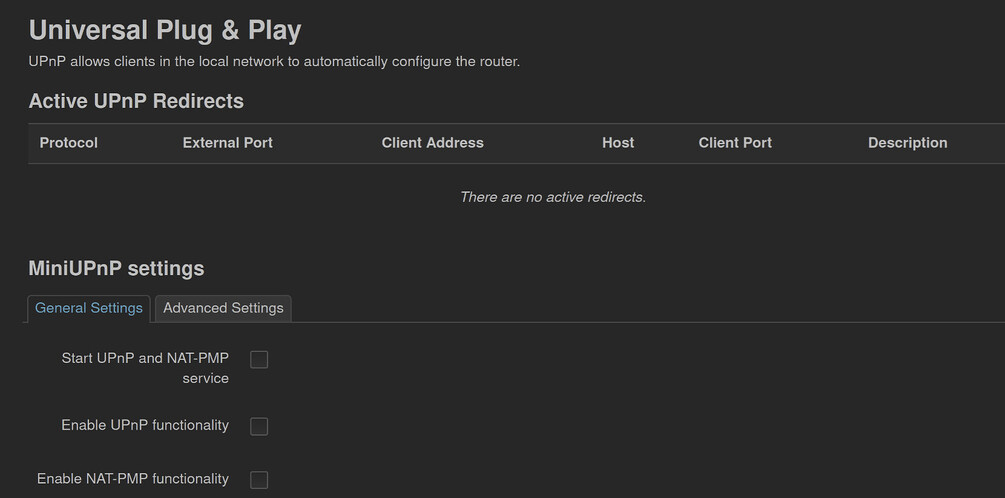
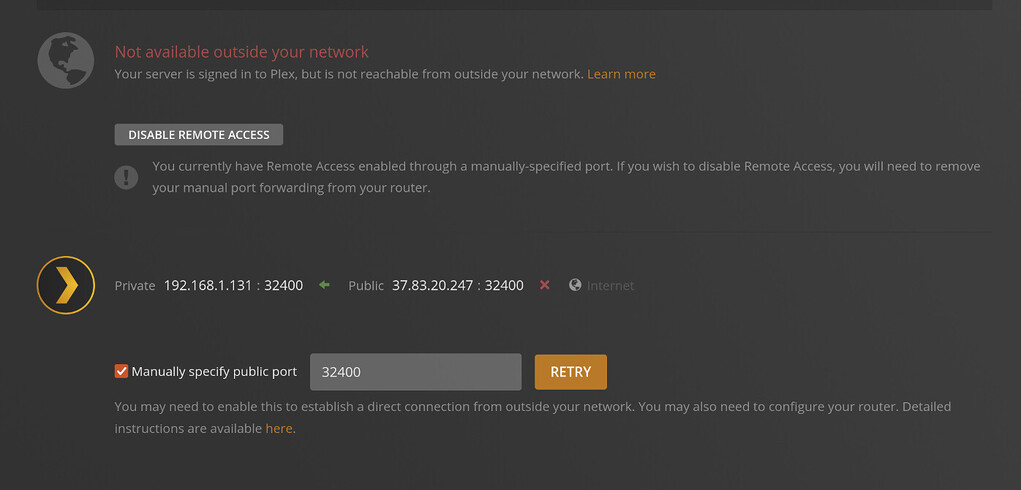
I don’t have CGNAT, I have a public IPv4 address and my Router - which is on OpenWRT - has UPnP and NAT-PMP enabled.
In my routers settings I can also see that the client port 32400 has been opened (although websites to test if certain ports are open claimed it wasn’t).
Can you see/access the router’s public IP address (WAN address) on the specified public port from outside your home network (e.g. using a service like canyouseeme.org)?
I don’t know If understood the question correctly.
Canyouseeme.org only lets me use the IP of the network I’m currently in. And from inside and outside my home network the page cannot reach port 32400 nor 21027.
Wait a sec… unless I’m misreading your screen shot, you’re using port 21027 externally, not 32400. You may need to adjust either the PMS configuration, or the router configuration.
Server have a firewall? is it enabled? have you allowed port 32400 through if it is enabled, other thing it could be but unlikely, is your ISP blocking that port?
Omg, you’re definitely onto something! Disabling the firewall on my server did it!! Thank you so much!! But what do I do now? Isn’t a huge security risk to disable the firewall? Or can I now make an exception rule for Plex somewhere?
usually you have your network firewall (Router) that manages security but if you want application based firewall then yes re-enable the firewall and allow port 32400 through, or whichever port you want to use for Plex
I wanted to open port 32400 only for my public IP but then Plex didn’t work unfortunately. Is it a security risk that I now opened port 32400 for all IPs? Because then it worked. Also my router does have a firewall.
So first things first, you need to open a port (in this case port 32400) on your router/gateway you can either allow traffic from specific or all public IP addresses on the internet.
Second, you can either allow port 32400 through your OS firewall or completely disable it, its not too much of an issue disabling your OS firewall as its already inside your local network and behind your routers firewall, but the way I do it, is allow port 32400 through my OS firewall that way I can still have my OS firewall enabled.