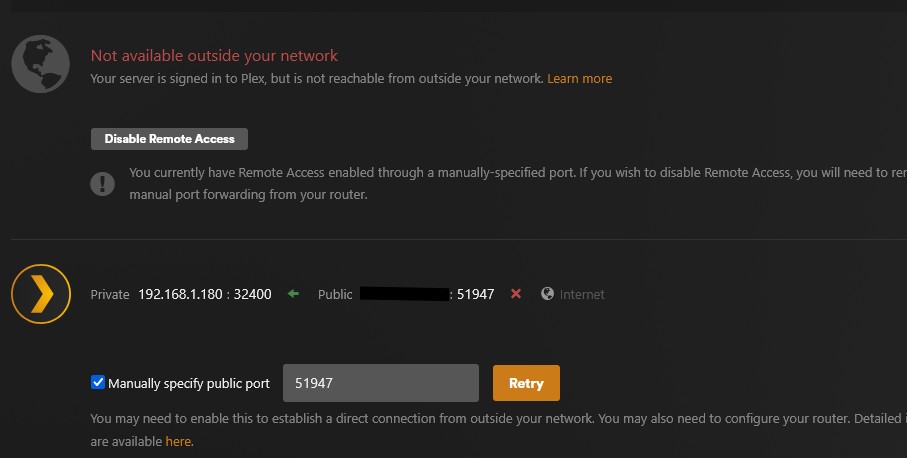
Server Version#:4.147.1
Player Version#:
<If providing server logs please do NOT turn on verbose logging, only debug logging should be enabled>
My remote access is not available outside my network. My public port is 0, and if I manually specify a port, it reverts to not available. When I manually specified the port, I also added it to port forwarding. The modem, router, and switch have been restarted. Please advise
When the remote access shows 0 as the public port, it means that you haven’t manually specified a port and that it was unable to establish a mapping via NAT-PMP (UPnP). So either:
Set up a manual port forward rule on your router, specifying any unprivileged port (I’d use something in the 50,000 - 60,000 range) for external and 32400 as internal (TCP only). In the Plex remote access settings, check the “Manually specify public port” box and set the same external port number, and save; or,
Configure your router to enable UPnP (leave the “Manually specify public port” setting disabled in Plex’s remote access settings).
Note: Remote access is incompatible with CG-NAT, which many ISPs are now employing to conserve IPv4 addresses. If your ISP uses this, remote access is incompatible unless you enable Plex Relay (which has bandwidth restrictions).
If you have a manual port forward configured on your router, please show a screenshot of it. And the Plex remote access settings page (please redact just your public IP address).
In your 3rd image, you show your port-forwarding configuration. In order for remote access to function, your “Local LAN Ports” need to be set to 32400 - 32400. Plex Media Server always listens on TCP 32400 on the LAN.
After doing so, you should enable the “Manually specify public port” in Plex’s remote access settings and set the port to 51947 (to match your port forward rule). Don’t forget to save the change and then retry.
I’m saying that you should be forwarding to port 32400 (Local LAN Ports in your settings above). Your external port (51947) can remain the same. If it still doesn’t work after making the changes I suggested above, please send updated screenshots reflecting the changes.
Make sure to tell Plex about your port forward!
Check „Manually specify public port“ and enter 51947 as its value.
Edit:
If it’s still not working, please verify your port forward is accessible/visible from outside your home network. You can do that using a service like canyouseeme.org (asking it to check your port 51947).
That leaves you with testing a different port (updating the public port in the port forward rule and your Plex settings)… you could go for anything „random“ in the range from 20000 to 50000, or an established/known port like 8080.
If that doesn’t work, you should contact your ISP to verify if they’re blocking certain ports (or traffic).
Bonus question:
Does the public IP recognized by canyouseeme.org match the public IP / WAN IP of your router and the one seen in Plex‘s Remote Access settings?
Ok, there’s one more thing I’d like for you to check. Somewhere in your router’s status page (whatever they call it for your router) it will show its WAN IP address. Don’t post it here, just note it.
Visit canyouseeme.org and note the IP address shown there. It should match the one shown on your router. If they don’t match, that means you’ve got a double-NAT situation.