Server Version#: 1.32.4.7195
Player Version#: Web browser
I am currently having issues accessing my Plex server remotely. I migrated my Plex Server over to different hardware due to issues with the old hardware and I am currently unable to go back. When I check the Remote Access locally on my plex server, it says its connected.
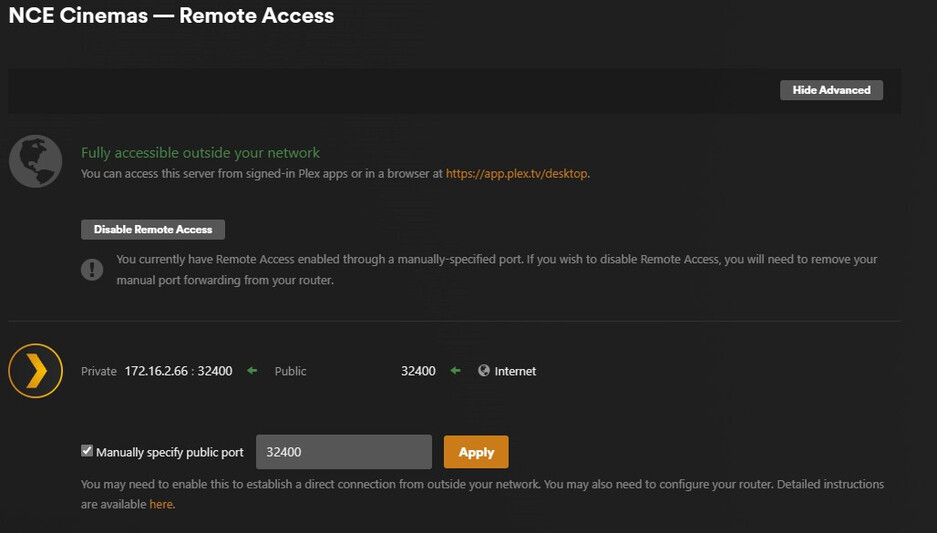
But when I go to plex via app.plex.tv/desktop, the server says that it is connected indirectly.

My current setup:
ATT Modem > Opnsense Router (192.168.1.1)> Unmanaged Switch > TrueNAS Server (192.168.1.2)
ATT Modem Config:
I currently have the port forwarding set for port 32400.

At the moment I have set IP Passthrough to pass through to my Opnsense router.

One red flag I have noticed here, is that if I do this before forwarding the port, I am unable to select Opnsense as the device on the port, so I have to do the IP passthrough 2nd. Is this redundant?
Opnsense Config:
I have assigned the static IP address 192.168.1.2 to the TrueNAS server. I then Port Forwarded 32400 to the IP address 192.168.1.1


TrueNAS Scale/Plex Config:
Here are some screenshots of the config setup for the Truechart’s version of Plex.


Plex Logs:
Plex Media Server Logs_2023-07-14_15-01-58.zip (1.2 MB)
Any insight would be helpful. I will be leaving for the weekend starting tomorrow, so there is a chance that I might be slow to respond.
