Server Version#: 1.13.8.5395
Player Version#: web 3.71.1
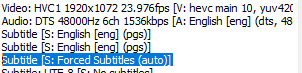
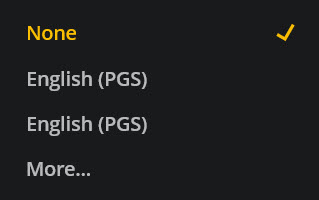
I’ve just noticed that some of my mkv’s that have multiple embedded subtitles don’t have all the subtitles listed at the client. Has anyone else run into this? Screenshots of the same metadata from the Plex web client, and from MPC-HC of the same file:
Unfortunately, the one I think I want used is the auto one. I have a nagging suspicion it’s because the stream says ‘auto’ instead of ‘SRT’ or ‘EN’ or something along those lines, but I’m not sure. Any ideas?
Are you sure the subtitles are actually in the file? I’ve seen files report they have a subtitle in the file’s header (what you appear to be looking at), but the actual stream is missing.
MPC-HC will almost always show you an entry named (Auto) for subtitles. But in most of the cases it won’t make any subtitles available if you select it.
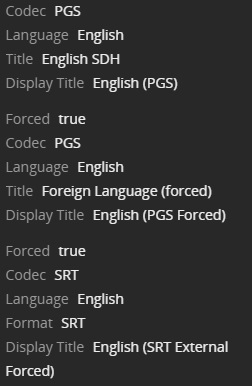
You can use Plex Media Info or the MediaInfo app to see if the subtitles are really in the file. Plex Media Info also lists any external subtitles. The MediaInfo app shows the number of elements for each subtitle track.
You can use MKVToolNix’s Header Editor to set the Forced Display flag if it is not set appropriately in the file.
Examples:
Plex Media Info:
MediaInfo:
Text #1
ID                                       : 4
Format                                   : PGS
Codec ID                                 : S_HDMV/PGS
Codec ID/Info                            : Picture based subtitle format used on BDs/HD-DVDs
Duration                                 : 2 h 1 min
Bit rate                                 : 24.1 kb/s
Count of elements                        : 2098
Stream size                              : 20.9 MiB (0%)
Title                                    : English SDH
Language                                 : English
Default                                  : Yes
Forced                                   : No

Text #2
ID                                       : 5
Format                                   : PGS
Codec ID                                 : S_HDMV/PGS
Codec ID/Info                            : Picture based subtitle format used on BDs/HD-DVDs
Duration                                 : 1 h 27 min
Bit rate                                 : 1 980 b/s
Count of elements                        : 344
Stream size                              : 1.24 MiB (0%)
Title                                    : Foreign Language (forced)
Language                                 : English
Default                                  : No
Forced                                   : Yes
Ooops, I forgot I had started this.
So, I didn’t mean that the selected stream wasn’t showing anything. The point of the screenshots is that MPC-HC can see more subtitle choices than Plex appears to (there are 3, according to MPC-HC, but only 2 according to Plex, at least that I can select from).
Unfortunately, I don’t think I will be able to pursue it further, as I can’t seem to recall what I was watching at the time that I had the issue, and nothing in my Tautulli history fits what the specs of the screenshot I posted so…oops. I’ll just have to try and notice if I run into it again.
Thanks!
Something like that, yes.
It will appear in the menu as soon as the played video file has a VOBSUB or PGS subtitle stream.
No matter whether there are actually ‘forced’ subs in it or not.