Under the WAN settings on your router what DNS is being used?
DNS Address is 192.168.1.253
You’re looking for a 4 digit number separated by periods. 8.8.8.8
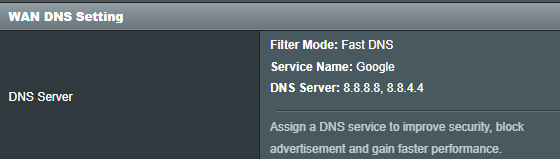
Can’t find one anywhere. Under the WAN setting there is only the following:

Before i bother telling him to set this are there some isp router/modem combos that won’t let you use your own DNS?
You have connect to DNS server automatically which I would change

I suppose you can always change it back if it doesn’t start working
Oh I think a lot of ISPs lock down what should realistically be user manageable settings now. Probably the lesser of two evils for them. Saves them from a lot of heartache caused by users that know just enough to get themselves in trouble, and instead inconveniences a smaller subset of users who usually known enough to workaround it anyway (bridge it and use your own better router).
Certainly worth try though. If it does just turn out to be flaky ISP DNS then hopefully that will resolve everything. If not, then can change it back as you pointed out.
Found an option that looks similar and changed it. No dice. Still not working.
Currently on hold with my ISP, hopefully 3rd time lucky…
According to them they cleared and refreshed the IP of my Modem from their back end. Still nothing. They’ve ‘escalated my case to their backend team’. They also seem to think that my problem may be resolved by switching to a Business Internet Plan as my usage was high and may have tripped a security flag on their end.
Sounds fishy, lol
If that was the case, they should be able to tell you that for sure with specifics about your data use
TBH, this sounds like an upsell tactic by a by someone more interested in making a commission than fixing your problem
They also try to tell people they need a business account with a static IP to configure remote access for people who don’t know any better
I would tell them you’d like to schedule an appoint for a tech to come out to your house and troubleshoot things before they decide that charging you more money is the only option to fix things
And what would the tech be able to troubleshoot that they weren’t able to do remotely? Not trying to be argumentative here, just feeling worn out at this point since every solution seems to be failing and its leaving me more and more frustrated.
I found a work around solution to fix my problem! At long last!
It’s not very elegant but it got me off the ground again. Made use of this bit of Docker Code and it allowed me to bypass my ISP’s hardware completely here since they allow port forwarding. Unfortunately necessitated subscribing to a VPN, but I’ll take it.
