ISSUE FIXED: It was related to a vpn blocking the Plex Media Server for remote access after the VPN App was updated.
Applied an exemption to the VPN for Plex Media Server as well as MS Edge (browser) so the port can be seen by the required Apps
Server Version#: 1.28.2.6151
Player Version#:
Just had the strangest thing begin to occur:
PLEX was working well, feeding my wife files to watch from her Mum’s house and I got a call asking what happened to the PLEX TV shows.
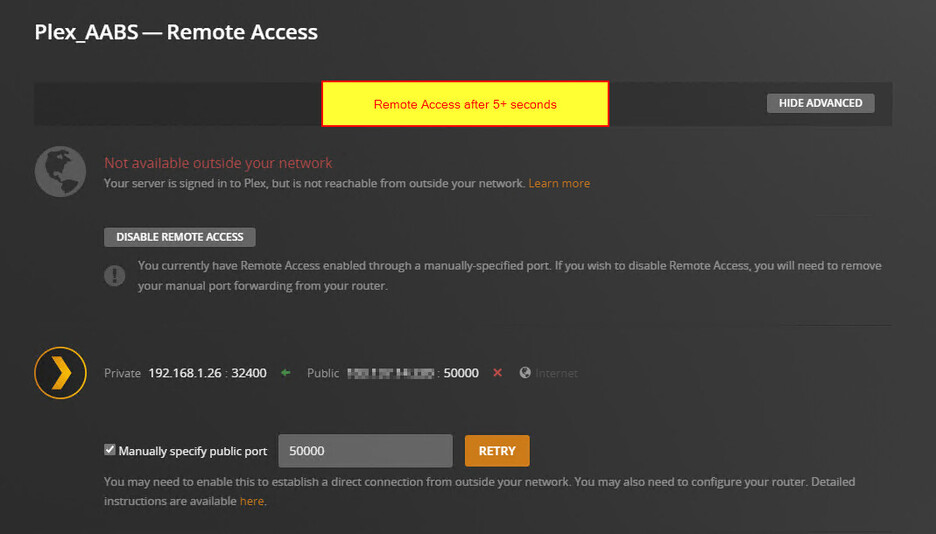
Checked the server and found PLEX was no longer available outside my network. I tried rebooting my PC and restarted Plex server - same issue. It is available momentarily, then after 10 seconds or so it becomes unavailable again.
*Definitely NOT available remotely
*Up to date server version
*NOTHING was changed at my address at all
*I had followed some guides and set my public url to port 50000.
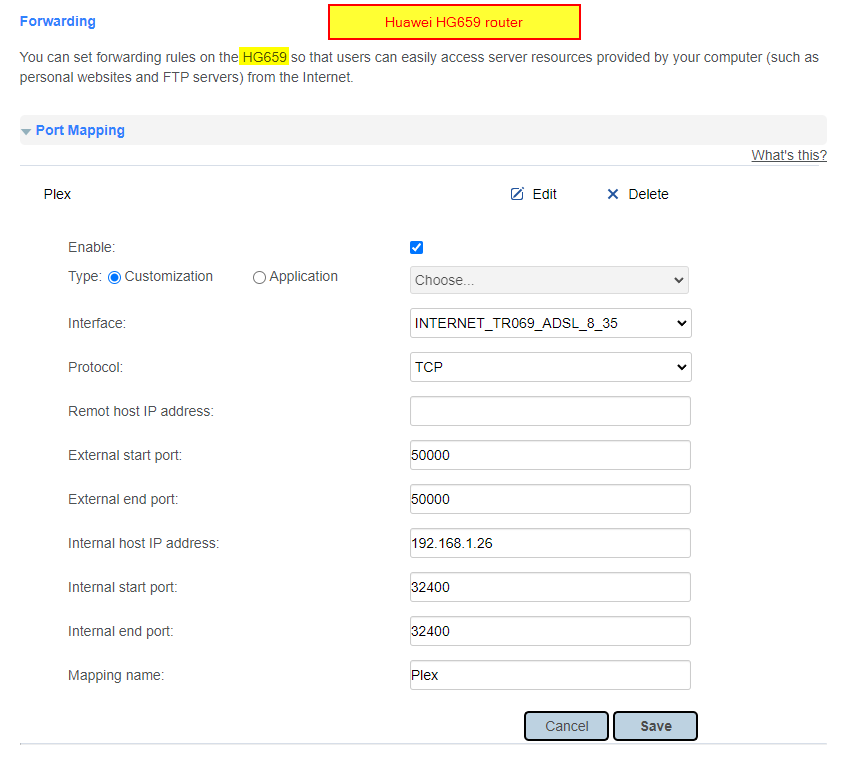
*Port Forwarded on my Huawei 659 router (remote IP is my external ip from my ISP & port 50000) Internal host IP address is set to my plex server PC static IP - 192.168.1.26: 32400
*IP address is definitely set to static in the PC adapter
Again - I have changed no settings at all that was a precursor to this.
Any thoughts? Was there a server update this afternoon by chance? Any other thoughts as to what could cause it to work for a moment, then not?
When configuring your port forwarding rule, ensure you do not specify a remote IP address. When you do specify a remote IP address it means that the rule will only be used for traffic received from that IP address (not to it). You may be able to leave it blank, or specify “none” or some other value which means “accept traffic from anywhere.”
If in doubt, paste an image of your rule configuration here for inspection (blank out your public IP address).
In general (the wording may be slightly different on your router):
External/public port should be 32400; this can be other values, but 32400 is a good place to start. This is the port you manually specify in your Plex remote access settings.
Internal/private port must be 32400.
Protocol should be TCP.
Internal/private IP address should be that of your Plex Media Server host.
External/public/remote IP address should be blank, none, or however your router allows you to specify no value.
Just a little update…i tried connecting to my server via the iOS app on my phone whilst using 4G - I was able to watch a show.
I am yet to test it from Mum’s but I am hopeful.
Is is common that Plex lies about whether it is actually providing remote access?
Interesting. I’ve be having the same issue recently. Everything was set up and working perfectly, then I began getting the issue of indirect playback from users outside of my local network, as well as the “Not available outside your network” error in Plex. I’ve been blaming my AT&T BGW320-500 modem/router which has been having it’s own issues, but now I am thinking you’re on to something.
Note that if you use your mobile phone outside your local network, you may still be able to watch the movie (indirect playback), but you’ll find that the quality is throttled significantly. To verify this further, just check your dashboard on your plex server and observe the transcoding quality while the video is playing on your phone.
Sometimes my Plex server will show I’m in the green and accessible outside my local network, but still show indirect playback, which is frustrating to say the least. Moments later is may go red. To further make it confusing, I gave up last night, went to bed, and this morning all is fine again. This happened a couple weeks ago as well. So it feels like just a matter time before it returns.
So my wife has been watching her shows using indirect playback and it is OK, but not ideal.
Seems that when I refresh the Plex Server browser tab, it all goes green again for a little then back to red.
Very painful
I’ve resolved that changing the external ports, after one week without problems today I’ve to change one of the port of the two servers. It seems that could be ISP or Plex platform related, hope can clarify what this happens…
Have you checked to confirm that your port forward is working externally? https://canyouseeme.org/
Once that is confirmed then you can continue troubleshooting the next parts. It might be worth stepping through this very helpful guide here The Basics of Remote Access Troubleshooting
That should hopefully help you confirm your setup piece by piece until you find the item that is now preventing your remote access from working. Could be something like a network, firewall or AV update/change that happened automatically.
Thanks perplexity. I tested and my port is in fact not open. This is confusing tbh but mainly because the iPrimus (Australian ISP) Huawei HG659 router UI looks nothing like other examples.
My internet conx looks like this:
My Forwarding settings are not this:
(I selected the INTERNET_TR069_ETH_VID_100 because it was the only thing connected on the above internet screen)
When I test my port fwd on your link it says it cannot see me.
Anything stand out for you? I wonder if anyone uses iPrimus as an ISP in Australia that can help with a setting suggestion?
Also, my internal IP is reserved for the media server 192.168.1.26
Compare the WAN/public IP address shown by your router to that reported by Plex’s remote access settings. Are they the same? If not, your provider may be employing CG-NAT, a configuration used to mitigate the lack of public IPv4 IP addresses available now.
Intriguing. Out of curiosity, what is the error you receive from canyouseeme when you check the port?
Looking inward for a moment: Do you have another computer (or mobile device) on your internal LAN? Can you access your PMS from it via internal IP access? 192.168.1.26:34000

 Damn, I thought I might be OK.


