Server Version#: 4.41.1
Player Version#: NA
I’m having issues getting remote access to work and have forwarded the port and set the DMZ server as a test with no luck. I’m running Plex Server on a Linux Mint box that isn’t hosting anything else. It’s library is on a QNAP NAS (Not using the QNAP as the server because I want hardware transcoding). I’m not sure what I’m doing wrong :< Please help!


You don’t need DMZ enabled. Ensure you have set a fixed IP address for the Mint box and the port forward is routing to that address.
Your router firmware is quite a few releases behind too.
An FYI that you only need TCP, not UDP, forwarded for Plex remote access.
Thank you! I upgraded the firmware and changed it to TCP and still not working. I checked the Linux Mint server and the IP is indeed 192.168.2.21 and the firewall is disabled. I did see there’s an IPv6 firewall and I disabled that and it seems to say it works but I refreshed the page and it says it’s not working again… what the hell??
Sometimes the Plex UI reports the remote status incorrectly. Try checking https://www.canyouseeme.org/
Also try shutting down Plex Server and restarting.
canyouseeme doesn’t see me either. I tried changing the port to 3242 as a test. I’m not sure what else to try :< I do have a router/modem combo before the ASUS router, but it’s firewall/router is disabled along with it’s Wi-Fi (it was provided by AT&T)
have you got “Secure connections: Preferred or disabled” in plex server settings?
This is how i forward the port, 17353 externally which is default and 32400 internally.
never had a problem and works all the time
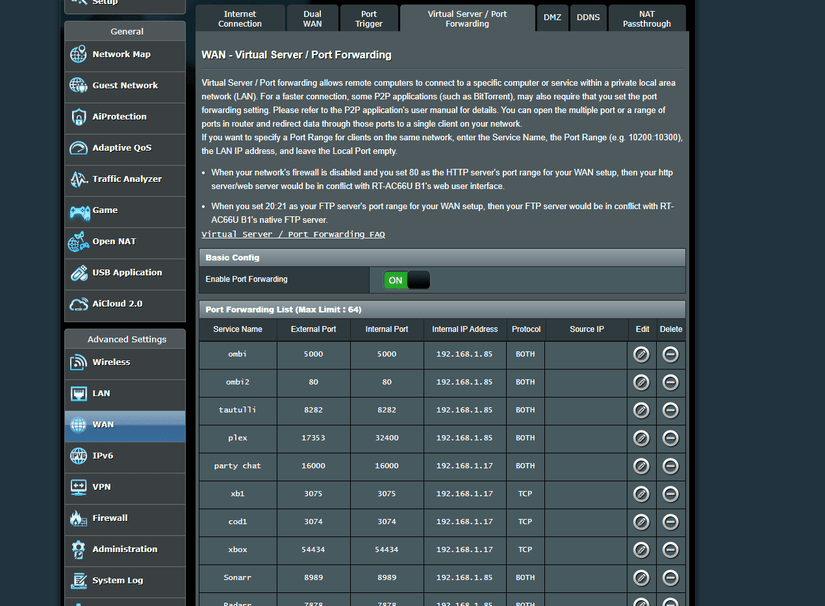
needs to be in bridge mode not just routing firewall disabled
This topic was automatically closed 90 days after the last reply. New replies are no longer allowed.
