Not Enough Bandwidth error on wired gigabit LAN network, Roku Ultra client

Server Version#:Version 1.32.4.7195
Player Version#: Roku Ultra

I’m getting a “Not Enough Bandwidth” error when playing a 4k movie off my network. But my server and clients are all hard wired ethernet on a gigabit capable network.

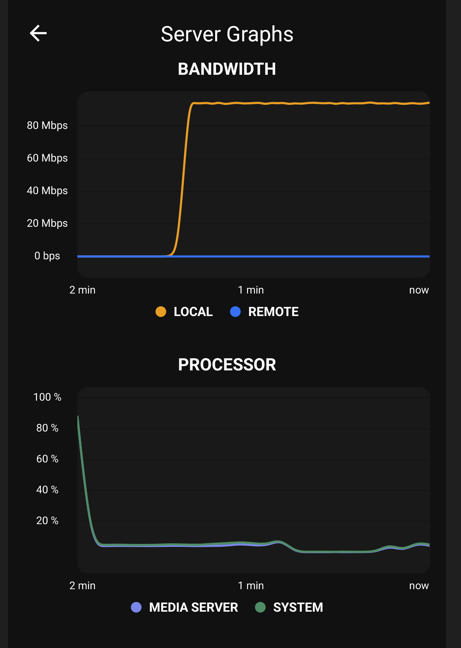
I ran the speed test connection on my Roku Ultra, and its showing 93Mbps, excellent connection. The Roku only has a T-base 100 ethernet port, not gigabit ethernet.

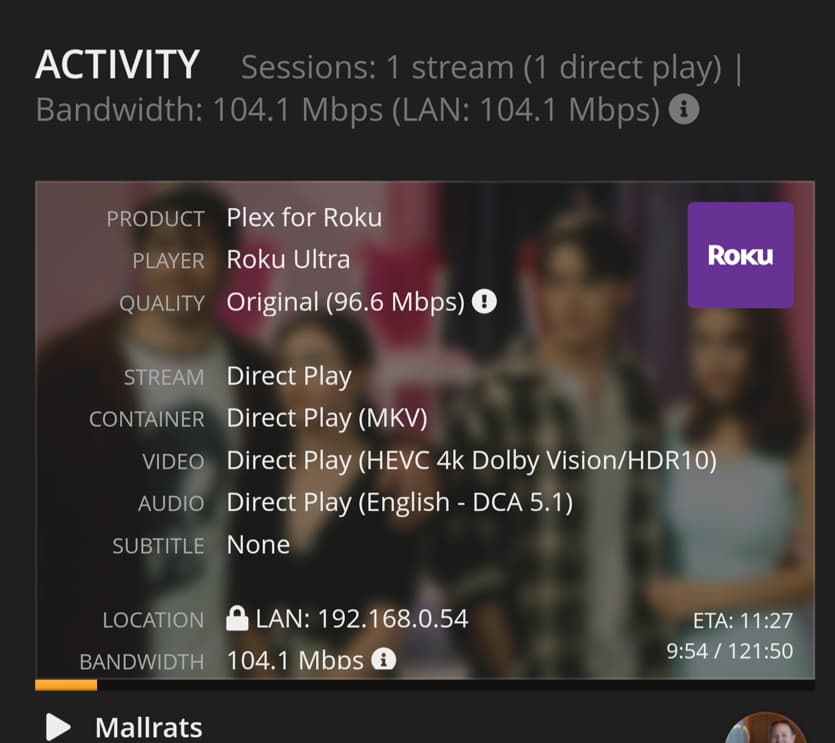
In MediaInfo, the movie shows an average bitrate of 96.6 Mb/s, which I’m guessing may be the issue, possibly flooding the Roku’s ethernet connection, but I thought the Roku might just buffer the extra rather than choking on it.

The error in the logs is “Jul 09, 2023 08:11:08.213 [140704961477432] DEBUG - Failed to stream media, client probably disconnected after 1146880 bytes: 104 - Connection reset by peer”

Log attached. Movie is Mallrats, playing at 8:11am - 8:20am.

Is the best solution to limit the bandwidth on the client side and just let the server transcode down to something the Roku wont choke on? Or switch to wifi, which has 802.11ac and a theoretical 450 Mbps?

Edit/Update: Did some experimenting, and it does seem to be the bandwidth limits of the Roku. I changed the Local Quality to 20Mpbs and the crashes stopped. Turned it back to Original and they resumed. Guess I’ll try the wifi next. Otherwise I’ll add a Shield TV, which has an ethernet connection.

New question, though – when transcoding I noticed two things. A) PMS didn’t transcode HDR to HDR. It transcoded down to SDR. Any way to avoid that? and B) PMS transcoded the audio even though it didn’t need to. In Original, it played the DTS (DCA 5.1) audio track. When transcoding the video, it transcoded the audio to AC3 5.1.


Plex Media Server.zip (815.1 KB)

Plex transcodes all video to H.264 SDR.

When transcoding to fit under a bandwidth limit, Plex transcodes both the video and audio.

1 Like

Good to know. Thanks for the edumacation.

Checked the wireless connection and was able to get 122Mbps, so probably going to roll with that for now and see if its stable. If not, I’ll slap a Shield tube behind the TV and wire it.

It won’t do you any good. The tube has issues with high-bitrate files just the same. Only a Shield Pro will bring an improvement.

Average bitrate means nothing. The actual bitrate can be higher, sometimes a multide of the average. It then all depends on the distribution of these high bitrate peaks and their length whether the network buffer of your player device is sufficiently large to smooth these out. More often than not, it won’t be big enough.

Get the Shield Pro. The tube model has problems with high bit-rate media, such as 4K HDR Blu-ray rips.

Many 4K HDR movies burst above 100 Mbps.

The Ethernet port on my LG is 100 Mbps and some of my 4K movies buffer as a result. When on 802.11ac, they play fine, as the throughput is over 100 Mbps.

I don’t have a Roku, but if the Ethernet is 100 Mbps, you’re probably experiencing the same.

@FordGuy61 @OttoKerner Roger that, gents.

@Otto - Agreed 100%. If the avg is 96 then there’s definitely peaks much much higher. I was able to see some of them in the PlexDash app, but not get an exact reading. Looked like 120+.

I was surprised by the actual bitrate of Mallrats relative to Avatar or Avengers or some other high octane action flick. Avatar: Way of Water shows me an overall bitrate of 50Mbps and Avengers Endgame shows me 42Mbps. 96 for Mallrats? Don’t see the need, but I’m not Kevin Smith.

The crashes were happening in relatively dark, low motion scenes. I’ve had crashes like this before during epic battle scenes and knew it was the spikes in bitrate from all the wiz-bang happening.

Thanks as always!

It’s not a deliberate decision.
The movie is still an independent production. And for the time it was made in, still shot on celluloid. Which means plenty of film grain. And grain will require a shedload of bandwidth. And that will only increase, the higher you crank the resolution. So for this movie, I’d say a 4K release is absolutele nonsense. All that’s increased is the crispness of the grain, but not an increase in actual picture detail.

This topic was automatically closed 90 days after the last reply. New replies are no longer allowed.