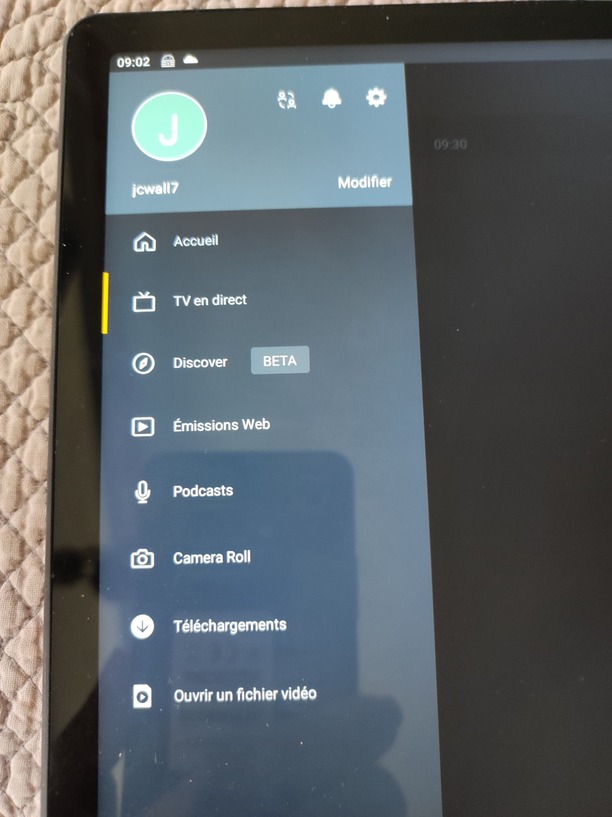
I’m new to Plex, I just installed the app on my smartphone, then on my tablet. And the big surprise is that I don’t have the same content, even if the app bears the same number i.e. 9.0.2.31766.
I have Movies and Shows on my phone, as well as music.
I have TV on my tablet !!!
My menus are different. Actually I want movies on my tablet too…
Welcome to Plex!
What kind of libraries are we talking about? If you’re signed in to both apps with the same account, you should have access to the same libraries – be that libraries from your own server, libraries from a friend’s server who gave you access to those libraries or libraries from Plex online media services (e.g. “Movies & TV on plex”).
If something got added after you initialized the app, those libraries could be hidden in the More section of the sidebar. You can pin/unpin libraries to customize which are displayed by default (e.g. if you don’t want to show your home videos on a tablet that others might have access to).
For the time being I have no server and no access to any other apart from the Plex site. Regarding librairies, I should be able to manage them through ‘Manage Library Access’ (there is no ‘More’ section on my sidebar), but as I said, I have no access to grant and I am not granted access anywhere else.
I signed in with the same account on both devices, the streaming services I selected for my smartphone were retreaved on my tablet, all settings are the same… But the sidebar menus are different!
That’s a weird situation – I’ve asked around but seemingly nobody’s seen this before.
Can you try resetting all customizations of the tablet client? There should be a button at the top-right of the home screen with that option.
Between the moment I shot the image yesterday and now, I did not use Plex. You won’t believe me, now my menu is complete with Movies and Shows as well as Music !!!
Did I Say strange ?