Server Version#: Version 1.19.4.2935 (tried 4 versions below that)
Player Version#: Version 4.36.1
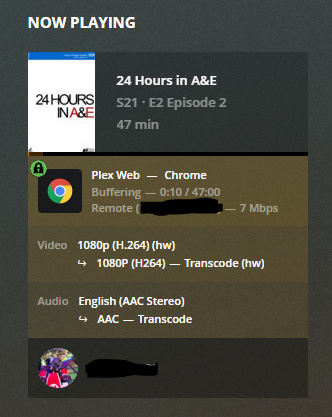
So my setup has been fine for awhile and not sure on the exact timing but suddenly I cant play basically any content unless it’s SD (if I am lucky) without buffering. This I know hasn’t been an issue at least a month ago and always was able to use the maximum quality to play the original files (direct play/stream and even transcoding). Long time Plex user and I hate to say this issue got me scratching my head…
Local network testing: Everything plays normally and fast at highest quality (no issues). Extremely quick to launch.
Remote: Player will not start playing content for maybe 30-90 seconds, maybe play a few seconds and buffering every second. Note this again hasn’t been an issue before…
Plex server: Windows 10 with enough specs to run about 20 streams + hardware encoding with P2000. This server is on a fiber connection with 1000Mb down and 100Mb up.
Remote Player: Chromecast, Web player, and Plex desktop app. Home internet is on cable 1000Mb down and 45Mb up.
So with sharing those details, I shouldn’t be having issues as no hardware and connection should be limiting this. I checked the Plex logs and sometimes I see a “slow query” warning but everything else seems to be normal activity giving me no idea what could be going on. Note no changes to equipment between my house to the plex server. Firewall rules also remained the same and already went through everything.
Look at the Plex Media Server log - most recent - and ‘Find’ “MDE” entries.
I see a lot of Direct Play Disabled, Impossible, due to a restriction - either at the Client or The Server or the Available Bandwidth at either, The Client, or Server.
I’m no log reader, but that indicates something isn’t being allowed to go Full Throttle - either by setting, or bottleneck.
Public Enemy #1 is very likely Remote Quality at the Client not being set high enough. Public Enemies #2 through #500 is anybody’s guess.
We do need better eyeballs on those logs:
@anon18523487
is capable and my first choice…
Can’t wait to see what happens.
Are you writing from a different Plex user? Your logs show a different admin account than your forum profile.
Edit - And your PMS keeps turning off and on. Are you doing that manually or is something going on?
Interesting as I am not getting that behavior when I am doing a local stream. I have set the max stream allocation for 100Mbps but that is only the place I have that info. What is odd I stream the same content locally it works extremely fast (yes knowing local network is better than over the net but the upload there is 100Mbps and the download to the chromecast is a gig). So not understanding where this bottleneck is happening. If the server is bottle-necking due to performance of it or the NAS you would think even locally you would be having the same issue.
This again I have watched the same shows, same file types with direct stream/play and haven’t had issues before. Nothing has changed between the gear from point a to point b including the connection.
Going to dive deeper in the logs after work again to try some more things. Thanks for the pointers what to look for in the logs.
No this is indeed the same account I log into plex with for my admin account.
Also the PMS kept restarting as I was trying different versions seeing if this was a bad update. Did 4 versions below this current one and still no luck. Still having issues atm on my end.
Ok this is bizarre. Now everything is working with no changes to anything after a few weeks dealing with this issue. Those remote logs now are not showing that the quality isn’t keeping up and my streams are buttery smooth now. Possibly a Plex bug but not too sure. Thanks for the help trying to track this down!
