I don’t believe you can go back a version but do believe you can remove updates which might make it go all the way back to when you first got the shield. If you want to do this, go to settings, apps, find the app and select remove updates.
You can side load individual versions as far down as the remove update method goes. Easiest just to do the remove updates thing though.
I believe they said that this was an Nvidia issue that was being worked on for next release over at their forums. I could be wrong, but this was in discussion.
Had the same issue with my 2017 Shield TV feeding content from Synology NAS via cables and gigabit switches. After 13 mths of seamless operation I started getting the “network speed to slow” along with the associated inability to play anything. Did a lot of tinkering and tasks suggested above. This following fixed my specific issue: I installed manually the shield network storage software update as per the photo below - this was not auto updating. I have the Express VPN shield app which is turned off for the majority of the time. I only turn it on when I use Netflix.
I went to settings>apps>Express VPN and forced stopped the program and cleared data and cache. Restarted the Shield.
**These steps seem to have fixed the direct play network speed warning in the PLEX app – all is playing fine now in HD with DTS audio.
Regards
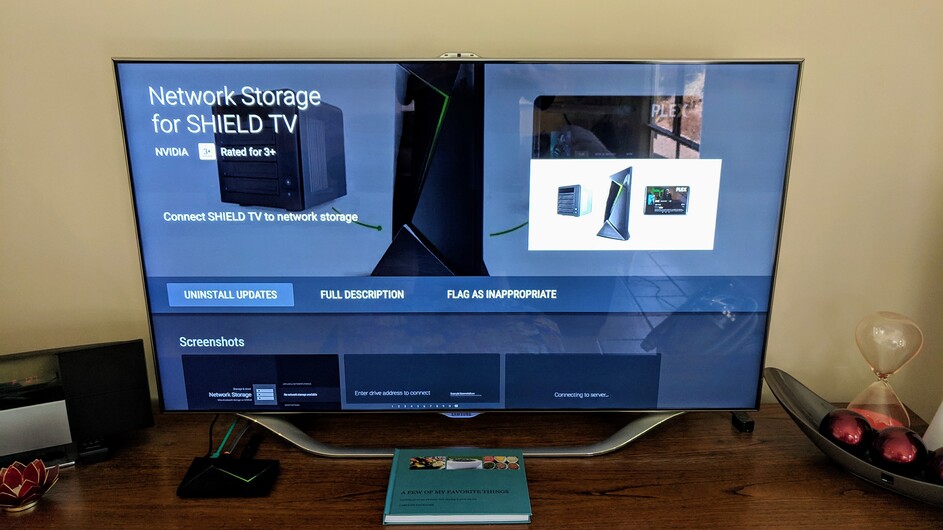
Still doesn’t work for me
FYI, on my Shield TV this update is installed already and I still have the issue occasionally.
There is a known Shield OS issues with Shield & Synology NAS SMB v3. The FIX is to change Synology NAS to SMB1.
See here for more info: https://forums.geforce.com/default/topic/1102308/shield-tv/shield-experience-upgrade-7-2-3/
This is such a massive pain in the ass. I have 2x Shields both direct playing 4k locally via GbE - previously without issue, but now experience buffering problems in both plex and plex-in-kodi.
The issue seems to be as discussed above with the buffer and image / audio packers. Whereas the Plex app pauses and then jumps, Kodi seems to make the issue more obvious by pausing and then speeding up when it grabs the correct frame, rather than skipping.
Be lovely to get a fix for this whether from Plex or Nvidia as it makes 4k streaming unusable, and i’m back to 1080p transcoding, which works perfectly…
I’ve now had the chance to watch several films back natively on Kodi with a mounted network drive and all works without a problem.
Does anybody know when Nvidia is going to release another update since it’s well known it’s a shield problem and not Plex
1 Like
I rolled my version of plex back to 6.12 and it’s worked perfectly on the shield for the past 2 days.
Who is actually working on this? Nvidia have said Plex are working on the “Your connection to the server is not fast enough…” issue but I’ve seen comments suggesting Nvidia is.
I bought the Shield specifically for Plex since it could playback all my HD and UHD media directly without transcoding or remuxing the audio. Since the end of last year I’ve experienced this issue while watching all different types of content from 720p TV shows to 4K movies. I’ve just receive the same error while watching a show I recorded using Plex and the HD Home Run.
Like most people I’m running a gigabit network throughout the house. I have a single enterprise gigabit switch between my server and client. This has been happening for so long that I started using Emby which can also direct play all my content and doesn’t have any of these issues on the Shield. I prefer Plex and I’ve had my family using my Plex for years at the moment I’ve having to find alternatives for my playback.
To resume playback I just hit back then go back into the program and it resumes fine. This happens randomly, sometimes near the end of a program just before something big happens. Since you’re close to the end of the program you’re not given the option to resume and have to fast forward through the program from the beginning which takes you completely out of the moment.
If I rollback the Plex client updates it works fine like for other people but it updates again in the background.
Is there an official Plex response to this issue? Who has actually acknowledge the problem and accepted they will work on resolving it?
I’ve included my logs if they’re helpful. The last instance of this issue in my logs is toward the end of the logs, I copied them immediately after the problem.
Plex Server Version: 1.15.5.994, Plex Inc docker container.
Docker Version: 18.09.5.
Server OS: Ubuntu 18.04 (4.15.0-48-generic)
Hardware: Xeon E3-1225v3 + 32GB Memory
Storage: 8x6TB RAID 6 (mdadm)
Plex Client Version: 7.14.1.9954
Platform: nVidia Shield version 8.0.0 SW Version 7.2.3
plex client logs.txt (2.2 MB)
2 Likes
In the meantime, you can turn off auto-updates in the Google Play store to stop that from happening and save some sanity.
We’re do I find a stable version to download and use in the shield and what’s the best version to use atm
I recently got a Shield as my trusty old Roku only has a 10/100 port. I have found the Shield and the Plex/Emby apps to be much less stable than Roku’s. For instance, the Roku Plex app plays any muxed UHD content I can throw at it flawlessly EXCEPT when it hits the 100 Mbps threshold.
I moved to the Shield for that wonderful full Gig NIC. The problem is a combination of bugs on the Shield and Plex making my UHD content play back with artifacts or pixelate or time out, etc.
I can’t win!
1 Like
Encountered the problem a week ago. Uninstalled all updates to the plex app and the error message went away. Set my processor settings to maximum and the error message came back. Plex was very laggy. Set processor back to optimized and plex is working correctly with no error message.
You can test a beta image on your Nvidia Shield, see the following…
Yes, you have to contact a mod and provide your Shield’s S/N. They do a manual push, but only on weekdays. They will not state timelines anymore of when the next update will push, so your guess is as good as mine-- however, there have been plenty of positive results including my own on one of the Shield’s I have this beta on currently.
If you read through more of the thread prior and after to the post I linked to above, you’ll find out that there was a known kernel switch (to a Linux based on) back in the large Dec '18 firmware update. The kernel switch changes a lot of stuff on the backend for the better, but along with that came regressions. It seems both Nvidia and Plex teams are working through these regressions introduced, maybe not at the pace we all wish for, but they’re certainly not idle nor not aware these ‘issues’ exist (at a software dev level).
1 Like
I’ve had this issue for months and the new image from Nvidia has fixed it 100%. I haven’t had one occurrence of the “Your connection to the server is not fast enought to stream this video” since the upgrade 3 days ago. I’d get it probably every 10 - 20mins of direct play time.
3 Likes
I downloaded the new beta mentioned above, seemed to work for a day but the dread ‘connection not fast enough’ has returned. I’ve had to back to 6.12 and now I’m also getting issues with that, I’m guessing it is something that installed with the beta.
Still regularly having this issue. Latest Plex client, gigabit ethernet…
