Server Version#: 1.23.2.4656-85f0adf5b
Player Version#: any
My folder structure is ArtistName\AlbumName\track# - SongName.ext
Works great on all the .mp3 files. MP3s work 100% perfectly.
But some of my files of this artist are .ogg, which has caused odd behavior.
The .ogg files show up under a separate artist box (TWO of them, actually), even though their Artist and Album Artist tags are identical to the .mp3s. Thumbsup is good one, Thumbsdown are the bad .ogg ones.
The existence of the 2nd .ogg artist is even weirder. It only contains 1 album of 1 song. I don’t know why it didn’t get combined with the first .ogg artist.
The tags are fine. I set up the MP3 ones manually the same way. The oddball one that gets its own artist is also fine, there’s no extra spaces or anything. I did cascade update of all files with the Artist, Album Artist, and Album tags.
Oh, and the one .m4a file in this album, it shows up as an album under the .mp3 artist with just that 1 song, so I guess .m4a will integrate with .mp3, but .oggs won’t.
You might want to check that these OGG files only contain “Vorbis comments” as meta tags, and not additionally “id3” tags.
(mp3tag should have appropriate preferences to automatically clean that up)
It is also important to have the “track number” as a meta tag, if you want your albums to not get fractured.
I thought mp3tag had some options to clean vorbis tags, but apparently not.
Your thread title suggests OGG files, but your screenshot says you are using Opus files. This is not the same. I have a hunch that Plex may not be able to read the meta tags from opus files yet, while it handles ogg files perfectly fine.
Try to perform the Plex Dance “light” (meaning step 4 can be omitted)
with the whole artist.
Ahah! The Plex Dance fixed it, but not right away. At first, it semi-fixed it, segregating the .ogg files into their own artist, but they now all showed up under a single album, sans track 9, the only .m4a file which was in its own album under the original artist.
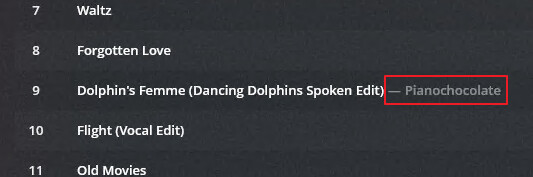
So since you noticed these are Opus, I googled and found .opus is the recommended extension for Opus files. I renamed *.ogg to *.opus, repeated the Plex Dance, and now everything is as it should be. The .opus files are no longer segregated from the rest.
There is still this oddity, the lone .m4a file has artist suffixed to it, but it’s not a problem at all since everything works properly.
mp4 and m4a files have had that peculiarity since the the Plex music agent was introduced. I’ve mentioned it a few times over the last year or so, but it’s never been addressed.
I actually would prefer that the artist name was shown all the time for all file types. It’s especially noticeable to me when you have an album with a few tracks with a “featuring” artist. Those tracks are the only ones displayed with an artist, the rest have none. It just looks like there’s missing info in my opinion.
I’m okay with the peculiarity. I do have a lot of tracks with a “featuring” artist so it would be nice for that.
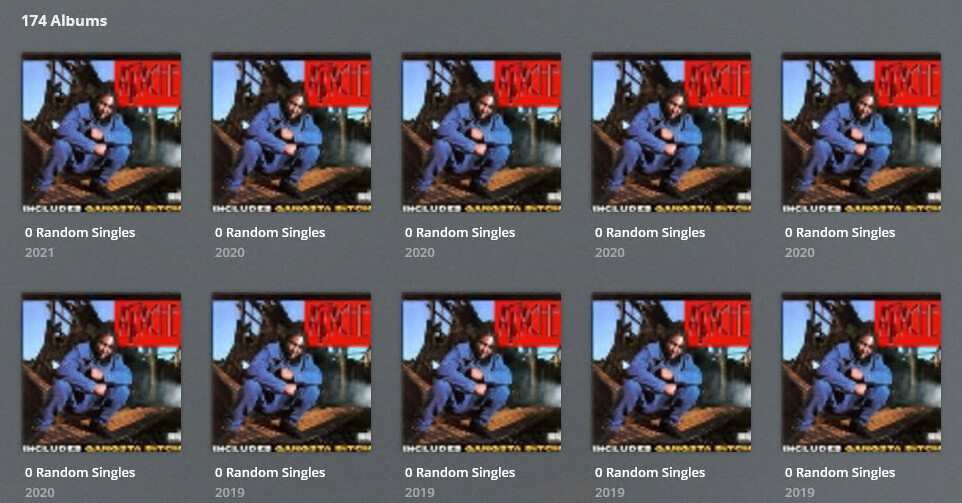
I’m having a similar problem with singles though. I dump them all in a single folder, “Random Singles” and give them “Artist - Title.ext” format. I’ve changed the “Album Artist” to “Various Artists” and Album to “0 Random Singles” (the 0 so it shows up at the top of the list). However, under “Various Artists”, it still creates many separate albums called “0 Random Singles” for some reason. I suspect the Year has to be the same on all of them since it does seem to split them by year, although it’s even split them within the same year. I prefer them all to keep the correct year so I can tell how old the song is, but I guess if it’s not going to work that way, I don’t have much choice.
Is there a place where all the rules are laid out? I didn’t catch it.
I did see an article about putting them in a file structure same as regular albums and naming them similarly as well (\artist\album\track# - title.ext), but that seems a huge amount of work for a folder of over a thousand tracks. No way to have it just look at tags alone?
There are ways to do this automatically. For instance mp3tag can take the embedded meta tags and rename the file and create a folder structure from the tags.
The latest beta version of the version also contains this entry in the change log:
(Music) If a single directory appears to have multiple albums, match them all.
This would at least allow you to forgo the subfolder per album.
However, the subfolder per artist is still required.