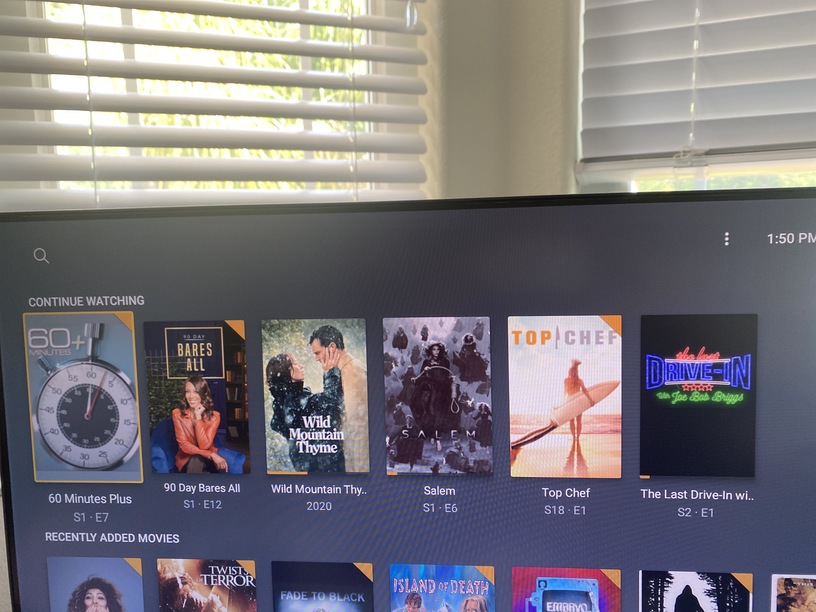
But this feature integration move just seems to me like someone had an idea that certain use cases would benefit from tihs integration (like VOD which is also in Plex interest). Then you learned from the past and introduced that as experimental… you had some voices on either side of the garden fence, then moved forward - but you are now facing the same that you had with the Roku UI desaster when it went public.
People just do not like it.
Now, I don’t want to speculate too mucn, but for me, it looks like someone at Plex is now trying to tailor the needs to fit the solution rather than tailor the solution to fit the needs. “Oh, look what we have, we had no complaints before…”.
Guys, I think it is time to give users a way of configuring thier own view. Why not offering server-side configurations and add a client side switch to either have the new and shiny thing (as a standard) or to grab everything that each server has to offer according to those individual server-side options.
I understand that VOD can be nice to have and is important to Plex.
But why take something away from people and then try to understand needs…
I think, long-term TV show episode handling of show-hoppers users is a cool use case of features that Home and On Deck delivered since years. I am hesitant to do server updates right now.
Just put some drinks to a virtual conference software table, say “hi” to management and developers and introduce to them what was cool about the “traditional” way of handling things.
I bet, some of you guys can group together and come up with something cool and new that respects that usage mentioned many times in this thread - be it an option “classic / new” or something even nicer than that. Just try.
I don’t think its strange… I think it all depends on the household.
For example, I like to watch horror movies and science fiction shows. My wife does not. If I’m watching a something she doesn’t like when she comes into the room, I dutifully stop it and we put on something we both like. Same thing for her watching Halmark-type movies. Then maybe we’re watching something together and she falls asleep. I stop it and put something else on. Between the two of us, we could easily have 6-8 partially watched items and sometimes more in Continue Watching on the living room TV. Sometimes it will be a week or more before we get around to finishing them.
That’s why I really dislike the idea of forcing Continue Watching and On Deck into one line. I want those items isolated, not lost in a mixture of items because we watch our Plex library like “normal” TV viewers that have a bunch of shows we rotate our time with.
I like this option idea too. I think it provides simple flexibility for lots of folks without being too much of a unique personal preference to be niche.
I think some of the use cases presented are a bit unique sometimes but with additional details they help me understand better (and either think of options or agree that a new settings would be cool).
For example, people having 15 currently watching in-progress movies makes no sense to me but when it’s explained that it’s because there are 5 people in the house - particularly kids - watching under one account that doesn’t seem so weird.
Anyways… for me, and possibly others (including devs\employees) seeing people detail out WHY they want certain settings a particular way makes it easier to understand it; sometimes it can even help figure out a way to fix it with existing options.
My preference would be to have the CW list for items that have been partially watched while the OD is for series that I’ve been going through. I’m working my way through several series and usually watch an entire episode but usually have one or two that I watch part way then don’t get back to for a couple of days. In the meantime I’ve watched several more episodes of another. SO it worked best for me to have the CW on top so I can easily see the partial episodes.
Collections are a great idea, but not useful for me because my library is huge enough that they need to be split up by decade or else (for example) they take too long to load, among other issues.
On a slightly different note, I had collections for a while, but they just confused people who thought I had lots of duplicates - which I technically did, because of the automatic function that was creating a new collection every time I added a movie. That was quite a clean up task.
I think Plex’s best option is to provide a range of ways for people to arrange their libraries, and then let us choose, instead of assuming that the way you’d prefer we do it is the best way for us all to do it.
One thing I’ve learned from this thread is how Plex can be used in so many different ways. We all assume our way is best.
I have multiple Movie and TV libraries. I always thought that was the way it was meant to be. If not why would Plex allow the creation of more than one of each type?
I would like to see a Plex Lite version. No VOD, no Live TV, just my own media.
Of all the most annoying things ever thought up by the twisted minds at Plex…
that ain’t one of them 'cause in this one small corner of the Plexiverse I can return control of the spacecraft to me - it’s pilot.
I have this happen too … “why are there commercials in your stuff?” … that’s the Movies and TV, just unpin that and you’ll only see my server stuff. I guess a way around that would be to make them household accounts? Then what I turn off would be turned off for them too?
@vvw1970 I really hope some additional flexibility with Collections gets worked out, particularly so that I can have items in multiple collections that have differing “show in library” settings. Right now, I hide movies that are in a series collection - let’s say “James Bond” so they are all kept together instead of scattered across the library. Maybe I’d also like to do a “Secret Action” collection that includes Skyfall as well as The Accountant. Well, I don’t want to hide The Accountant from the regular library because it’s not in a series so “Agent Action” collection is set to allow showing movies in the Library … and now Skyfall shows up in the library too.
I also can’t do sub-collections (Bond->Daniel Craig Bond->movies or Star Trek->TNG->movies) but that one I understand could get unwieldy.
I definitely turn off the auto collection feature as well … it’s a nice feature, just not for me.
I think moving away from multiple libraries for organizing works well for the features and tools that have evolved but without that extra flexibility with Collections, it’s still a bit limiting when people suggest it as a solution to situations like yours or for people who want dedicated year\genre type collections to reduce load times or onscreen scrolling (though recent update to allow holding down the button on the remote to continually scroll helps).
Maybe playlists help here as well but that’s more personal use and not library management functions … like a person’s personal watchlist vs “video store organization”?
Yeah, there’s something unusual there with the limit of 6, that shouldn’t happen, and is being investigated at the moment. The server side settings are coming back in PMS 1.23, which should go to beta once it’s been through QA.
Since people can have multiple servers connected and pinned in their client … how will the server side setting impact Home Screen display for people with multiple servers connected?
If I limit my server to 5 weeks and 10 items and Jane sets her server to 80 weeks and 100 items, does that mean my server content would only show up on client side up to 5 weeks\10 items and 80 weeks\100 items for Jane’s server?
Will there be an option on the client so I can limit how many things from Jane’s server loads because I don’t want to load 100 items? I would prefer a client side solution vs a server side solution really, but maybe that’s too much for the client to handle.
I’m sure this setting had the same impact in the past with multiple servers attached but I never had to think it out until this new conversation so am curious how this works out.
The server side affects how many items that particular server will contribute. So in your scenario, you could have 110 items. 10 from your server, and 100 from Jane’s. In the past, each server had its own On Deck, this recent change has given the ability to merge them, so you only need the one Continue Watching hub, that covers all sources you have pinned. So, you could either talk to Jane about her settings, or remove items from Continue Watching from your side on the client
Gotcha. It aggregates them together - makes sense. Thanks!
I like the combined list, but I think those settings may require more consideration from admins now that the list is combined and you’re right, that might be a conversation for human solution vs technical one.
Follow up question… having the remove option is helpful - though a client side dynamic option might be nice - but will removing a specific listing be per client device or across clients via account reference? If I remove from iOS device, will it also remove from display on my Roku?
Edit: Since the options selected for On Deck and Continue Watching can impact performance - is that a server or client based decision? The info here says it can impact loading performance but doesn’t say if that’s because of the server or client capabilities. Or both maybe?
I am the pilot of JuiceTown Airways. I fly the orbiter.
My passengers are in charge of that handy fold-down tray table and they can recline (1.4") into Kickback Mode for the flight <—I told them to set up a Plex.tv account (they did). I also told them to Disable whatever they didn’t want from Online Media Sources and insured them “JTTV” in beautiful Hog Knutt, WV doesn’t broadcast advertising.
I found out later some of them actually watch that stuff - they’ve been de-sensitized to American Broadcast Advertising for so long they can handle it, while I am the exact opposite.
I guess that is exactly what Plex had in mind and it’s working out for them. I can’t see it at my house - and if they complain I remind them about that paper they signed before they boarded the vehicle - it’s in their Account Controls…lol
Sure. We are supposed to see everything on home - continue watching that we are currently watching and on-deck correct? As you can see that is not the case. 1st pic is the Home Screen
I’m not enjoying the on deck and continue watching being merged. Myself and shared users hate it. Disappointed with my decision to purchase a plex pass before