Why can't we have mixed rows (Movies/Shows) on the frontpage or in collections?

Plex does it like naturally in their own Discover section and it’s great. So you can have themed rows that have movies and shows in it together.

This is like my biggest problem right now, I have with Plex, because I want to curate my frontpage and make it more interesting with every visit. But you always have this strict division between the libraries. You can sort one library over the other, but you can’t have actually a cross-section of all the content of your libraries presented together.

You can’t even have one single row that is showing all the latest additions regardless of the library they’re in. You can show new movies at the top, but if you want to see new shows or seasons, you have to scroll all the way down past the movie library section to actually see them.

Same for collections. Why is it impossible to create an MCU collection, that contains all the movies and the shows in the right order?

And the Discover section proves that it is possible to do it that way. Am I the only one who hates this strict division between the libraries?

1 Like

You’re not wrong that you can’t combine separate libraries together. The only row that does that is the “continue watching” row - a special row Plex created. There’s generally a good reason for this separation for folks managing local content and every media management software does it this way (though some will let you combine similar libraries - so if you have two TV libraries you can make a “combined” version but it takes some manual work). But as you can see it’s a common request.

There is a way to adjust things with Plex so you can get some of what you want within the structure provided.

Totally doable. You can create a manual collection or a smart collection or you can even do it automatically. Check out this article about creating collections.

For MCU if you don’t want to build it yourself and like how TMDB has put their different Marvel collections together (including artwork and metadata for the collection) you turn on the automatic collection feature and it’ll build that for you automatically. I don’t think there is one all encompassing Marvel one but there are ones for like Avengers and other subsets.

I don’t like the auto collection feature myself so I don’t have that on but I do use manual and smart collections. I have a Marvel manual collection and I have it sorted by release year - but you could manually sort it if you’d prefer. I have Star Wars and Star Trek collections and LOTR collection and Die Hard and John Wick collections and Bond collections (a few different ones). They can overlap but that can be a little funny sometimes and you can choose to display titles only in their collection in the Library view or as the individual titles.

I also have a few collections that are smart collections that automatically build themselves based on search filters. I have a couple for some favorite actors so as long as a movie is in my library with that actor - it shows up in that movie collection (Cary Grant for example). Or I have an Anime collection that automatically collects titles with the anime genre (which I have to add myself sometimes) to make them easier to find in one place.

And that relates to:

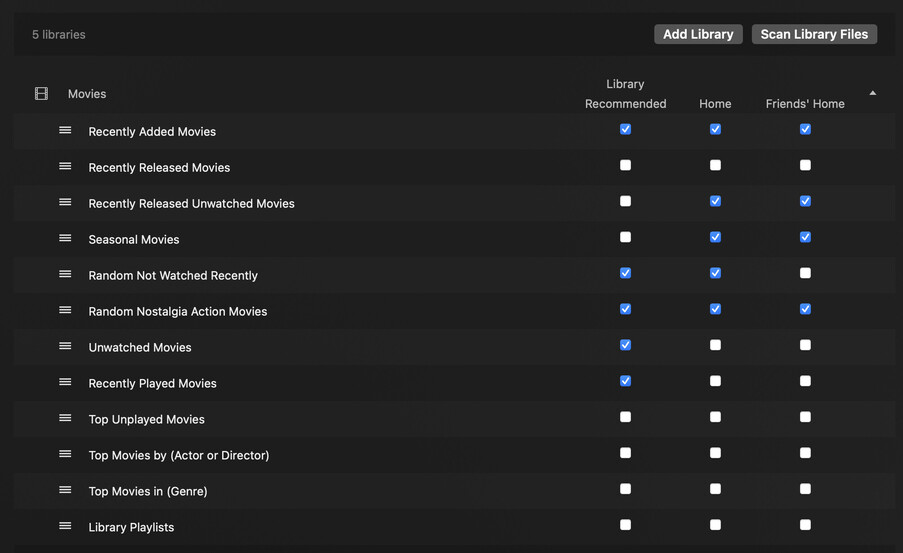
You can customize the rows on the Home Screen in your settings. In the Manage->Libraries section of your server settings you can turn off and on specific rows and re-order them.

And Collections can be added to those rows.

So here’s how those can work together.

I ordered my libraries in the order I want those library rows displayed on Home (that’s how it works out). Depending on your app you can either move them around manually or the order you favorite them in determines the order they get displayed.

Then I turned off rows I didn’t need and turned on rows I wanted and ordered them per library (see previous screenshot).

So, on my Home Screen I have the following rows:

  • Continue Watching
  • Recently Added in TV Shows
  • Recently Added in Movies
  • Recently Released Unwatched Movies (*)
  • Random Not Watched Recently (*)
  • Random Nostalgia Action Movies (*)
  • Recently Added in Anime Shows (this is just a dedicated TV library for subbed anime)

Those three rows marked with * are custom collections I created and added to my Home Screen. They work great!

I turned off all the rows for TV Shows library except for Recently Added. I turned off all the rows for Movies except for Recently Added in Movies - and I turned off the built in “Recently Released” row and turned on that custom smart collection that does the same thing except it doesn’t show titles that have been watched already; works better for me than the built in one. The other two custom ones are pretty similar and build a random collection of 30 movies based on parameters - one is for titles that have never been watched or haven’t been watched in 3 years so that some older titles just bubble up and the other randomly loads titles from the Action genre released in 80s/90s/00s (both have a few little fiddles to reduce some content like no documentaries and such).

One neat thing is you can set some of these ones based on watched status or play count to the user account so my friends\family to use my Plex get results relative to their account in those rows that use watched status.

You can see in the first screenshot how I customized those movie rows specifically. Once you set the visibility option on the smart collection it’ll show up there to turn on or off or re-organize.

By doing this those custom rows now remove a lot of decision fatigue when people are just wanting to find something to watch and don’t have anything particular in mind. Much easier than trying to scroll through hundreds of movie titles in the Library view.

One reason I stick with Plex over Emby or Jellyfin is that those other platforms don’t have this feature to create smart collections or customize the Home Screen with your own rows (Emby is supposed to get it in v5). I really like this feature and it’s not really promoted much.

Now one problem you may run into is if you have lots of different libraries - then it gets really cluttered. You can merge the “recently added” function for multiple like libraries. I personally don’t like that but it might help reduce some row clutter in that case.

Otherwise, I can only recommend merging libraries in that case - which is easy enough to do but you’ll lose historical data; moving files around in the same library will keep data but separate libraries treat titles separately - another reason to combine libraries sooner rather than later. Plex used to kinda recommend splitting up libraries to manage 4k vs SD titles or sharing controls but most of that has been worked out in other ways (version management and labels for example).
Not really. Using Plex since 2021. I switched to Emby after some time, because Plex wasn’t able to do Hardware Tone Mapping with Quicksync and Windows. I switched back after they finally implemented it. When I searched for this stuff I couldn’t really find anything that was related to my question. But it’s possible that I posted something before, in one of the topics you linked.

Thank you for your detailed explanation and the work you put into this. But I already knew about most of it. And yes, libraries have to be managed separately. But on a technical level all comes down to items that have a type attribute, that can be movie, show, music or whatever. It’s the job of the software to interpret and show the data in a specific way. It would be no problem, creating a script, using the Plex API that creates lists of mixed content from different libraries and show it together in one row. Plex does it themselves on the Discover page.

Ok, I give you that. But the maximum you can achieve is having two collections with the same name in different libraries, and it will show the content of the one in the other. But there is still a separation. You can’t have all the movies and shows of a franchise in one list sorted by release date. Emby can do that for example. But that’s one of the very few things it does better than Plex.

I am using Kometa (Plex Meta Manager) for that, so I have a bunch of different collections for genres, seasons, themes, franchises and directors, all with custom covers. I am just not able to put them on the frontpage in a good way.

Yes, and this would be a very good thing, if it wasn’t bound to the library order. If I could move the rows freely around on the frontpage, I’d be happy. But if you have a movie and a tv shows library you have 2 big blocks on the frontpage with their respective rows in it. You can move the blocks and the rows inside the block, but you can’t move one row from the second block over the first block.

There are scripts out there and I could easily write one myself, where you can manage time patterns for randomly (or more controlled) showing different rows on the frontpage, automatically. But it’s still limited to these library blocks. So if I want to show a few collections from two different libraries, they will always be in library order. So in my case, movie collections first and then tv show collections. There is no other option right now.

Agree. For Emby there is a plugin for smart collections, but it doesn’t work very good. And you have next to no options to customize the frontpage. Also there is no Kometa for Emby. Overall Plex is in a much, much better shape on a technical level. Even stuff like the intro detection is like day and night between Plex and Emby. And now Plex has credits detection too.

I don’t. I really don’t see any reason to have more than one library per media type. Why should I add more fragmentation?

1 Like

As you noted you can see both collections from either collection as long as they are named the same in both libraries (I don’t think this feature is all that well known). Emby does it by using playlists I think? Basically a saved queue system that you can add any media too? Plex has playlists too - would that work? I honestly have only used them for music and documentation about playlists from Plex is non-existent (couldn’t find anything in their documentation section) so I dunno. Might be worth trying. I only recall playlists area doesn’t show up until you create some I think? It’s probably a long shot.

It sounds like you really want your home to be a broader content display landing page which is just opposite intention of my setup which is specifically for a more focused view to remove decision fatigue of “too many options”. Just different purposes and yours definitely butts up to some of Plex’s limitations and I can appreciate the frustration. I don’t think that will be solved unless Home gets its own customization control like Emby\Jellyfin do it rather than it being library specific like it is now. Maybe the new server admin tools coming Soon™ will include it. :slight_smile:

I like your idea of being able to have randomized or dynamically changeable rows. Kinda like Plex does the holiday row popping in occasionally. That’d be something I’d like… set my single “nostalgia action” row to change between nostalgia action, sci-fi, fantasy, or animation occasionally without having the extra rows and that’d be awesome!

You shouldn’t really. Not anymore.

Back in the before times, separating libraries was the only way to control certain aspects of Plex - and other media center software like XBMC (which eventually became Kodi) . You’d put your different resolutions in different libraries to separate HD and SD or to separate lower bitrate files from higher bitrate (for remote access bandwidth limitations) or you’d use different libraries to organize genres or put your kids movies (or adult movies) where you could control sharing and access. Stuff like that was recommended because there weren’t good functions to do that otherwise. Managing by library used to be pretty significant and so Plex kinda evolved a bit on the library centric path; at least from my view. Eventually the media server software got better and managing those things got easier. I think, because of how Plex have been refactoring things the last several years - particularly pushing the “fewer libraries” expectation - that they are moving toward more media type management instead so hopefully some changes will become more flexible.

Emby just not have this strict division between libraries. You can create a collection or a playlist and put movies and shows in it together. They will be treated as equal items in the collection. But you can only mix top level items together. You can’t have a collection with movies and single episodes from a tv show, for example

No. I use playlists for certain tv franchises with multiple shows to put them in the right release order. But you can’t include movies in those lists. For example, the Stargate or Star Trek franchises. It’s not possible to include the movies so they fit in properly in the timeline of the franchise.
Same problem with the collections, where you can’t have one that contains all the movies and shows lined up together in the right order. You have to make two distinct collections for the same franchise. It’s not how I feel it should work.

I think so, yes. Kinda like my own customizable Discover section, based on the content on my server. Basically, I want everyone to see something new whenever they visit the home page.

Emby/Jellyfin doesn’t have any customization control. That was one of the reasons I switched back to Plex. Emby lets you create collections, like I want them to be, but there is no way to put them on the home page. You can only choose between a few predefined rows. Basically, you’re just being able to show new content on the home page for every library, plus the continue watching row.

I don’t think there will be any more options with this one. Just all the existing options in a new interface. But we’ll see. Breaking up the strict division between libraries would need a fair amount of refactoring. Also, developers always shy away from changing things that could confuse users, who are just used to the way things work.

I guess transcoding wasn’t a thing back then :smiling_face:
But today, I don’t see good reasons to still have a special 4k library. But I read that all the time that people still do it. I try to have all the content in H265 now. Not only the 4k stuff. So most of the stuff can be direct played, if the client support it (which almost always is the case now). But the biggest plus for me is, that you don’t need HDR Tone Mapping anymore, because it can be included in the codec. Better quality and lower bandwidth usage at the same time. And it saves resource costs for transcoding and tonemapping, most of the time.

1 Like

I think they’ve said they are expanding controls so admins can do more and have more control so hopefully they’ll add functions for broader organizing at the server level that isn’t tied specifically to the library.

I appreciate all the info about your experiences with Emby and Plex. I’m constantly curious if it’s worth the effort to switch to Emby when Plex does “funny” things so it’s really helpful. :sign_of_the_horns:

Like you said, some of what Plex does is still ahead of the others. One big one is title matching - I have been SUPER lazy about my file naming and organizing because Plex lets me do that and still matches just fine, so if I switch to Emby\Jellyfin I’d have a bunch of re-org and renaming to do. :slight_smile:

Hopefully the end result of their Experience release shakes out better than how it’s started.

Well, that’s what Filebot is for :wink:
Radarr and Sonarr also take care of naming files, if you use these. Personally, I’m using the TRaSH naming scheme. Works like a charm with Plex and probably with Emby/Jellyfin too. Plus you know what your files are, just from the files alone. Can come in handy, too, sometimes.

1 Like

One thing I’d like to be able to do is keep part of the original file name because I use that to help me keep track of aspects of the file outside of the media server. So things like if it has multiple audio tracks and what they are (TrueHD and EAC3 or only TrueHD? dual audio or only jpn w/eng subs?) or if it’s one of my rips or from a particular fansub or release group. Plex basically ignores lots of things in the filename (or I can put them in [brackets]) but Emby\Jellyfin don’t have a way to tell Emby\Jellyfin to ignore things in the filename. Their solution is to include it in the NFO file. It’s not a big deal but is another aspect where Plex lets me be lazy about it. :slight_smile:

Edit: This topic has gone kinda off-topic… but still useful! :slight_smile:

I’ve actually been dying to have a way to merge Movies and Shows into collections, (no not into libraries like people seem to fixate on when you tell them about the idea). Plex’s service allows rows of movies and shows, I personally just want to make my own collections of different genres to have a decent mix of movies and shows on the homepage. Say home page has:

  • Recently watched (movies and shows)
  • Continue watching (movies and shows)
  • Action (movies)
  • Action (shows)

People are quick to tell me I can relabel the movies and shows to “action” only and the collections will merge, sure, but they will remain split up in the home page.

Yep, it drives me crazy, that it still isn’t a thing yet. I was even trying to build my own Plex client to accomplish this, plus some other things I’d like to add. And even though it would be possible, I quickly realized that it isn’t worth the effort. It would take months, just to get to a level where it’s halfway usable.

But as you say, it’s not a big deal on the technical side. Plex does it all the time, just not with your self-hosted libraries.

And yes, of course, the libraries itself should be separated by content type. But everything outside the library context shouldn’t be strictly separated, for example the stuff on the homepage. The weird thing is, the watchlist is already combined. There you have movies and shows together.

So why not do the same with collections, for example? Make a global collections page, like the watchlist, where movies and shows are combined. I hate that I have to create two collections for the MCU or other franchises.

But most annoying is the homepage. I’d like to put a lot more content there, from collections and stuff and I would like to randomize it, so it would change after a while. But as it is now, when you put more movie content on the page, you push the TV show content further down. You wouldn’t even see the recently added TV shows content, unless you scroll way down.

And don’t let me even start about having a configurable highlight carousel at the top.

This topic was automatically closed 90 days after the last reply. New replies are no longer allowed.
