Seems I have also missed this 
“Plex’s latest funding will boost its own streaming catalog while supporting others | Engadget” Plex's latest funding will boost its own streaming catalog while supporting others | Engadget
Article from Cord Cutters News:
Plex Raises $50 Million to Become “One Stop Shop” for streaming
https://www.cordcuttersnews.com/plex-raises-50-million-to-become-one-stop-shop-for-streaming/
The CEO says, “Plex will be putting funds toward developing the interface to bring all of your media to one place, including movies, shows, music, and your personal media collection. The goal is to include all major streaming services, along with premium titles available to rent or buy, by 2022
If Plex is going to develop the interface to meet those goals by 2022, I think it’s a logical deduction to associate the changes being made in the middle of 2021
I wonder if the new Smart Collections feature might work well for this scenario. It’ll still be based on library pinned order, but if you have collected RA hubs and then sort out your own dynamic smart collection as the top option for the library that might be able to be leveraged to get a more personalized dynamic set of rows … though I haven’t really seen how the combined RA works out for ordering (TV vs Movie) and I haven’t had time to fiddled with the Smart Collections (I was gonna wait a bit for any bugs to be sorted out first).
Now that the forced change is live, it’s emphasizing yet again what a hot pile of crap it is for users like me. I can’t decide what I enjoy the most:
- That I need to pin every single library—especially TV libraries—in order to have items from them show up in “Continue Watching” (thus entirely defeating the purpose of pinning) (I discovered this one last night when a new episode of a show I’m watching was missing from Continue Watching, because its library is one I have hidden from my pins SPECIFICALLY BECAUSE IT’S A LIBRARY I DON’T USUALLY CARE TO NAVIGATE TO, and the “new” and “continue watching” queues were sufficient to keep the RELEVANT episodes on my home page)
- That I need to pin every single library to the front page in order to see a “New” queue for it (thus, again, entirely defeating the purpose of pinning)
- That I need to use the order of the pinned sidebar to reorganize the order of the “New” queues (thus entirely defeating the purpose of having a sidebar)
And don’t tell me I should just use Collections instead of separate libraries. I shouldn’t have to spend a ton of time moving files and adjusting per-movie/show Plex metadata/settings (for 500 movies and over 200 TV shows) to “fix” something that wasn’t broken until YOU broke it, for absolutely no reason at all (with a “solution” that’s an entirely different feature, and one that doesn’t necessarily do what I want it to do, and does do things I don’t want it to).
Oh, and FUN BONUS, I just discovered that libraries that weren’t previously pinned that I pinned so their content would be accessible from the home screen? Using the sidebar to navigate to any of them now lands me at a page that says: Not found. We’re having trouble finding this page. It might have been deleted. (I can get to some of their content from the home page, in the new/continue watching queues. But the libraries themselves are inaccessible.)
Tell me again why you FORCED this update on ALL USERS, when it clearly shouldn’t even out of beta?
I agree.
The ten minutes it took to learn the required steps to make it as if nothing ever changed?
I’m never gonna get those 10 minutes back.

It took far less time than it clearly took to post some of the rants here.
10 minutes for you maybe.
Obviously some of us can’t get Plex to work the way it did no matter how many minutes are alloted. 
That was the beauty of the Managed Home screen. You could manage how it appeared.
“Jack of all, master of none” software does everything but never does anything well.
There are always compromises.
I would rather instead of implementing this new Home Screen, I would prefer it be left alone,ie returned to the previous Home Screen, or at least be given the option to customize it to my liking easily. I like Plex because it is mine and I don’t like the idea that I can’t use it the way I want.
Thank you
I think I had something similar right after the update, in my case the issue was resolved by setting Allow Fallback to Insecure Connections to Always on my local server, it probably was reset. If your server doesn’t have SSL you can try that, or On same network option.
Thanks, that is a very neat idea! I didn’t yet explore much of the Smart Collections too, was busy being disappointed in things I can’t do 
Thanks for the advice @JaysPlex .
My main Plex device is an Android box and should update automatically, but I’ll check the version.
Here’s what I’m seeing:
- On the home screen, it does show more than 6 items in Continue Watching, but I’m not sure it’s the whole list. Plus, it merges CW from all libraries I’ve pinned to the sidebar which is … less than ideal.
- When I enter each library, in the Recommended tab, there are only 6 items, which is, again, less than ideal. It’s the same on my Android app and the web app (app.plex.tv).
If you’re only seeing six, it sounds as if you’re not on PMS 1.22.3, which should have resolved this bug. 
Possible bug? (have not read this massive thread but thought I should mention)
I noticed now that we can merge the Home Screen again, it does not work for the Videos category… at all. It only shows TV and Movies categories and removes anything under the Videos category. No libraries show up at all from the Videos category on the Home Screen.
Is the “Videos” library pinned to the sidebar?
The only way any library shows up on the home screen now is if it’s pinned
If you Merge recently added items, Other Video recently added goes away. You’ll need to activate Unplayed Videos (if you have some), or Recently Played to get something to show up.
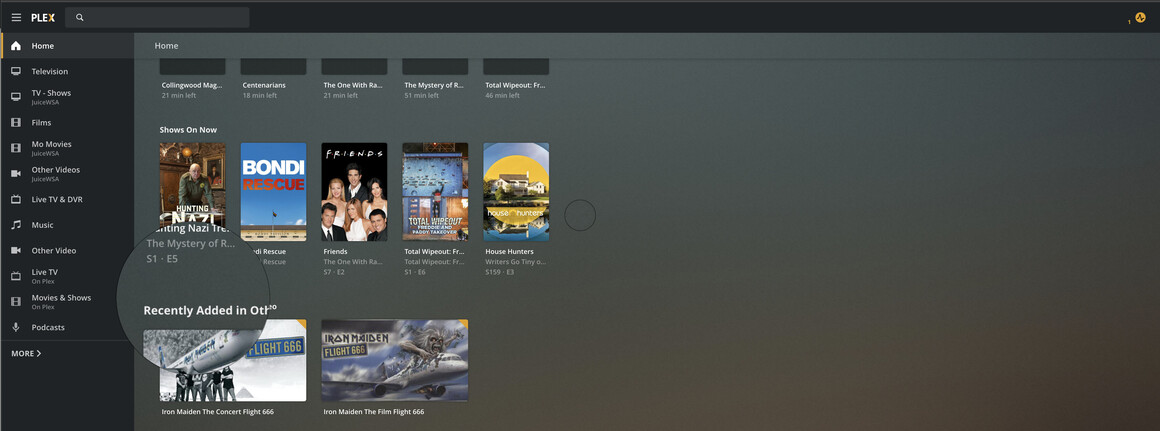
So Plex gets rid of On Deck, a feature that most users used it seems, in favour of a feature that a few users might use if they 're too bone idle to browse the library’s or use the search feature?
We did not “get rid of a feature”, we merged Continue Watching and On Deck into one hub. All the content that would have appeared in On Deck will appear in Continue Watching. Please try and make your comments more constructive, please.
Hi @DaveBinM - I have found a problem and reported it in here, but it seems to have got lost in the noise…
Can you take a look at this please? > On Deck, Continue Watching & Recently Added - #1051 by axemanuk666
