@kamhouse I actually have something setup which syncs watched history from trakt.tv to both servers (which I don’t want to remove).
@JaysPlex I believe my setup should be the same as sharing Plex servers with different people. Although I guess the main difference is that a user will probably not have watched status synced with a shared server so the same media that you’ve watched on your server is still unwatched on the shared (?)…therefore it would not show up twice in the new CW.
Thinking about it now, I guess you can say my use case or scenario is not normal/common. So far, the only way I was able to remove the duplicates was to remove them from pinned. It would just take more clicks to browse the other server but i guess is acceptable.
I have not experienced that on 2 servers but with 2 libraries on the same server. For example a 4k library and a “normal” movie library. 2 Poster will show up in CW when you watch one of those movies.
So I guess it’s not just for me that On Deck is gone. I cannot stand having everything thrown in to continue watching. Every update I have had that involves the home screen has taken something away or made it more inconvenient and never the other way around.
I also cNnot understand for the life of me why you guys need to keep making it more and more steps to delete an episode of a show on the Roku. Used to just be able to hit delete, then had to go to more then find delete and hit ok twice. Now with this latest update I have to go through the more options, select delete and hit ok, then go up and hit ok again.
Might be time to just look for something else to manage our media…
Is there a technical reason why the home check boxes can’t be checked on unpinned libraries to have new items included in the recently added movies hub on the home screen? I don’t really want all my libraries pinned to the side bar, but I would like to surface newly added content to any of them by having it show up in recently added movies or TV shows on the home screen.
Plex seems like it won’t let me save the check boxes for any of the “Home” boxes if the library isn’t pinned.
EDIT: I figured out the library had the advanced settings visibility set to exclude from home screen. After setting it to “include” the check boxes would save state. However it still doesn’t show up on the home screen.
SECOND EDIT: Apparently the old server web interface that still has the On Deck hub actually sees the new items from unpinned libraries. It is the new updated clients which are Continue Watching aware that don’t see anything new from unpinned libraries.
I think that is pretty much intended, and it will stay like that in the new clients. Not sure if it’s a technical restriction, it feels more like a whole direction Plex is currently heading - “what you pin is what you get” - which severely limits what we can choose to see on the Home page, compared to how it was before. It was discussed more in this thread and there is a feature request, but your specific issue could probably be resolved with a simple option, you can try requesting it on the suggestions forum.
Plex right now is a combination of feature creep by disconnected developers and management keeping the income steady (streaming services / third party subscriptions)
For the family just added a Odroid N2+ box (CoreElec) and combined it with PlexKodiConnect.
This returns the On Deck as its still in the API, once they remove it from the API it also has its build-in On Deck so that’s neat.
This gives a player that doesn’t change its UI on a wimp and can direct play any content, for myself primary is Emby already.
I saw it raised way up in the thread, but it was never answered–will we be able to sync Continue Watching? I used the On Deck syncing quite a bit, and thankfully still have it set up for one library, but if that were to break or if I wanted to use it on another library, it appears I would be completely out of luck.
Same here! I use it almost always to preload my on deck to my phone so I can watch content while on the train to work. I recently just got a new phone and can’t setup the sync job. I’m fine with the continue watching feature (ish), but at least give us the ability to sync the content.
I’m currently plex-less now on my way to and from work without lugging my old phone around.
There’s never been a way to hide individual items from showing up in Recently Added except to exclude the entire library from being shown on the Home Page. That setting is still available.
This has probably been brought up before but why does Merge Recently Added items ignore the Home setting for Recently Added Movies in Libraries? To clarify, I’m trying to have this specific library show up in Continue Watching, meaning it has to be pinned and set to Include in home screen and global search, but at the same time prevent it from showing up in the newly merged Recently Added Movies row.
If I deactivate Merge Recently Added items, the Recently Added in x row for that library doesn’t show up (as it should be), but Merge Recently Added items seems to ignore my Home settings completely.
I hope you can make sense of what I wrote
This is ridiculous… I see several replies herein from Plex stay saying ‘they’re looking into it’. How many requests to simply turn On Deck back on does it take from paying customers to get Plex to do that. I don’t understand. For 2-3 years you have been attempting to make Plex mainstream at often, at the expense of its local, long-time paying customers.
I’ve been lurking since 2012, joined a bit after that - I’ve never gotten the idea that paying for PlexPass gave us any more input into the random crapshow they decide on every few years.
In other words folks, don’t expect to get to the head of the line in the forums because you have PlexPass. The Plexpass features are quite clearly layed out on the subscribe page, and I’ve seen mods/admins say as much. ‘Extra support’ or ‘valued opinions’ aren’t high or seen on those lists.
Just wait 3-4 years- the GUI will change again to something else that doesn’t make sense, and this will have been forgotten.
Unbelievable decision. One of the worst regression ever on Plex. Whyever. Here are thousands of opinions in this thread. Why is such user voting not evaluated?
For now: Can someone explain, how I (same user on both devices) can have different home screens on e.g. iPad and iPhone. Because the items of interests are completely different. For series I want to see other sections on iPad than on iPhone, for movies as well for music as well, etc. etc.
How can I reach this as before now with this really bad auto-managed home?
Home screen depends on what you have pinned on left in client. If you have different items pinned on one device than the other, the home screen will be different.
I’m most upset at the moment because when I start my Plex on Roku, it takes ~45 seconds or more to fill and sort the home screen. I have 5 servers shared with me (counting my own). I use no less then 2-3 libraries Pinned from each server for easy access from Plex (so, 20+ pinned libraries total because I have 6 libraries of my own pinned) - now that Plex depends on setting/sorting based on pinned libraries, it takes forever.
And don’t tell me not to pin so many. Then it takes just as long to go dig into “More…” and expanding each library under each server to find out what’s been added/updated/or that I’m watching on the shared servers or what photos/music my spouse has added to the photography and music libraries made just for them.
That’s clear, I understood before, but perhaps I didn’t get this or you didn’t get my problem.
How to have e.g. shows pinned on both devices, but I want to see last viewed episodes (from shows) on my iPad home screen, but not on my iPhone home screen or last added episodes (from shows) on iPhone but not on iPad, etc.etc.
Now I understand. You can’t anymore. Unless you make a library for ipad and a library for iphone, then pin each one to each screen. Silly idea, i know.
One home screen to rule them all is ok for some, not for others. I don’t think it should be that difficult to add an option in our server settings ‘shared home on all my clients’ to allow for similar to the previous action. Heck, make it a plex pass feature.
I just upgraded my Plex server and was presented with the merged Continue Watching and On Deck that now adorns the Home screen of the interface, and after much searching online for how to turn this "feature’ off, I ended up here.
@DaveBinM To echo what other users have already said - Continue Watching and On Deck are NOT the same thing and having them together like this is ridiculous. I get why some might want to take up less space on their screen, but I can’t see why this isn’t an option that can be toggled just like everything else on the Home screen.
Although, I’m a little shocked to see that this was being discussed and “considered” about six months ago, and nothing has been done - PLEASE just make it an option to turn on or off.
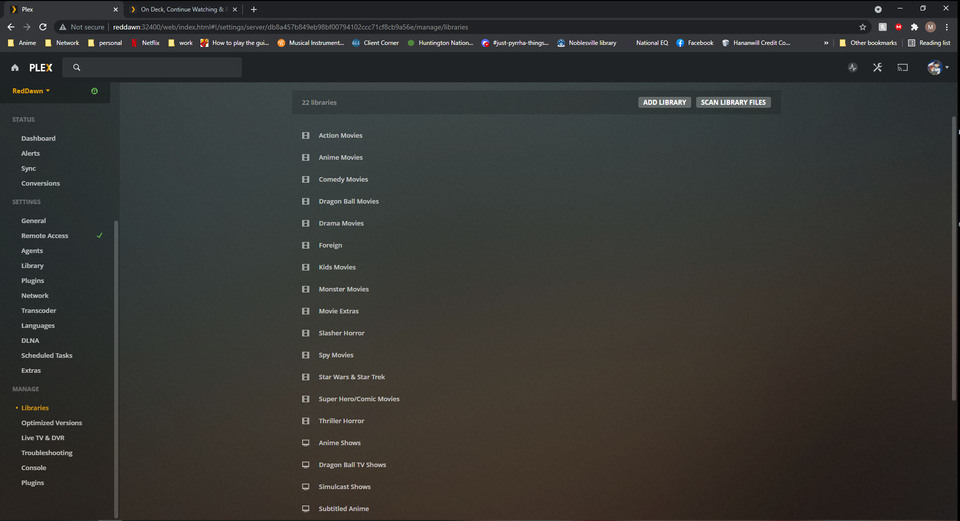
Is there a reason I would not have the ability to rearrange my libraries. I am missing the three line icon in the manage libraries “tab”. Here is a screen shot of my settings page.