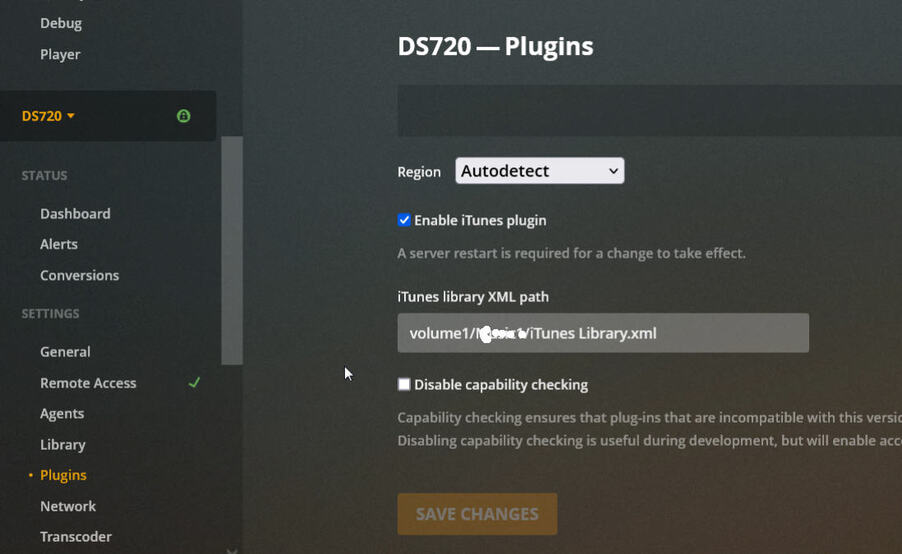
I should update my Plex but have been hesitant to do so because it was so difficult to get my iTunes playlists to import into Plex. This allowed me to import nearly 1,000 playlists I have (I’m in the radio/music business). Trying to replicate that in Plex would just be inconceivable.
Does the latest version of Plex from March 14, 2024 - v.1.40.1.8227-c0dd5a73e - have the Import from iTunes showing when you click the three vertical things to the right of “Playlists”?
I would like to also make sure you have the iTunes plug-in as part of your Plex. I believe if you didn’t import playlists from iTunes and follow that through how it works, you wouldn’t get the iTunes plug-in but I could be wrong.
Before I update my Plex, I’d like to know definitively whether there is the iTunes playlist import still. A few years ago Plex had removed that for some reason (I believe it was done in error) and it was added back in which allowed me to get my many hundreds of iTunes playlists into Plex.
As long as iTunes is on same machine and you have the iTunes xml path field in library settings filled out then afaik it should still work. (The itunes path location setting was moved a while back) I don’t have itunes to try.
It took me a bit to go back to my captures of how I did the XML iTunes so Playlists would come in the way it needed to be done. Here is a capture from Feb 20, 2022, Plex DS720 version of 1.24.0.4921. As you can see, the Plugins navigation shows in Settings for the DS720. You’ll notice to the right is a box to enable iTunes plugin.
Now I’m especially worried about the XML path for iTunes disappearing with the latest Plex update if I do update my Plex. Perhaps I’m forgetting how to get this to show up or not seeing how to get the plugins to show under the Settings as was in my Feb 2022 scan of my system I archived.
I must be able to import new itunes playlists as I make them in iTunes and add to Plex. And if I need to change the XML path, I should (hopefully) be able to do so still in Plex.
This must be on the latest version of Plex? I’m speaking of Plex on my Synology DS720 NAS. Under Library as your capture is pointing to, there is no such “Enable iTunes plugin or iTunes library XML path” on my Plex. I have Library set to Show Advanced and then tried Hide Advanced, neither of which show. No "Market source - local detection only (selection made in the dropdown) is anywhere on the Library page - only “Generate intro video markers”.
Your capture must be from the latest version of Plex I assume? I noted the version I’m on (1.28.2.6106).
So shouldn’t/wouldn’t it be somewhere on the version I’m on as my capture showed from Feb of 2022? I realize that’s from two years ago but it was a separate item on the left navigation page (Plugins). So I am not seeing iTunes XML path or Enable iTunes plugin anywhere on my version of Plex.
If I update to the newest version, I want to make absolutely certain this option is there per your capture. If so, that’s great - and that would confirm for me that I can update with confidence.
Forgive another question, but can you clarify whether the XML library is on my current version (not the newest version)? If so, where do I find - or has it disappeared?
To update my Plex, I went to Plex.tv/media-server-downloads and chose the NAS/Synology to get the newest version. This is what I’ve done in the past as I recall. It shows:
v.1.40.1.8227-c0dd5a73e
March 14, 2024
This would be the version I would want? And I would update on my Synology software for my DS720 obviously. Is the version directly above, the latest version of Plex and the one I should get? And call me stupid, but this version will have what is reflected in your capture for the iTunes items (enable iTunes plugin / iTunes library XML path)? So sorry to hammer this.
I have the Lifetime Pass for Plex.
Thanks for your patience as I seek to make sure on an important element for my use of Plex.
Can you confirm for me whether you run your Plex to run from music on your computer (the folders and files you added to Plex) or whether these folders and files reside on a NAS such as Synology?
I did have both my computer where I added a few folders of music to my Plex when I was first setting this all up 2 1/2 years ago) as well as my main music (and movies, photos) that reside on my NAS. I deleted my computer Plex library as I never used it.
I am not seeing the enable iTunes or iTunes xml path as on your capture. This makes me think/wonder if it’s because you have your library on your computer.
I should point out that my iTunes song files all point to my NAS, and that’s where Plex plays them from.
In other words, the preferences in iTunes for location is volume1/music (name of the main folder). And if I edit a song in Plex: it has that same location.
For me to get iTunes playlists into Plex took a massively complex series of steps, all of which required the two items on your capture.
If your music does reside on your computer and not the NAS, and you see the two things in your Plex and I don’t, why would that be? And how can I get my Plex to see that screen?