In my family room, where the Smart TV is connected via Wi-Fi, one of my movies stops every few seconds and a message appears saying that my connectivity is too slow to show the movie. I then randomly chose six other movies among my 128 movies to project on the same TV and they play perfectly. Only this one movie seems to have the problem.
My Wi-Fi is a Google Mesh with download speed of 868 Mbps and upload speed of 41 Mbps.
I then watched the entire movie on my Windows 11 computer, which is the server for my Plex system. It played perfectly, with no stopping of any sort.
My son, who lives in another city and has access to my Plex server, can run this movie with no problem.
I’ve been using Plex for several years now and have never once had any problem with it.
Should I delete this one movie and recreate it on the server? (I really don’t think that would help, but might it?)
I have downloaded logs, but do not see how I can upload the logs to this Forum.
Plex Settings ____________
Internet Streaming is set to 3 Mbps, 720p HD.
Another Setting shows Internet Streaming set to “Original”.
Thank you for this suggestion, but I really don’t see it’s connection to my issue. This one movie appears to be the only one of my 128 movies with this problem.
I have opened the Dashboard and am watching its content as I am playing the movie in question. Interestingly, the movie is running perfectly fine; no stops, no hesitation. I see nothing strange in the Dashboard.
The problem in the case you suggested I look at was that it took a long time to start up. My movie starts instantly. Two days in a row, that movie would stop every few seconds and then continue. This morning, it is running perfectly fine. Nothing at all has changed in my setup.
You clearly know much more about Plex TV than I, but I truly do not understand the connection between my issue and that described in the issue you directed me to.
That was just a slightly different symptom, but the described condition of the video file can definitely also cause the symptoms you’ve described in your first post. Particularly that a smart tv has major issues, while a computer video player has none whatsoever.
Anyway, was this perhaps a relatively new addition to your library?
Sometimes it takes one or two server maintenance cycles to perform a deep analysis of the files.
Doing so can improve playability under certain circumstances, since the server only needs to reserve the actually required network bandwidth for the file, instead of an estimated bandwidth (which usually has a very wide safety margin on top).
This was not a new addition to my Plex server, and I know that I have watched it in the past, probably a couple of times. But I did add a new film the day before watching this movie. Could that have somehow caused the problem? Again I comment that that movie was the only one of six or seven that I tried after seeing the problem arise.
Do you see if the server is transcoding the video when it buffers this often? Based on what I’ve read, it could possibly be a unique format that causes your server to transcode it rather than directly play it. And if the server is juuuust a smidge underpowered, it might be transcoding slower than real-time, which will result in lots of “buffering” and “the network might be too slow” messages.
Thank you for your suggestion. (Repeating a bit of my first posting) When I encountered the problem two days in a row, I did not know to check the Dashboard. Today, when I again tried to view the movie, it worked like a charm. I went onto the Dashboard and saw that the Audio was being transcoded, not the video part. At least, that’s what I understood from the Dashboard.
As to whether or not my computer/server is underpowered, it’s a relatively powerful Dell XPS 64-bit computer with 64 GB RAM. There are two hard drives, both solid state. One is dedicated to the Plex server – it contains all of my files.
whistles sounds like a powerful comp you got there. Still don’t know the full specs, but if you got a good comp, then the only option might be that some videos - even in a strong computer - can transcode still too slowly if the vids are 4K HDR. HDR to SDR can be pretty harsh even on a strong comp, and I think only Nvidia graphics cards can handle that. Software/hardware CPU might not be capable of transcoding fast enough. (please let me know if you need those terms explained)
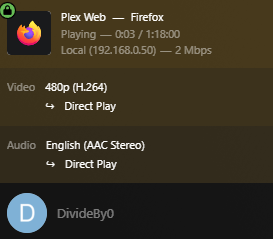
This is why seeing the dashboard when this happens will help narrow it down. It can tell us if its not transcoding:
transcoding audio only:
or transcoding both (and using HW acceleration, in the parenthesis):
My “Internet Streaming” setting is “3 Mbps, 720p HD”. To be honest, I don’t recall ever setting that value – I think it simply was the default when I created the account.
Thank you for clarifying that “Internet Streaming” only applies to when I am watching a movie on some else’s Plex server.
My setting for “Home Streaming” is “Maximum”. I assume that is what you meant by “Local Quality”.
I do not have a program to convert an MP4 to MKV or vise versa, but I could purchase that. The movie that I was having a problem with is in MKV format. But as I said earlier, for whatever reason, it is working fine now.
Regarding your comment that it is likely a problem with that specific file, let me remind you that when I watched it from my desktop computer (on which the Plex server files are stored), it worked fine.
Yeah, it will “work fine” on your computer, as the computer clients/players can play just about any file without needing a transcode. Clients/players installed on TV’s built-in OS are… not so good at playing all videos. Usually, Plex will need to re-transcode the video on the spot for those unless you have them in a fairly specific format.
You don’t need to purchase a program to convert a file to/from MP4/MKV. MKVtools is 100% free and excellent program that is great for re-muxing your file. Yours is already MKV though, so it might not do anything.
“Internet Streaming” is technically for any time you are not in the same house as the server. So most of the time your friend isn’t going to have a server in your house, so watching something from their server will then have to go over the internet, and is “internet streaming”. But Plex is great for keeping your media at home, and watching it on the go. So if you leave your house, you must connect to the computer using the internet, and the “internet streaming” quality will matter here too.
So it sounds like… there is no current issue? You say it is working fine now, and that’s great. But I don’t think we did anything to fix this. So if it happens again, please let us know about that, and try to capture a Plex dashboard image from your server (the box I showed up top). If you do not know how to find this info, let me know and I will explain.
You can play it directly off the computer or your son can play it remotely
My thought is, whatever the imperfection is with the file isn’t exposed until you try to play it over your Wi-Fi which isn’t a factor in the other two scenarios
Of course, this is a guess, but what I do know is remuxing the file fixes issues like this 9 out of 10 times
Thank you for all of your comments and advice. Yes, the problem seems to have gone away, and yes, I did nothing to fix the problem. If it occurs again, I will get back to this forum.
Thank you everyone!!! I really appreciate all the advice.
I get a similar error with my fireTV stick. If I restart the stick the problem goes away. Do you think the problem went away after restarting the TV? I think it helps to clear out buffers every now and then.
I wish I could be more certain to reply “Yes” to your question. But, in truth, I am not certain. Without a doubt, however, I do subscribe to the notion of “When in doubt, reboot.”