Hi - I was just wondering if there is a way to automatically open Plex in a different browser (Chrome) than my default browser (Firefox). Thanks!
Not from the Tray Icon - it only knows your Default Browser.
You can set a bookmark easily enough - like mine:

First one is Local - http://127.0.0.1:32400/web/index.html
Second one is Plex.tv
Thanks! That works!
You can usually take the existing icon of that browser and make a copy of it.
Then edit it and add the URL of the web app into “Target”, after the path to the exe https://app.plex.tv (separated by a space character)
Then place this shortcut onto your desktop or into the start menu.
This should work on any OS in a very similar fashion.
Works great! Thanks!
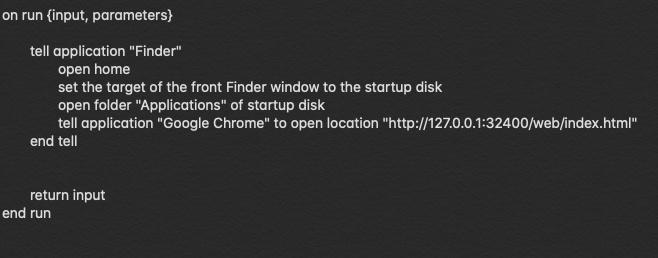
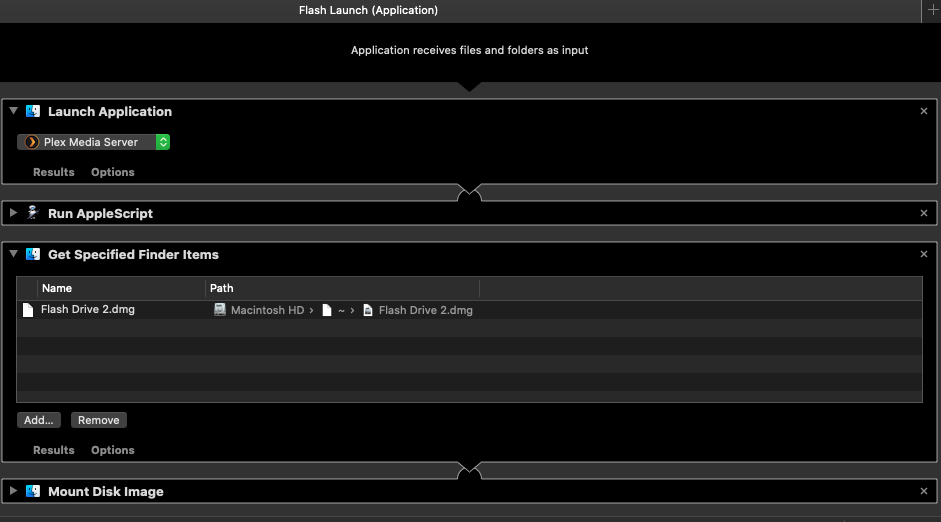
I’ve worked for weeks to find a solution to this my self. I’m a Mac user, Safari is my default browser. I created an app in Automator that opens my media file, Plex and Chrome but could not figure out how to get Plex to open in Chrome. Until now! Sorry this only helps Mac users but perhaps it will give you the ideas to transfer to other OS.! Here is the screenshot of the app made in Automator for Mac. the Apple Script copied into the “Run Apple Script” command is: