I recently found several video files that are local content that appear in all of the Plex players mobile TV desktop but are not playable because the media files themselves are no longer in my Plex media server folders
When I tell Plex to rescan where those media files used to be it still doesn’t remove their references in the media player. I’m a bit lost on how to get things cleaned up here.
I’d appreciate any and all suggestions. Thanks
Make sure the file is not in some other location being scanned by Plex.
- Using the web browser interface, go to the pre-play page for one of the videos.
- Click on the three dots, then choose Get Info.
- This shows the path to the file.
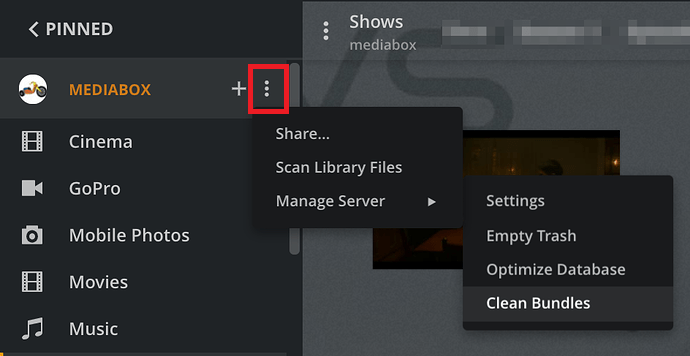
Remove stale entries from Plex database.
See screenshot below.
- Scan libraries
- Empty Trash
- Clean Bundles (also in Settings → Troubleshooting)
- Optimize Database (also in Settings → Troubleshooting)
If the file is still displayed in the clients, check for database corruption.
- Pull log files (Settings → Troubleshooting)
- Look in Plex Media Server.log and .1.log to.5.log, for SQLITE3 ERROR entries that mention a corrupt database, malformed disk image, or similar.
- Or upload the ZIP file to the thread, and others can take a look.
Additionally to the above:
Edit the library
go to the “Add Folders” tab
verify every path in there that it’s
- still existent
- accessible to Plex server
- not completely empty
