Make sure the file is not in some other location being scanned by Plex.
- Using the web browser interface, go to the pre-play page for one of the videos.
- Click on the three dots, then choose Get Info.
- This shows the path to the file.
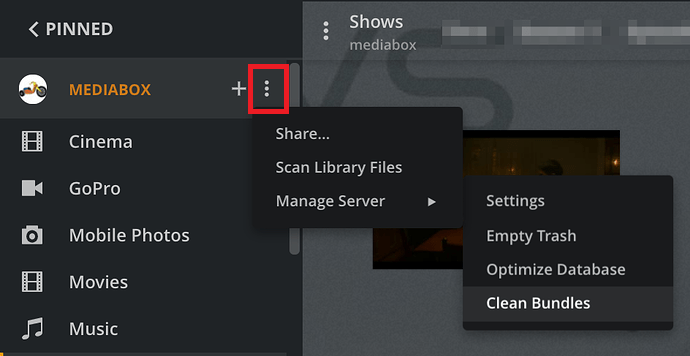
Remove stale entries from Plex database.
See screenshot below.
- Scan libraries
- Empty Trash
- Clean Bundles (also in Settings → Troubleshooting)
- Optimize Database (also in Settings → Troubleshooting)
If the file is still displayed in the clients, check for database corruption.
- Pull log files (Settings → Troubleshooting)
- Look in Plex Media Server.log and .1.log to.5.log, for SQLITE3 ERROR entries that mention a corrupt database, malformed disk image, or similar.
- Or upload the ZIP file to the thread, and others can take a look.