…But I am learning. You won’t need version data or screen shots for this! Just a couple simple (I think) questions.
During my installation I read a great number of site pages, all were very helpful. So last week I came across a site that gave some very detailed information as to how to compare the Plex SQLite database to the actual number of movie files on the media drive. I set it aside, although not very carefully, to read later and I lost track of it. Does anyone know the link to such a site with this type information. If so I would really like to get to it. Which brings me to my second question…
Is there an easy way to compare the movie file names on my media with what Plex uses? Here’s an example: I have a movie file titles Batman vs Superman (2016). However Plex seems to like Batman v Superman.(2016). I ask because I watched half of this movie through Plex one evening and the next day when I go to watch the end it wasn’t there (in Plex). It just disappeared. But it was still on my media. After I renamed it to what Plex likes, viola, scanned and I was able to watch the movie. Strange, me thinks, but…
I’m not trying to work with the database. I am looking for a site I saw that helps users to understand why their might be a discrepancy between the number of movie files in the media/movies folder and the number shown as scanned by Plex. Currently I have 1738 movie files in the media/movies directory, however Plex only scans in 1435. I just know I saw this information in passing and I’d like to review it further.
When you say files, are you comparing actual movie files with .mkv, .mp4, .m4v, etc. extensions or are you including the number with additional files like extras, and possibly extra versions like a Directors Cut.
For starters you can check to see if anything needs to be split apart if it was categorized as a duplicate.
I have a test server and I currently have 93 folders but Plex sees 92 movies listed and that’s because there are a set of duplicate movies, each a different version, one censored and the other uncensored. I could technically keep them in one folder but I have them separated in individual folders, accounting for 93 folders instead of just 92. This can also happen in your case or there could be simply a matter of Plex not matching films correctly. You’ll have to take a look using the duplicates and other filtering methods.
You’ll want to keep a cohesive method with films as it’s easy to keep them orderly at say 200 movies but once you reach 4,000 and they are scattered, you are truly gonna have a problem.
/media/movies/Up In The Air (2009)/Up In The Air (2009).mp4
/media/movies/Up In The Air (2009)/Up In The Air (2009).srt
…and the count I mentioned above is the count of directories, ergo movies… and no duplicates. All 1738 are on the same 12TB hard drive.
I am following the naming conventions as closely as possible, but just look what happened with Batman v Superman. Besides there must be a way to know what didn’t scan. I believe the site I am looking for helped with that.
Similar to Webtools, you can use Tautulli but it will also export a cvs file of your Movie Library with the paths… unfortunately, just like the problem within Plex, it cannot distinguish whether or not a movie has been misidentified unless you actually go down line by line and that’s similar to going through one folder at a time on the desktop.
Something I use to use was https://www.tinymediamanager.org/ and would have it read the movie folder structure to have another way to compare that to the one in Plex.
Thanx… I know you are trying to help and I appreciate that, sincerely. Indeed you did help, a lot. I am new at Plex and I was unaware of the “Duplicates” filter until you pointed it out. I did find several duplicates and have taken corrective action. Unfortunately, not nearly as many dupes as the difference between the Plex scan and the directory of files. Right now I will take some more time to persue your other recommendations… again THANX! I may come back for more later…
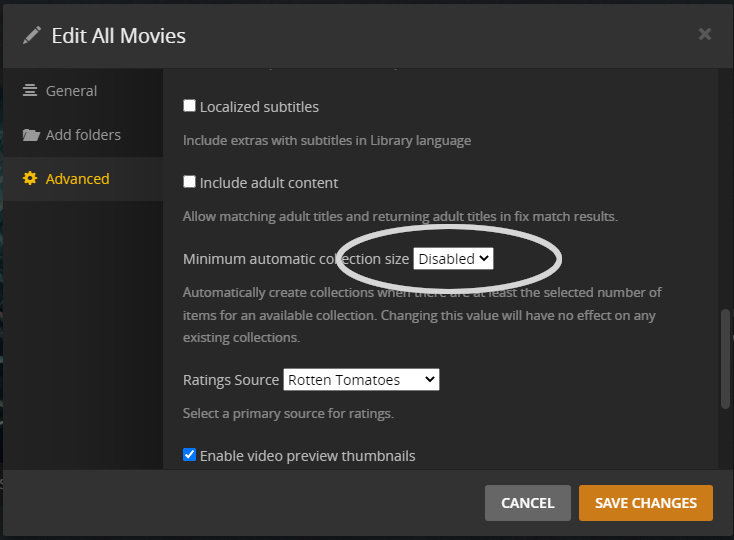
It could be that you have the library set to automatically create collections (I think it’s on by default) If that option is enabled it will combine the movies in a collection into a single item in the library, so the count will appear to be off.
Edit the movie library, and on the advanced tab, find these settings, I’ve disabled them completely,
I did have Collections turned on. Actually I like the Collections feature. When I turned it off everything matched up much much better. I will turn Collections back on, but at least now I better understand why the big difference! Thanx!
Some time ago I stumbled across a python script that compares the file system and the PLEX database and returns missing media files: find_plex_unscanned.py
It’s quite old by now, but still working, it seems.