Did plex just do away with the free serving of our owned media from their app?
Plex app on TVs, computer, firestick, all lost sight of my media after upgrade.
In past I was able to set up the links in Plex App on chrome to tell Plex App where the file folders are to host/serve to TV to watch my media files in my home. The feature in settings is now GONE I can not set up the links of where my data is, where did this feature go?
Plex App (v6.0…) on Amazon fire stick asked to preform upgrade, did upgrade. Watched 2 owned media from OMV/docker storage like I have done for almost a year now. Next morning all viewing sources (TVs, Fire Stick, Computer) devices no longer see all the 100s of server media. When I go online with chrome see the links for the plex app to see the media plex app online is no longer giving me the ability to set up new folders of media like I have done for months?

Plex Media Server version: Available in Authorized Devices.
Plex Media Server platform (Win/Mac/Linux/etc):
Can you access the server directly, via http://<pms_ip_address>:32400/web? Use an incognito/private browser window to avoid conflicts with any browser plug-ins.
See the Server Logs support document. Please zip the logs directory and attach to the thread.
in browser I entered “http://10.1.10.111:32400/web” and it started the original plex app I am use to seeing but with out any of my folders and no media. There is not a way to add new or reinput folders or edit the old folders to reload the again. I had set up 9 folders of tv and movie folders with plex so that I could watch the media on our TVs for months and months ago. The folders and media are still on the OMV storage. the only think overnight that changed was the App update on the Fire stick, kept watching media after I allowed it to update. So next day the other 2 Smart TVs stopped showing the media in the folders and the folders got a triangle with an explanation inside and would not allow me see any media in the folders. All i could do was ask plex app to update the library list which I did but does not show the media in the folder.

Please provide a set of server log files.
Since you cannot access your server, stop Plex Media Server, navigate to the Plex Data Folder, ZIP the Logs directory, and attach it to this thread (Drag the zip file into the message window. It will attach at the cursor location).
looks like the logs I found, not sure if they are the logs you need, have been running every 30 seconds so the logs are at their maximum. there are over 1780 logs but only go back a few days not more than a week. Would you be kind and communicate with me directly (private chat) on this platform?
You can DM me the logs if you wish.
Click on my username, then the Message button.
Any problem resolution will be done on the forum, so all can benefit. I won’t post any personal information, such as your e-mail address. It is rare that the resolution involves exchanging private info. If that is necessary, it will be via DM.
And FYI, I’m not a Plex employee. I’m a user just like you. Ninjas have some additional admin/moderator capabilities on the forum - closing or redirecting threads, stuff like that.
I used this to set up plex

I do not know that I ever allowed Portainer to update. After setting all this up and running plex for about a year, amazon firestick alerted me to an update for the Plex App, I hesitantly gave approval using the tv firestick update I believe the plex App updated. That tv needs fire stick to play/use plex media. So we could use plex via the plex app. the next day the plex app stopped showing the media movies and TV shows as if the actual files were no longer being seen but the folders they were in were seen and asking me to retry connection to get the libraries. I have not changed the IP addresses or any of the paths to the folders or the media files.
Should I “Reset Customization” maybe the navigation to the folders or IP address location needs to be reset and rebuilt again since I can not see any way to add new media folders like I used to when adding a new TV or Movie Folder(s), I do not know why that option disappeared?
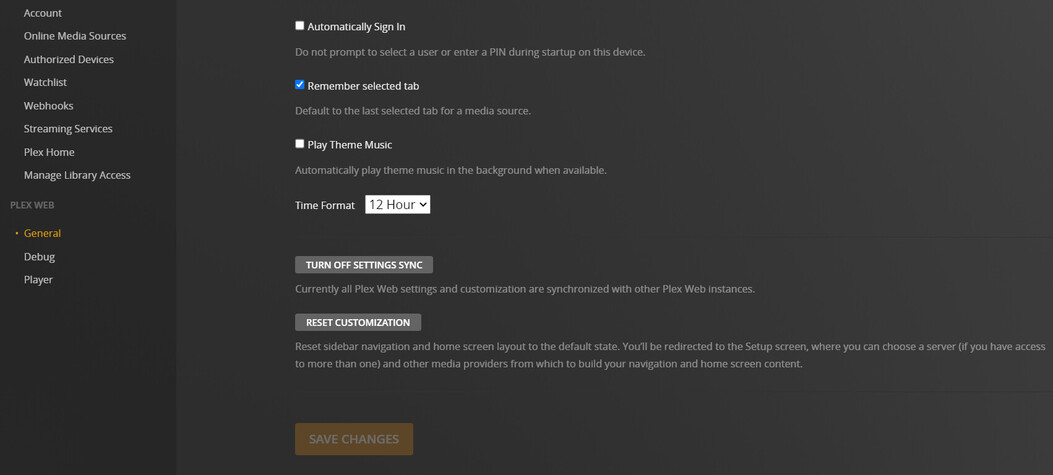
The following is from Debug in plex
[
{
“type”: “info”,
“host”: “app.plex.tv”,
“userAgent”: “Mozilla/5.0 (Windows NT 10.0; Win64; x64) AppleWebKit/537.36 (KHTML, like Gecko) Chrome/104.0.0.0 Safari/537.36”,
“browser”: {
“platformVersion”: “10”,
“id”: “chrome”,
“name”: “Chrome”,
“version”: “104.0”,
“webkit”: true,
“platform”: “Windows”,
“platformID”: “windows”,
“platformModifierKey”: “ctrl”
},
“version”: “4.88.1”,
“username”: “farmers20”,
“cloudUrl”: [
{
“scheme”: “https”,
“address”: “plex.tv”,
“uri”: “https://plex.tv”,
“testState”: “connected”,
“isBundled”: false,
“isFallback”: false,
“relay”: false,
“isUntested”: false,
“isPending”: false,
“isConnected”: true,
“isUnauthorized”: false,
“isUnavailable”: false,
“isFailed”: false,
“isAborted”: false,
“isLoopback”: false,
“isPrivate”: false,
“isHttps”: true,
“isSecure”: true,
“isPlexDirect”: false,
“currentTest”: null,
“sources”: [
{
“id”: “internal”
}
]
}
]
}
]
There could be multiple reasons why the Plex server is not accessible. It may not be running, the database could be corrupt, you could be locked out for some reason, etc.
None of the settings in the Plex Web section will help.
The log information you provided is from Plex Web (the web browser client), not Plex Media Server.
You will need to manually navigate to the Plex Data Folder to retrieve the server log files.
The location of the log files depends on how you set up the docker container. The video you followed during setup hopefully tells you the location. Where is the Plex Media Server data directory located? may also help.
